4 Practical Benefits of Two-Factor Authentication (2FA) for SMBs
Two-factor authentication (2FA) is one of the simplest and most effective ways to prevent account breaches, protect business data, and meet your cyber insurance and compliance obligations. Most attacks begin with a stolen or guessed password, 2FA provides the additional layer that stops attackers even when credentials have been compromised.
This guide explains what two-factor authentication is, why it matters more than ever, and the core business benefits it provides for small to mid-sized organizations.
What Is Two-Factor Authentication?
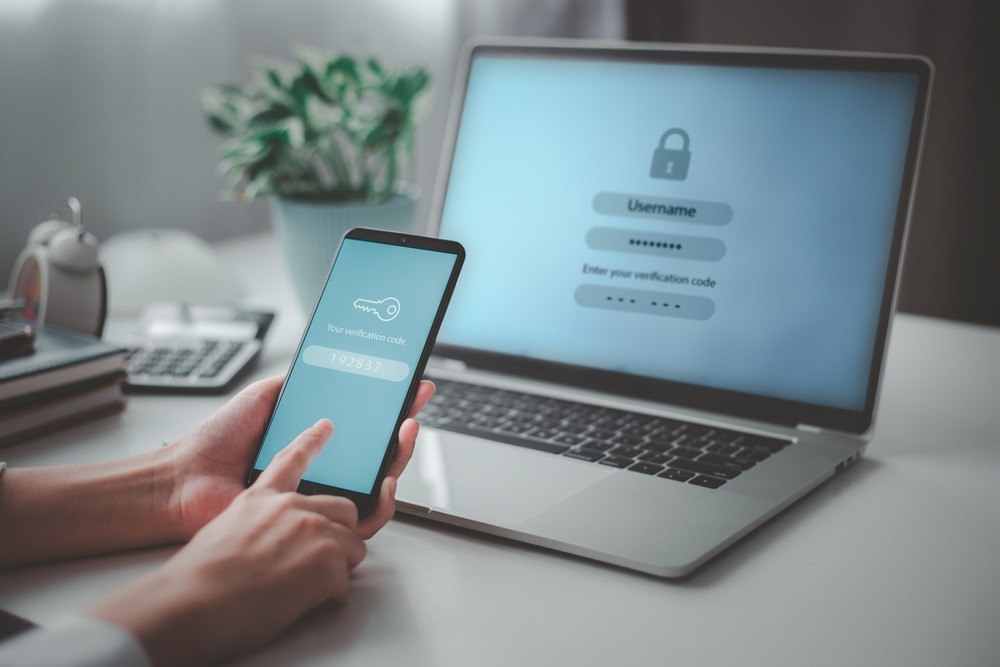
Two-factor authentication (2FA) is a security control that requires two separate forms of verification before granting access to an account or system. It pairs something you know (a password) with something you have (a one-time code, mobile app, or hardware token).
How 2FA works:
-
User enters their username and password
-
A unique, time-sensitive code is sent to their device or authentication app
-
The user enters the code or approves a push notification
-
Access is granted only after both factors are validated
This matters because passwords are no longer enough. Phishing, credential harvesting malware, and dark web password dumps have made single-factor authentication one of the biggest risk areas for SMBs. Even if a password is stolen, 2FA prevents unauthorized access.
Why Two-Factor Authentication Is a Business Must-Have in 2025
Nearly every major breach begins with a compromised login. Cyber insurers, auditors, and regulators now treat 2FA or MFA as a baseline requirement, not a “nice-to-have.”
According to Google research:
-
100% of automated bot attacks are blocked
-
99% of bulk phishing attacks are stopped
-
Up to 90% of targeted account takeover attempts are prevented
Beyond security, executives rely on 2FA because it protects their credibility, insurance eligibility, and operational continuity.
4 Practical Benefits of Two-Factor Authentication
1. It Dramatically Reduces Credential-Based Attacks
If your team relies on cloud applications, remote access, or business email, your logins are a high-value target. 2FA makes stolen passwords effectively useless.
With 2FA in place, attackers are blocked from accessing:
-
Email accounts (the most common entry point for wire fraud)
-
Cloud platforms such as Microsoft 365 or Google Workspace
-
Remote access tools
-
Shared vendor portals or financial systems
This simple control helps prevent:
-
Data breaches
-
Vendor impersonation
-
Email takeovers
-
Wire transfer fraud
For executives, this reduces the fear of a preventable mistake leading to a public incident — a top business concern identified in the executive psychology research.
2. It Helps You Meet Cyber Insurance Requirements
Most cyber insurance providers now require proof that 2FA/MFA is enforced across:
-
Email
-
Remote access
-
Financial applications
-
Backup systems
-
Administrator accounts
If you suffer an incident and can’t prove 2FA was in place, claims may be delayed, reduced, or denied entirely.
Insurance underwriters and auditors treat 2FA as an essential, measurable safeguard — one of the easiest steps to close compliance gaps quickly.
Related: Meeting Your Cyber Insurance Requirements
3. It Strengthens Remote Access Security
Your team is no longer tied to one office or one network. They log in from home, airports, hotels, and public Wi-Fi networks — all of which bring risk.
2FA adds a critical safeguard:
-
If a password is intercepted
-
If a device is compromised
-
If a browser session is hijacked
…the attacker still cannot authenticate.
In a hybrid-work world, 2FA is the digital version of checking an employee badge at the door.
Related: Cybersecurity Assessment Checklist
4. It’s Easy for Employees (and Hard for Attackers)
Modern 2FA tools require no technical training. A smartphone app or push notification is enough for most users. The workflow is fast, intuitive, and does not slow down productivity.
Meanwhile, attackers face major hurdles:
-
2FA codes expire quickly
-
They cannot be reused (preventing replay attacks)
-
Behavioral analytics detect suspicious login behavior
-
Alerts are triggered automatically for unusual activity
In other words: 2FA is user-friendly security with enterprise-grade impact.
Looking for help with 2FA in your area? Explore our Austin cybersecurity services or San Antonio cybersecurity support.
Protect Your Business with 2FA (Implemented Correctly)
2FA provides powerful protection, but only when deployed consistently and monitored correctly.
At 7tech, we help you implement 2FA the right way by:
-
Aligning deployment with your cyber insurance and compliance requirements
-
Integrating 2FA across cloud apps, VPNs, remote desktops, and privileged accounts
-
Monitoring login attempts and alerting you to suspicious behavior
-
Reducing internal friction by making onboarding seamless for employees
Our Managed Security Services are backed by our U.S.-based Security Operations Center, 20-minute human response time, and a 97.4% CSAT rating, reinforcing why executives trust 7tech with their most sensitive access controls.
Explore: What Is MSSP in Cybersecurity?
Explore: Threat Detection and Response →
FAQs About Two-Factor Authentication (2FA)
Is 2FA required for cyber insurance?
Yes. Most insurers mandate 2FA for email, remote access, privileged accounts, and backups. Without it, claims may be denied or premiums increased.
Does 2FA slow down employees?
No. Modern push-based 2FA takes only seconds and typically reduces login-related support tickets.
Is 2FA the same as MFA?
2FA is a type of MFA that uses exactly two factors. MFA may include two or more authentication layers.
What kinds of systems should have 2FA enabled?
Email, Microsoft 365, remote access, financial systems, administrative portals, and any application containing sensitive data.
Can attackers bypass 2FA?
It’s rare. Most bypass attempts require user interaction (e.g., approval fatigue), which strong monitoring and training help prevent.
Does 2FA help with compliance?
Yes. Frameworks like HIPAA, FTC Safeguards, and CMMC expect 2FA as a baseline access control.
Get the Benefits of Two-Factor Authentication WITHOUT the Headaches
The sooner your organization implements 2FA, the faster you reduce credential-based risk. Whether you need help configuring 2FA, rolling it out across your team, or integrating it with broader threat monitoring, 7tech can handle the entire process for you.
Our cybersecurity experts configure 2FA to support secure growth, eliminate credential risk, and maintain compliance — without disrupting operations.
Contact 7tech or call (844) 701-MSSP to speak directly with a cybersecurity expert.

Neal Juern, Founder and CEO of 7tech, helps business leaders take control of their IT and strengthen cybersecurity without the complexity. Since founding 7tech in 2012, he’s built it into a 5X MSP 501 winner and guided hundreds of executives toward smarter, safer operations through Managed IT Services and Managed Security Services that make sense to people outside the IT department. He speaks regularly to executive and nonprofit audiences across Texas.