
How to Choose the Right IT Support Provider in Austin
Choosing the right IT Support Provider in Austin is less about who can fix issues fastest and more about who can reduce operational risk, support business growth, and bring accountability to your technology environment. For Austin businesses, the right provider combines responsive support, managed IT services, local expertise, and strategic guidance so IT becomes a managed business function rather than a recurring source of disruption.
Who This Guide Is (and Isn’t) For
This guide is designed for Austin-area business leaders who need to evaluate IT support options with more clarity and less guesswork.
It is especially relevant for:
- Business owners and executives responsible for IT decisions in Austin
- Organizations evaluating managed IT services, IT outsourcing, or a Managed Service Provider (MSP)
- Companies that depend on technology to support operations, compliance, and growth
This guide is not for:
- One-person startups with minimal IT needs
- Businesses looking only for short-term or project-based IT help
If your organization relies on technology to stay productive, secure, and competitive, this guide will help you evaluate providers more effectively.
Why Choosing the Right IT Support Provider in Austin Is Harder Than Ever
Austin has no shortage of IT companies. On the surface, many appear to offer similar services: IT helpdesk support, network support, cybersecurity tools, cloud services, and troubleshooting. That makes provider comparisons harder than they should be.
The real difference is not the service list. It is the operating model behind the service.
Some providers act as true IT partners. They take ownership of day-to-day IT operations, document systems thoroughly, manage vendors, monitor risk, and help leadership plan ahead. Others operate more like reactive IT service providers, stepping in only after something breaks. Without the right questions, those differences often stay hidden until a problem exposes them.
That matters even more in Austin’s business environment. Many local organizations support hybrid teams, multiple office locations, field staff, job sites, and cloud-based workflows across distributed users. Those realities require more than occasional troubleshooting. They require consistent monitoring, clear documentation, strong access controls, and disciplined support processes.
The U.S. Chamber of Commerce’s Impact of Technology on Small Business Report found that 95% of small business owners reported using at least one technology platform in running their business in 2023, underscoring how central technology has become to daily operations.
And Uptime Institute’s Annual Outage Analysis found that more than two-thirds of outages cost over $100,000, reinforcing why proactive monitoring, recovery planning, and operational resilience matter.
As a result, many organizations are moving toward managed IT services in Austin, where the provider assumes ongoing responsibility for oversight, maintenance, and continuity rather than simply responding to incidents after the fact.
For executives, the decision should not be based on who promises the most tools. It should be based on who can demonstrate responsibility, operational maturity, and alignment with business goals.
Key Features To Look for in an IT Support Provider in Austin
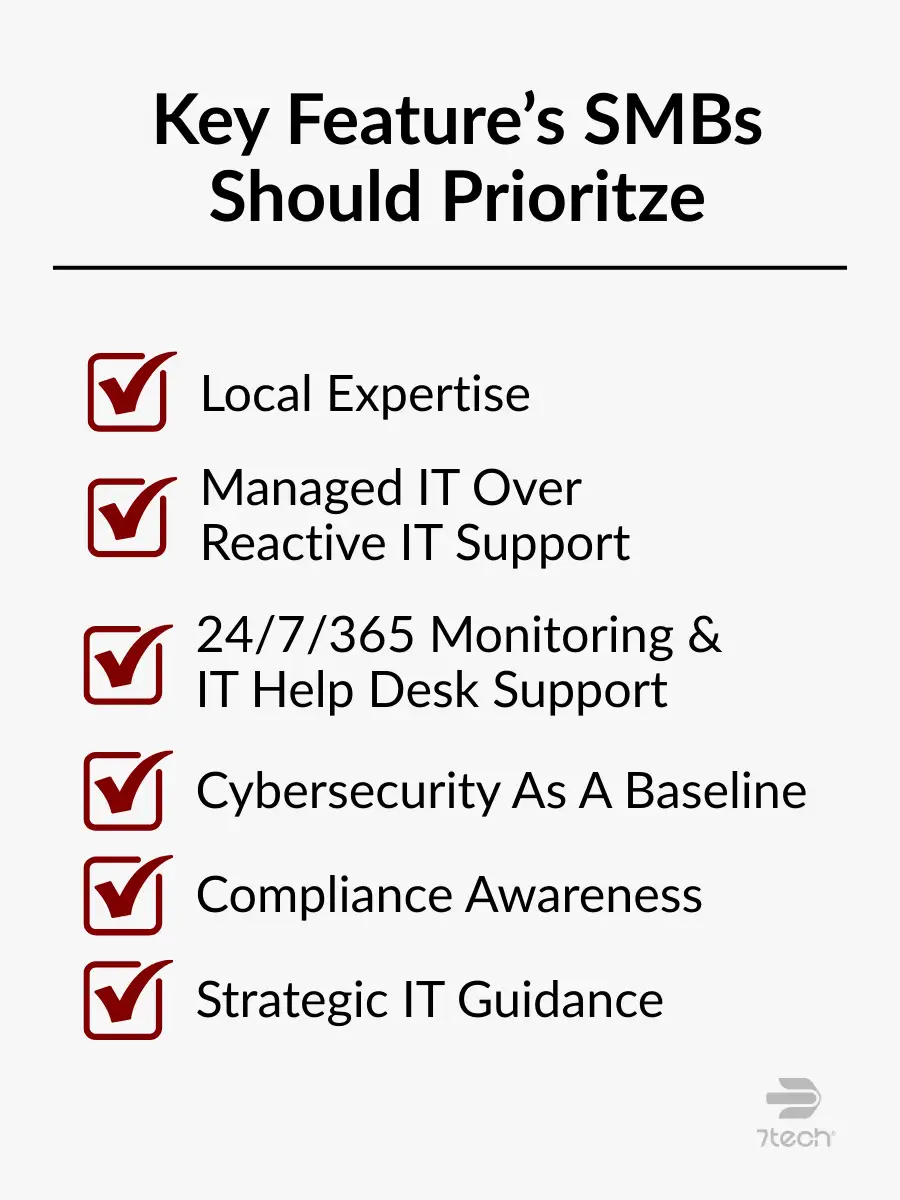
When evaluating an IT Support Provider in Austin, focus on the capabilities that reduce uncertainty, improve resilience, and help leadership make better decisions over time.
Local Austin Expertise and Onsite Capability
Austin businesses often operate across multiple offices, job sites, or client locations. That is especially true in construction, engineering, healthcare, and professional services. A local IT company is better positioned to understand regional infrastructure limitations, common connectivity issues, onsite coordination needs, and when in-person support is necessary to resolve an issue quickly.
Remote support is important, but not every issue can or should be handled remotely. A provider with a real local presence can respond more effectively when networks, hardware, office moves, or onsite troubleshooting require direct involvement.
Managed IT Services Over Reactive IT Support
Break-fix support waits for problems. Managed IT services work to prevent them.
That difference matters. Reactive support may appear less expensive at first, but it often leaves businesses dealing with recurring issues, inconsistent maintenance, avoidable downtime, and limited strategic planning. Managed IT services introduce a more stable model built around continuous system monitoring, routine maintenance and patch management, standardized support processes, and greater operational predictability.
For executives, this distinction is not just technical. It is financial and operational. The question is whether you want IT to help prevent disruption or simply respond after disruption has already affected the business.
If you are comparing service models, a useful next step is reviewing the differences between Managed IT Services vs Break-Fix in more detail.
24/7/365 Monitoring & IT HelpDesk Support
Austin organizations increasingly support employees outside traditional office hours. Hybrid work, remote access, and distributed teams have changed what effective support looks like.
A strong IT support Austin provider should offer continuous visibility into systems and alerts, IT helpdesk support that aligns with how your workforce actually operates, faster issue detection before users escalate problems, and clear processes for after-hours support and incident response.
This is not about creating constant urgency. It is about maintaining awareness so problems are identified early and handled within a defined support framework.
Comprehensive Cybersecurity as a Baseline
Cybersecurity should not sit off to the side as an optional add-on. It should be built into daily IT operations.
A capable IT service provider should integrate security into the environment through endpoint and identity protection, secure monitored backup systems, disciplined access controls, threat detection and response processes, and ongoing user awareness and risk management.
The goal is not to layer in tools for appearance. It is to reduce risk while preserving productivity. That only happens when cybersecurity is operationalized as part of the support model rather than treated as a separate conversation.
Compliance Awareness and Documentation Discipline
Many Austin businesses operate in regulated or risk-sensitive industries such as healthcare, financial services, legal, and professional services. For these organizations, compliance is not a side project. It influences how systems are configured, accessed, monitored, and documented from the beginning.
Your provider should be able to demonstrate familiarity with relevant compliance obligations, consistent documentation practices, support for audits, reviews, and assessments, and clear backup, access, and policy alignment.
Compliance failures often begin as operational failures. Weak documentation, poor access management, or unclear recovery procedures can create problems long before an audit makes them visible.
The FTC extended the compliance deadline for certain Safeguards Rule requirements to June 9, 2023, showing how compliance timelines can directly shape IT planning.
Proactive Strategic Guidance
A strong IT partner does more than maintain systems. They help leadership make better technology decisions.
That includes helping the business align IT strategy with business goals, plan for infrastructure, security, and staffing changes, evaluate risk before it becomes disruption, and make more informed decisions about vendors, platforms, and investments.
For executives, proactive guidance creates business value. Predictability comes from a defined monthly scope and cost structure instead of surprise invoices. Accountability comes from knowing who owns security, backups, escalations, and vendor relationships. Downtime is reduced through monitoring, documentation, and clear response processes.
For a broader evaluation framework, it is worth reviewing a detailed guide on how to choose a managed service provider.
What Austin Businesses Can Expect from 7tech
Austin businesses evaluating 7tech can expect a support model built around accountability, responsiveness, and operational ownership.
- Average response time: ~20 minutes
- Same-day resolution rate: ~80%
- Years serving Austin SMBs: 13+
- Operational focus: Clear ownership for systems, vendors, backups, and security
- US-based support: No offshore helpdesk
For leadership teams, those metrics matter because they reflect more than responsiveness. They reflect a provider model designed to reduce uncertainty and improve day-to-day IT visibility.
Questions to Ask During Your First Meeting With an IT Support Provider in Austin
This section mirrors the evaluation framework used in 7tech’s IT Buyer’s Guide and focuses on understanding value, scope, and accountability, not sales promises.
For a deeper evaluation process, you may also want to review our full list of Questions to Ask Your IT Provider.
Support & Communication
Ask questions such as:
- How do users request IT support?
- What happens when an issue comes in after hours?
- How are priorities communicated and escalated?
- What does normal day-to-day communication look like?
These questions reveal whether support is structured, transparent, and user-friendly or inconsistent and reactive.
Cybersecurity & Risk Management
Executives should also ask:
- How does the provider handle network and endpoint security?
- Which protections are included as standard and which are optional?
- How are threats detected, escalated, and contained?
- Who is responsible for security decisions across vendors and tools?
This helps determine whether security is truly integrated into the support model or fragmented across systems and assumptions.
Backup, Recovery, and Business Continuity
Reliable providers should be able to explain:
- How data is backed up and protected
- How recovery is tested and verified
- What the response process looks like during a disruption
- Who owns business continuity coordination during an incident
Backups matter, but recoverability matters more. Leadership should never have to assume recovery works.
Strategic IT Leadership
To understand the provider’s long-term value, ask:
- Who delivers strategic IT guidance?
- How often are business risks and priorities reviewed?
- How does the provider support budgeting and future planning?
- How are technology decisions connected to business goals?
A provider that cannot speak clearly about planning will usually default to issue resolution rather than business alignment.
Transparency & Documentation
Documentation is one of the clearest signals of maturity. Ask:
- What documentation will be shared with leadership?
- How are vendors, licenses, and assets managed?
- How is environment knowledge maintained over time?
- What reporting is available on support trends, risks, and performance?
Providers that manage well usually document well. The reverse is also true.
What a Strong IT Provider Should Be Able to Show You
A qualified IT Support Provider in Austin should be able to produce real documentation, not just verbal reassurances.
That may include:
- A sample Quarterly Business Review showing trends, risks, and recommendations
- A current asset and license inventory with ownership clearly defined
- A backup verification report showing the latest successful restore test
- A documented incident response process with named responsibilities
- Defined response, escalation, and performance metrics
If a provider cannot show you how they manage an environment, it becomes harder to trust how consistently they manage one behind the scenes.
Common Misconceptions About Choosing an IT Support Provider in Austin
Misconceptions often lead businesses toward the wrong provider model. Here are some of the most common ones.
Myth: All IT companies in Austin offer the same services.
Reality: Service depth, responsibility, security maturity, and operational scope vary widely.
Why it matters: Those differences directly affect uptime, security posture, and long-term cost.
Myth: More tools automatically mean better IT support.
Reality: Results depend on how teams operate, monitor, and govern those tools.
Why it matters: Poor execution increases risk without improving outcomes.
Myth: Outsourcing IT means losing control.
Reality: Outsourcing shifts execution while leadership retains decision authority.
Why it matters: Clear ownership and documentation often improve visibility rather than reduce it.
Myth: Compliance can be addressed later.
Reality: Compliance requirements shape access, backups, documentation, and system design from day one.
 Why it matters: Retrofits increase cost and operational risk.
What to Expect When Transitioning to a New IT Provider
Changing providers can feel risky, but a structured transition should reduce disruption rather than create it.
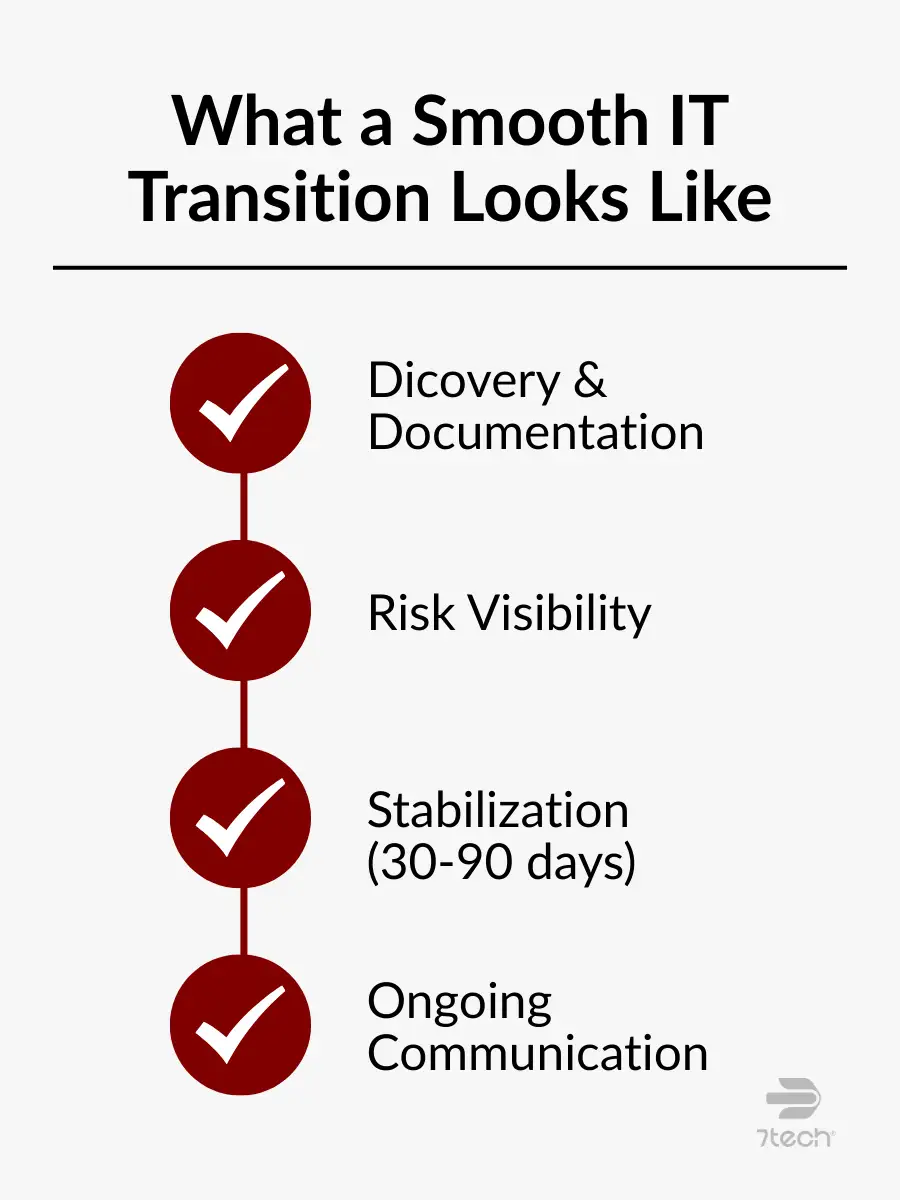
A well-managed onboarding process usually includes:
- Discovery of systems, assets, vendors, and dependencies
- Documentation of the current environment
- Identification of immediate risks and operational gaps
- A stabilization period during the first 30 to 90 days
- Clear communication with leadership and end users throughout the process
The objective is continuity. A strong provider should be able to assume responsibility methodically while minimizing interruption to the business.
That transition process is also a useful test of maturity. If a provider cannot explain how they take over an environment responsibly, it is reasonable to question how they will manage it long term.
Red Flags to Watch for in the Austin IT Market
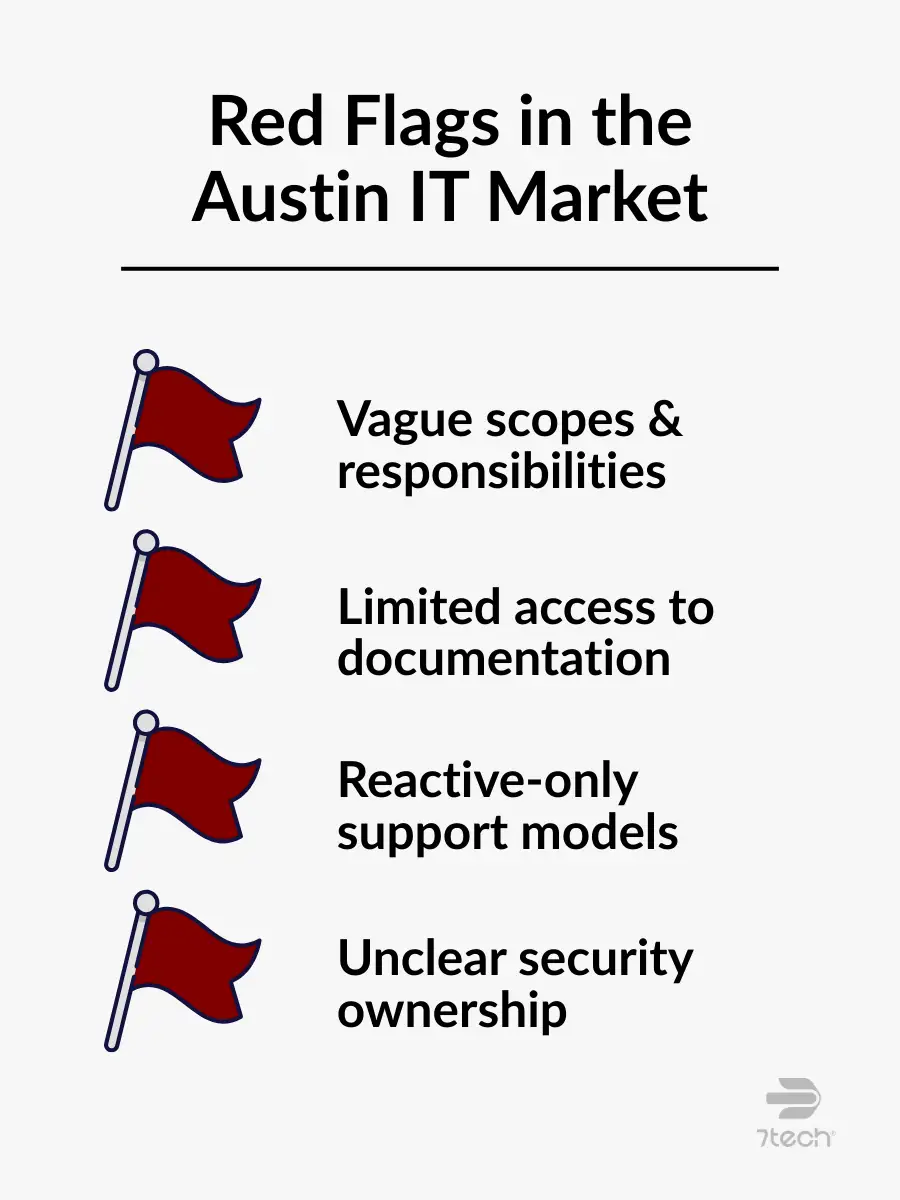
Be cautious if an IT provider shows signs of the following:
- Vague scopes or unclear responsibilities: When responsibilities are not clearly defined, issues tend to fall into gray areas, leading to delays, confusion, or duplicated effort when something goes wrong.
- Limited access to documentation: If system documentation is not shared, leadership lacks visibility into how critical systems are configured, supported, or recovered during a disruption.
- Reactive-only IT support models: Providers that focus only on fixing issues after they occur typically offer limited insight into risk reduction, planning, or long-term stability.
- Unclear cybersecurity ownership: When it is not clear who owns security decisions and responses, gaps can emerge between tools, policies, and real-world accountability.
For a deeper breakdown, see our guide on IT Provider Red Flags.
Co-Managed IT Services vs Fully Outsourced IT Support
Both models can work for organizations with or without internal IT staff. The right choice depends on how much responsibility your business wants to retain.
Co-Managed IT Services
Co-managed IT services are often used when a business has internal IT staff but needs additional capacity, specialized expertise, or support coverage. In this model:
- Responsibility is shared between internal IT and the external partner
- Network and security support may be augmented rather than fully delegated
- Strategy is often collaborative
- Internal leadership retains more direct operational involvement
This model works well for organizations that want to keep some internal control while reducing strain on existing staff.
Fully Outsourced IT Support
Fully outsourced IT support places primary day-to-day ownership with the provider. In this model:
- The IT provider handles most operational execution
- Support, maintenance, monitoring, and vendor coordination are largely externalized
- Strategic guidance is more provider-led
- Internal teams can stay focused on business priorities rather than IT administration
This approach is often best for organizations that want clearer accountability and less internal operational burden.
| Key Consideration | Co-Managed IT Services | Fully Outsourced IT Support |
|---|---|---|
| Internal IT Presence | Often used when internal IT exists, but not required | Common whether internal IT exists or not |
| Day-to-Day IT Ownership | Shared between the internal team and the IT partner | Handled primarily by the IT provider |
| Network & Security Support | Augments existing capabilities | Fully managed by external specialists |
| Strategic IT Guidance | Collaborative | Provider-led |
| Best Suited For | Organizations retaining some internal control | Organizations offloading more day-to-day IT responsibility |
The decision is ultimately about ownership. How much responsibility does your business want to keep, and how much does it want a trusted partner to manage on its behalf?
How Austin’s Business Environment Influences IT Support Needs
Austin organizations often support a mix of office-based staff, hybrid workers, field teams, and multiple locations. That changes the requirements for effective support.
In industries such as construction, healthcare, and professional services, IT environments often need to accommodate:
- Standardized device management across different locations
- Secure remote access for hybrid and mobile staff
- Coordinated onsite support when networks or infrastructure require in-person work
- Cloud-based collaboration without sacrificing visibility or control
This is why computer network support Austin businesses depend on often requires more than remote troubleshooting. It requires a provider that can blend remote responsiveness with onsite capability, documentation discipline, and long-term planning.
Local context matters. The IT model that works for a single office with a static workforce may not work for a growing Austin company with multiple sites, compliance obligations, and distributed operations.
That is also why Austin managed IT services tend to place greater emphasis on flexibility, documentation, and accountability.
FAQ
What does an IT support provider in Austin typically offer?
Most offer IT helpdesk support, network support, cybersecurity services, vendor coordination, and ongoing system management.
What’s the difference between an IT company and a Managed Service Provider (MSP)?
An IT company may offer a range of technical services, including project work or reactive support. A Managed Service Provider (MSP) typically takes ongoing responsibility for monitoring, maintaining, securing, and supporting your environment over time.
How do managed IT services differ from IT outsourcing?
Managed IT services usually refer to a structured, ongoing support model with defined scope, monitoring, maintenance, and strategic oversight. IT outsourcing is a broader term that can include managed services, project support, or delegated IT functions.
Can an IT service provider help ensure compliance?
Yes, many providers support compliance efforts through documentation, monitoring, access controls, backup practices, and advisory services. The exact level of support depends on the provider’s scope and your industry requirements.
When does co-managed IT services make sense?
Co-managed IT services work well when businesses want shared responsibility alongside internal staff, especially when internal teams need additional expertise, capacity, or coverage.
Your Next Step in Finding the Right IT Support Provider in Austin
Choosing an IT Support Provider in Austin should not be rushed. The best decision comes from understanding how each provider handles responsibility, communication, cybersecurity, documentation, and long-term planning.
If your business is ready to move from general evaluation to a clearer understanding of risk, responsibility, and cost predictability, schedule a discovery call with 7tech. We will review your current IT environment, identify documentation gaps, clarify vendor responsibilities, and help you evaluate what a more accountable support model could look like for your business.

Neal Juern, Founder and CEO of 7tech, helps business leaders take control of their IT and strengthen cybersecurity without the complexity. Since founding 7tech in 2012, he’s built it into a 5X MSP 501 winner and guided hundreds of executives toward smarter, safer operations through Managed IT Services and Managed Security Services that make sense to people outside the IT department. He speaks regularly to executive and nonprofit audiences across Texas.