


Table of Contents
A controller waiting on approved vendor invoices feels IT procurement when a laptop order, software renewal, or security review stalls the close process. What is IT procurement? It’s the structured way technology is evaluated, approved, purchased, secured, deployed, and tracked so teams can work without messy handoffs. It matters because every device, license, cloud service, and vendor contract affects budgeting, cybersecurity, compliance readiness, and onboarding. Purchasing is also getting more data-driven, with 61% of purchase influencers saying their organization has or will use a private GenAI engine to support purchasing.
Steven Simon, Director of Security Operations at 7tech, notes: “Good procurement gives finance, operations, and IT the same facts before money is spent, so approvals move faster and support issues don’t arrive as surprises.”
What Is IT Procurement For Growing Organizations
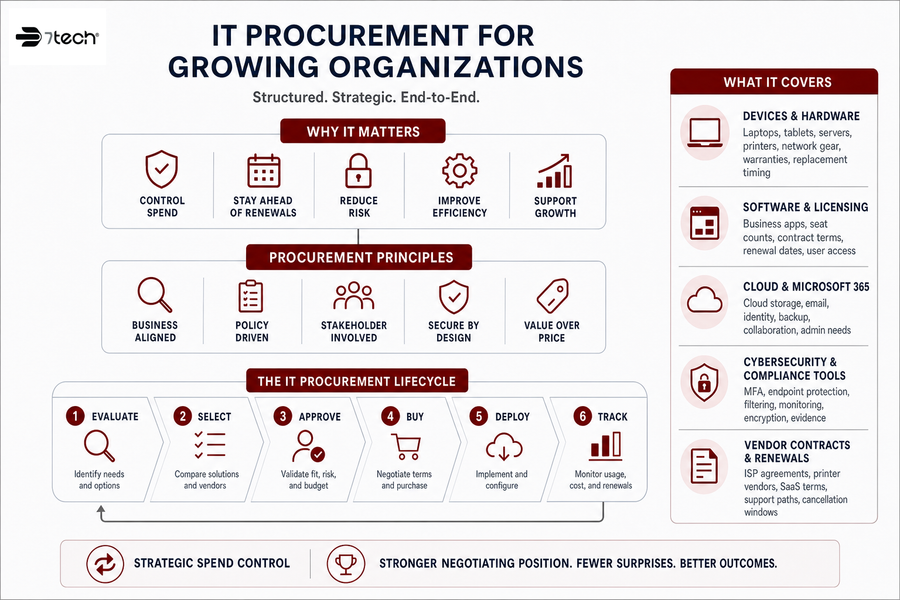
IT procurement is the structured way an organization evaluates, buys, approves, secures, deploys, and tracks technology. It covers the full lifecycle, not just the purchase order, so a new estimating tool, replacement firewall, or Microsoft 365 license renewal doesn’t become a surprise invoice, duplicate subscription, or unsupported system outside the Service Desk’s normal path.
-
Devices and hardware: Laptops, tablets, servers, printers, network gear, warranties, asset tags, and replacement timing.
-
Software and licensing: Business apps, seat counts, contract terms, renewal dates, user access, and ownership.
-
Cloud and Microsoft 365: Cloud storage, email, identity, backup, collaboration, licensing, and administration needs.
-
Cybersecurity and compliance tools: MFA, endpoint protection, filtering, monitoring, encryption, vulnerability reporting, and evidence requirements.
-
Vendor contracts and renewals: ISP agreements, printer vendors, SaaS terms, support paths, renewal windows, and cancellation terms.
Categorizing spend keeps purchases from spreading across credit cards, inbox approvals, and forgotten renewals. That matters when 88% of IT decision-makers are open to switching at least some technology vendors, because clean records make vendor review about cost, risk, fit, and support history.
What Is IT Procurement Process In Day To Day Operations
A field supervisor requests tablets for a jobsite, but the devices need approved apps, secure access, and support before crews use them. That’s where the IT procurement process becomes practical: it’s less about buying equipment and more about controlling risk, approvals, cost, ownership, and security from request through retirement.
-
Capture the business need Start with who needs the tool, what work it supports, which deadline matters, and what happens if the request waits.
-
Review budget and approval Confirm cost center, renewal timing, purchase authority, and whether the request fits planned spend.
-
Screen security and compliance Check data type, access controls, MFA, backup, and any assessment preparation needs before signing.
-
Evaluate vendor and contract Review support terms, ownership, integrations, cancellation language, and vendor risk. This is where 3rd Party Vendor Management keeps printers, ISPs, SaaS providers, and cloud vendors from becoming separate fire drills.
-
Deploy and set up users Coordinate Microsoft 365 Administration Services, IT Onboarding and Offboarding of Employees, device configuration, and Service Desk readiness.
-
Renew, replace, or retire Track lifecycle dates so unused licenses, outdated devices, and unsupported apps don’t linger.
More than 80% of organizations plan to increase investment in automation solutions, and procurement benefits from that same discipline.
Request intake, ownership, Technology Purchasing Assistance, vendor management, security review.
What IT Procurement Is Really Protecting Beyond The Purchase Order
Procurement protects more than the purchase price. It protects the workflow around the purchase.
Poor IT purchasing shows up as duplicate licenses, unsupported software, unmanaged devices, delayed onboarding, surprise renewals, weak access controls, and missing compliance evidence. That doesn’t mean someone made a careless choice. It usually means the business grew faster than the approval process, and the process didn’t keep up with systems, tickets, contracts, and data rules.
What this looks like in practice
A nonprofit handling donor data needs to know whether a new fundraising platform stores PII and who reviews access. A manufacturer approving shop floor tablets needs patching, device control, and support ownership before the tablets hit production. A contractor sharing plans with subcontractors needs file access rules that don’t depend on someone remembering to remove a user later.
That’s why 41% of organizations now require vendors to demonstrate compliance with specific frameworks before moving past initial evaluation. In our work as a compliance-focused MSSP, procurement is often where security review, vendor oversight, Zero-trust solutions, and evidence readiness first meet the business request.
|
Procurement Control Point |
Operational Example |
Evidence to Capture |
Typical Owner |
|---|---|---|---|
|
Vendor security intake |
New donor management platform reviewed before finance signs the SaaS agreement |
SOC 2 report, data processing addendum, MFA and SSO support confirmation |
IT manager with compliance officer approval |
|
Device approval workflow |
Shop floor tablets requested for barcode scanning are checked for MDM compatibility before purchase |
Asset tag record, supported OS version, mobile device management enrollment proof |
Operations lead and endpoint administrator |
|
Access responsibility mapping |
Subcontractor file-sharing access expires automatically when the project phase closes |
Access request ticket, manager approval, expiration date, quarterly access review log |
Project manager and identity administrator |
|
Renewal governance |
CRM renewal is flagged 90 days early so unused seats can be removed before auto-renewal |
License utilization report, renewal notice, cancellation or true-up confirmation |
Procurement coordinator and finance controller |
|
Compliance readiness check |
Defense contractor evaluates a cloud backup provider storing, processing, or transmitting CUI to verify FedRAMP Moderate or equivalent status during CMMC preparedness planning |
FedRAMP Marketplace listing or 3PAO Moderate Equivalency package, shared responsibility matrix, encryption details, incident notification terms, gap analysis notes |
Compliance lead with MSSP security review support |
Plan Your Next Tech Purchase
What The IT Procurement Process Should Include Before Approval
Standardizing procurement is hard because finance, operations, HR, and project teams all work against different deadlines. The goal isn’t to slow people down. It’s to make approved technology easier to buy, secure, support, and renew.
-
Use one request form: Capture the business need, owner, budget, data type, users, deadline, and approval path before the request becomes an invoice.
-
Review sensitive data first: Check whether the tool stores PII, health data, payment data, or controlled information before anyone signs.
-
Confirm technical fit: Validate Microsoft 365, cloud, identity, backup, network, and security requirements before purchase.
-
Assign vendor ownership: Name who manages renewals, support tickets, contract terms, escalation notes, and vendor handoffs.
-
Check existing tools: Avoid buying another app when an approved platform already covers the same function.
Simple design matters. Procurement functions that use designed simplicity principles are 21% less likely to face added complexity. In practical terms, a request form, cybersecurity analysis, cloud fit review, and Technology Purchasing Assistance can remove confusion before it lands in finance, the Service Desk, or an assessment preparation folder.
Make IT Procurement Easier
Align purchases, security reviews, vendors, and budgets with help from 7tech. Build a cleaner process before the next tech request.
FAQ About IT Procurement
What purchases count as IT procurement? Devices, software, cloud services, licenses, security tools, connectivity, remote access platforms, and vendor contracts all count.
Who should approve IT purchases? Finance, IT, security, and the business owner should review cost, technical fit, data risk, support ownership, and renewal timing.
How does IT procurement support compliance? It maintains evidence, reviews data handling, documents approvals, and supports readiness for assessments such as CMMC preparedness.
How Better IT Procurement Supports Cleaner Budgets And Safer Growth
Procurement discipline helps leadership see where technology money is going, which systems carry risk, and which vendors are responsible for outcomes. That clarity matters as 86% of tech leaders expect increased budgets from the year before.
-
More predictable technology spending: Track renewals, warranties, and contract dates before invoices arrive. Integrated operating models have helped top-performing companies reduce ordering costs by up to 52%.
-
Faster employee onboarding: New hires get the right device, accounts, permissions, and security settings because procurement, identity, and onboarding tickets are connected.
-
Stronger vendor accountability: Ownership is clear when an ISP, printer vendor, or SaaS provider opens a support case.
-
Cleaner compliance records: Approvals, data reviews, access decisions, and vendor evidence are easier to retrieve during assessment preparation.
-
Safer cloud and remote access: Pro-Cloud Technology, Mobile Device Management, Cloud Cybersecurity, and secure Remote Access Services work better when planned before purchase.
-
Fewer support surprises: A clear procurement path helps the Service Desk know what was bought, who owns it, and how it should be supported. We answer phones LIVE during business hours, and 20-minutes to human response, that’s our standard; 80% of our tickets are closed the same day they were opened.
7tech’s free IT Buyer’s Guide for Texas businesses covers IT service models, Break-Fix billing pitfalls, hidden contract costs, IT budgeting, downtime cost considerations, and provider evaluation questions.
Build An IT Procurement Plan With A Clear Guide
Strong IT procurement helps control spend, reduce vendor confusion, improve security review, and support compliance readiness without turning every request into a committee meeting. A practical structure gives finance, operations, and IT a clearer way to review systems, approvals, vendors, devices, and support tickets before costs drift.
7tech is a San Antonio-based managed IT and security provider offering compliance-focused managed IT and MSSP guidance, Texas-focused IT support, and nationwide security operations for nonprofits, manufacturers, construction firms, and other regulated organizations. If you’re reviewing IT consulting, cybersecurity, cloud planning, 3rd Party Vendor Management, Technology Purchasing Assistance, or co-managed expertise, we’re glad to help you sort the next steps calmly and clearly.
Discover Our Trusted IT Services Near You

Neal Juern, Founder and CEO of 7tech, helps business leaders take control of their IT and strengthen cybersecurity without the complexity. Since founding 7tech in 2012, he’s built it into a 5X MSP 501 winner and guided hundreds of executives toward smarter, safer operations through Managed IT Services and Managed Security Services that make sense to people outside the IT department. He speaks regularly to executive and nonprofit audiences across Texas.