
Why Procore Feels Stressful (And How Texas Construction Leaders Fix It for Good)
Short answer: Procore rarely fails on its own. When it lags, freezes, or times out in the field, the real culprit is almost always job site connectivity and access design, not the software itself. Once you fix how your sites actually connect to the cloud, Procore starts working the way it was built to.
We hear the same story from construction leaders across San Antonio, Austin, Dallas, Houston, and the surrounding areas: Procore runs great at the office, but it falls apart at the job site. That gap is exactly where schedules start slipping, RFIs get stuck, and frustration builds up fast.
If you’re searching for why Procore is slow on job sites, you’re probably being told it’s a software issue. In reality, it’s almost always a connectivity and access design issue.
If that sounds familiar, you are not alone. And the good news is that it is fixable. Here is the field-first playbook that actually solves it.
Understanding why Procore feels stressful starts with looking at what is happening at the job site — not blaming the software.
1. Fix Job Site Connectivity First (This Is the Real Root Cause)
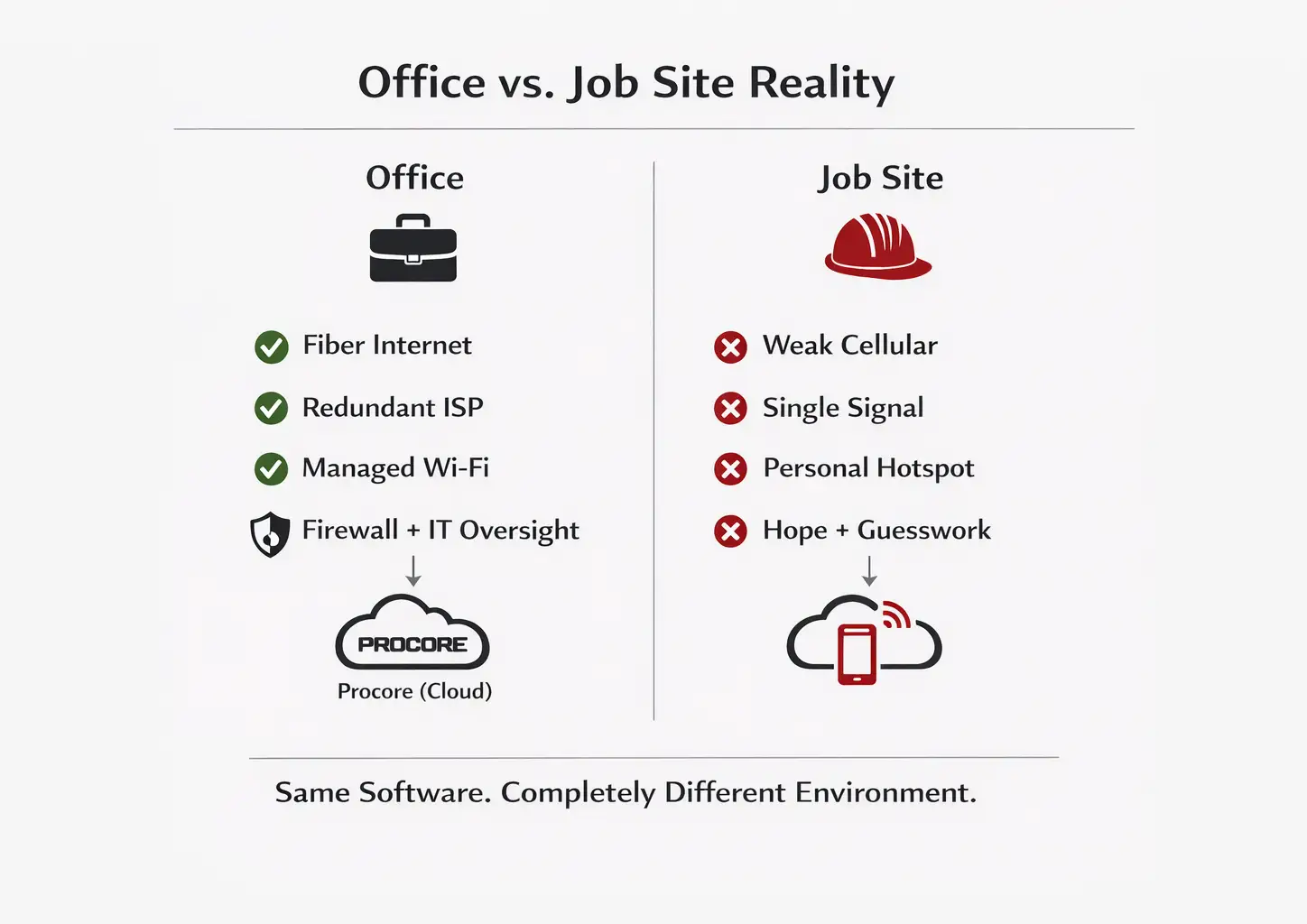
Nine times out of ten, “Procore problems” are really connectivity problems wearing a disguise.
Think about it: your office probably has fiber internet, built-in redundancy, and managed Wi-Fi. Your job sites? They are often running on a single weak cellular signal, overcrowded Wi-Fi from a nearby building, or somebody’s personal hotspot. That mismatch makes inconsistency inevitable.
This pattern shows up consistently across commercial, civil, and specialty contractors. It’s one of the reasons we’ve built dedicated construction managed IT services specifically for field-driven environments like these.
And the impact is not theoretical. In a national workforce survey by Illuminati Labs, more than half of U.S. workers reported experiencing cell phone connectivity issues that interrupted their work at least occasionally throughout the year. When your job site runs on unstable wireless or cellular service, interruptions are not rare events… they are predictable workflow disruptions.
And when those disruptions stack up across crews and project timelines, the financial impact grows quickly. We break down the real cost of IT downtime and how even short connectivity interruptions compound into measurable losses.
Here is what you can do right now
Walk out to where the work actually happens. The trailer, the slab, the interior steel. Bring the same device your crew uses every day, and run a simple speed test. Then run it again at a different time of day.
Cellular performance shifts based on location, network congestion, building materials, and even weather. That five-minute test will give you clarity that most teams never bother to get, and it will tell you exactly where the bottleneck lives.
What a field-ready setup actually looks like
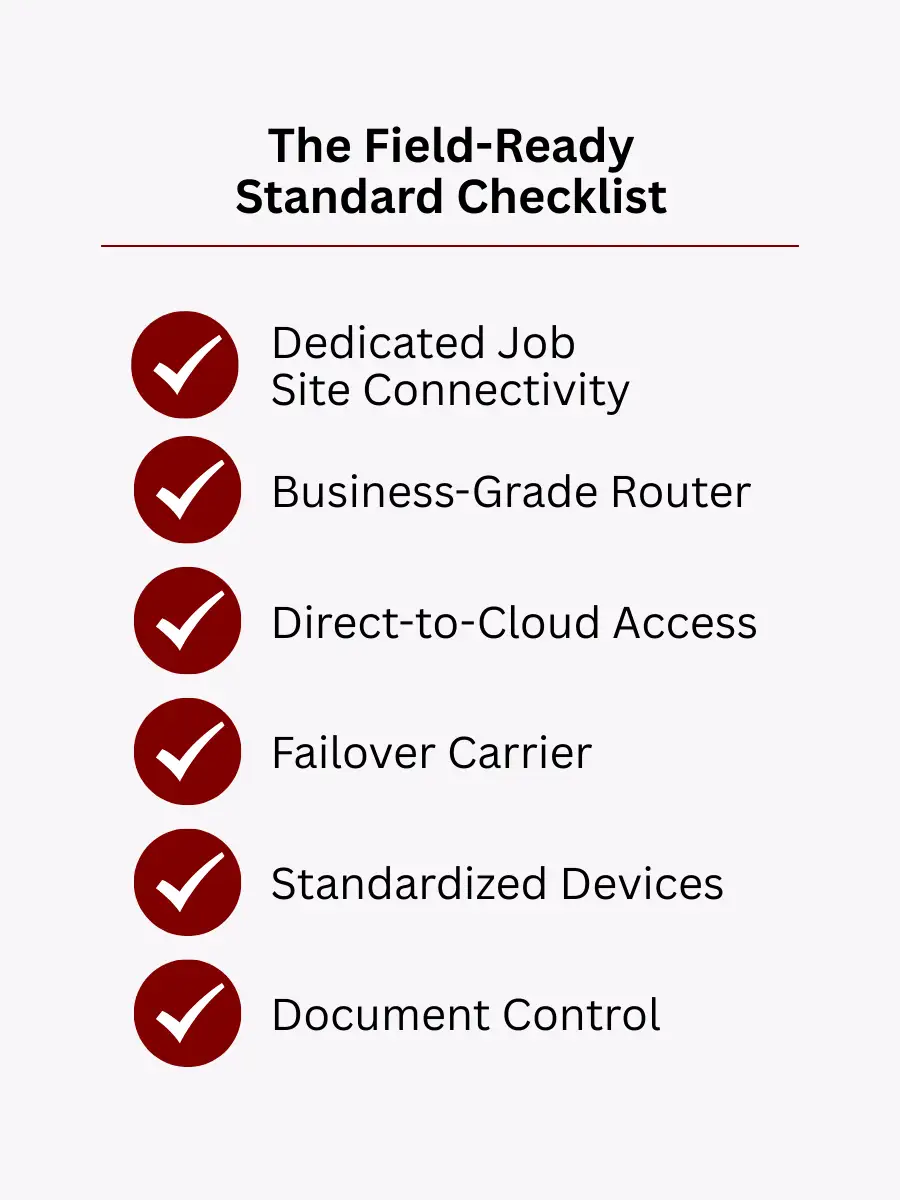
Dedicated job site connectivity (not just “whatever signal we can find”).
Business-grade routers or hotspots, not consumer-level gear from a big-box store.
Traffic prioritization so Procore is not competing with music streaming or personal phone use.
Security controls that protect your data without choking your performance.
Here is the bottom line: Procore does not slow down your projects. Weak connectivity does.
When leaders understand why Procore feels stressful, they realize the issue is environmental, not technical failure.
2. Procore Is Cloud-Based – Stop Accessing It Like It Is Not
This is a hidden performance killer we run into all the time, and most teams do not realize it is happening.
The slow path (and why it hurts)
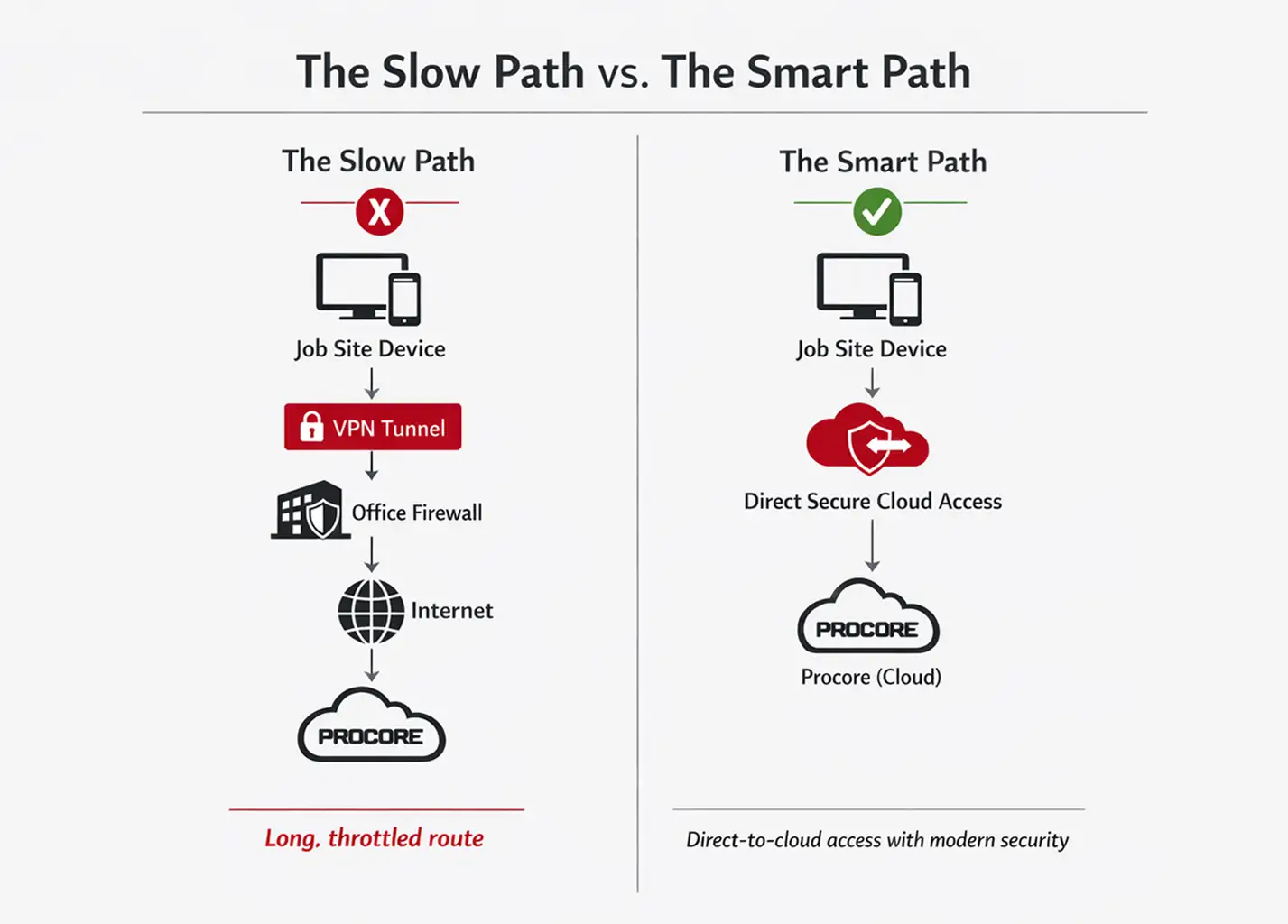
A field user connects to a VPN. Their traffic tunnels all the way back to the office firewall. From there, it goes out to the cloud where Procore lives. Add in traffic inspection, filtering, or extra server hops along the way.
The result? Procore feels broken. But it is not Procore. It is the long, throttled route your data is taking to get there. This routing mistake is one of the biggest hidden reasons why Procore feels stressful in the field.
The better approach
Direct-to-cloud access for cloud apps like Procore is critical in modern field environments. Instead of backhauling traffic through office firewalls, construction firms should adopt secure cloud-first architecture designed for performance and resilience. Our approach to secure cloud services focuses on protecting data without slowing down field operations.
Modern, cloud-aware security instead of heavy VPN tunnels.
Secure identity controls that verify the user without forcing all their traffic through the office first.
If your signal is strong but Procore is still slow, there is a very good chance your VPN or firewall path is the real bottleneck.
3. Your Job Sites Need Failover, Not Just the Office
In construction, the job site is the operation. If your office has internet failover but your job sites do not, you are going to lose productivity every single time the signal drops.
This matters even more in an industry where productivity growth has historically lagged behind other sectors. Federal Reserve research has shown that U.S. construction labor productivity has remained relatively flat over decades compared to broader economic gains. When field connectivity stalls, it compounds a challenge the industry is already working hard to overcome.
We have seen it happen over and over again across projects in Central and South Texas. One dropped connection at the wrong moment, and a superintendent is dead in the water for an hour.
Smart field failover options
Backup hotspots kept charged and ready to go at all times.
Secondary carriers, because Carrier A might be excellent at Site 1 and completely useless at Site 2.
Configurations that switch connections automatically, not “call IT and wait.”
The best construction leaders we work with do not ask if something will fail. They ask how fast they will be back up and running. This approach directly addresses why Procore feels stressful during unexpected connectivity drops.
That mindset aligns with what we discuss in our guide on zero downtime IT services: it’s not about preventing every disruption — it’s about designing systems that recover instantly when disruption happens.
4. Company Hotspot vs. Personal Hotspot (This Matters More Than You Think)
Personal tethering is one of the most common workarounds we see on job sites across Texas, and it is also one of the most unreliable.
Why personal hotspots cause problems
Signal quality varies from person to person and device to device.
Security settings are not controlled by your company.
Troubleshooting becomes pure guesswork.
Sensitive business data ends up riding on personal data plans with unknown limits.
The better approach
Company-issued mobile hotspots or dedicated job site routers give you:
Consistent, repeatable performance.
Straightforward support when something goes wrong.
Business-grade security and real visibility into what is happening on your network.
And remember, this is not really about phones. Most Procore work happens on laptops and tablets. The real question is how those devices are getting online in the first place.
5. Eliminate File Chaos Alongside Connectivity
Connectivity fixes half the stress. Getting your file management under control fixes the rest.
If crews are working from the wrong plan set, the cost shows up immediately. Wrong specs, wrong materials, rework. It adds up fast.
And the industry data backs that up. Research from Autodesk and FMI shows that construction professionals spend an average of 13 hours per week just searching for project data, and nearly half report spending more time than expected on non-optimal activities like tracking down information or resolving miscommunication. When file control breaks down, productivity drains quietly but consistently.
The problem we see everywhere
Files scattered across email inboxes, individual desktops, and shared drives that nobody has organized in months.
Versions named things like “final_final_v7.pdf” where nobody knows which one is actually final.
The fix
A single, controlled document source with proper versioning.
Mobile-friendly access for superintendents and project managers in the field.
Clear permissions so sensitive documents do not end up where they should not be.
Even with Procore in place, many teams still need a clean “single source of truth” for drawings, contracts, and change orders. We help our clients build that structure so nothing falls through the cracks.
6. Standardize Field Devices (Old Hardware Makes Procore Look Bad)
Sometimes Procore is not actually slow. The device running it is.
Outdated laptops and tablets cause all kinds of headaches:
Painfully slow page loads.
Upload failures right in the middle of submitting documents.
Constant re-logins that eat up time.
Browser crashes that wipe out unsaved work.
Best practice: Standardize your field devices and keep them updated. When every site is running the same reliable hardware, performance becomes predictable and your team can focus on the work instead of fighting their tools.
7. Browsers and Settings Matter More Than You Would Expect
Procore runs in a browser. That means when browsers are outdated, cluttered with extensions, or locked down with overly aggressive security settings, problems are going to follow.
Set the standard across your organization
Use modern, supported browsers (Chrome, Edge, or Firefox).
Keep them updated on every device.
Remove unnecessary extensions and toolbars that slow things down.
Make sure security settings are not blocking the core scripts or uploads that Procore depends on.
These are small fixes. But they prevent hours of daily frustration that your field teams should not have to deal with.
8. Security Without Slowing the Job Down
Construction leaders should never have to choose between keeping their data secure and keeping the job moving. But that is exactly the trade-off that many companies are making without realizing it.
The mistake is heavy-handed protection:
Always-on VPNs that throttle every connection.
Over-inspection of cloud traffic that adds unnecessary delays.
Firewalls that were tuned for office environments but are now applied to field work where conditions are completely different.
The better model
Cloud-aware security that protects your data while keeping access fast and responsive. Secure does not have to mean slow. Through properly configured managed security services, construction companies can secure job site connectivity without relying on heavy VPN tunnels that throttle performance. We help Texas construction companies find that balance every day.
9. Plan for “No Internet” Days Anyway
Even with the best connectivity setup in the world, reality is going to throw you a curveball eventually:
Texas storms that knock out towers.
Carrier outages that nobody saw coming.
Remote locations with minimal coverage.
Site conditions that change and suddenly block signal.
A resilient Procore strategy accounts for all of this:
Knowing exactly which Procore features are available offline.
Pre-downloading critical documents before heading to the site.
Having a clear, practiced plan for what to do when connectivity drops.
That is the difference between panic and progress.
10. What About Starlink?
We get this question a lot, and the honest answer is: it depends on the site.
Starlink can work well in truly remote areas where traditional cellular and wired options fall short. But it requires a clear line of sight to the sky, and performance and cost vary quite a bit depending on your specific location and conditions.
Our recommendation: Treat satellite internet as one option in your toolkit, not as the default solution. Evaluate it alongside cellular and wired alternatives based on the realities of each job site. We are happy to help you figure out the right mix.
11. Adoption Still Matters
Here is the honest truth: perfect connectivity will not fix inconsistent habits. Technology is only as good as the people using it and the processes wrapped around it.
The best results we have seen come when:
File locations are clearly defined and everyone knows where to look.
Versioning rules are consistent across every project.
Approval workflows are understood by the entire team, not just the project managers.
When the IT setup and your Procore processes are aligned, stress drops fast. We have watched it happen with construction companies across Central and South Texas, and the difference is night and day.
Make Procore Feel Like the Tool It Was Meant to Be
You are managing schedules, crews, and risk every single day. Procore should be reducing friction, not creating it.
By now, you can see that why Procore feels stressful has less to do with the platform and more to do with how your field environment is built.
If it is lagging or freezing in the field, switching to different software is rarely the answer. Fix how your job sites connect to the cloud, clean up how security routes that access, and performance follows.
If you are a construction leader in the greater San Antonio, Austin, Dallas, or Houston area and Procore feels stressful on your job sites, we can provide clarity. At 7tech, we specialize in working with Texas construction companies as one of the biggest industries we serve, delivering dedicated construction managed IT services built specifically for multi-site job environments and field-heavy operations. 7tech delivers customized field-ready connectivity and security that matches the real conditions of your job sites. No geekspeak. No guesswork. Just practical solutions that work where the work actually happens.
Next step: Get a practical, job-site-first assessment and a clear path forward. Reach out to our team and let us show you what is possible.

Neal Juern, Founder and CEO of 7tech, helps business leaders take control of their IT and strengthen cybersecurity without the complexity. Since founding 7tech in 2012, he’s built it into a 5X MSP 501 winner and guided hundreds of executives toward smarter, safer operations through Managed IT Services and Managed Security Services that make sense to people outside the IT department. He speaks regularly to executive and nonprofit audiences across Texas.