We Reviewed 26 Nonprofit IT Audits. Here’s What Failed Most.
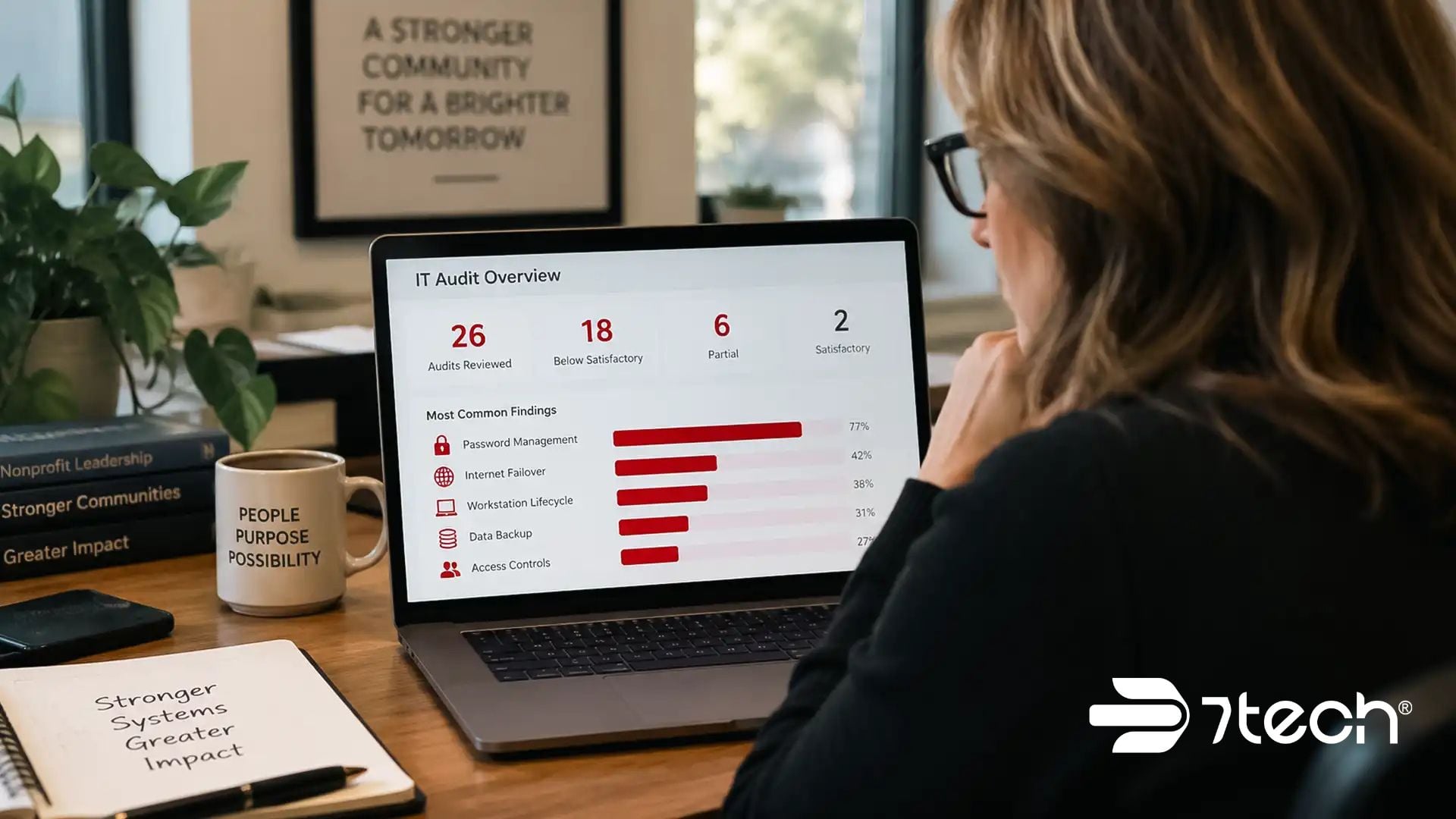
A nonprofit IT audit should show leaders more than what is wrong. It should reveal whether the technology supporting daily operations is secure, resilient, supportable, and governed well enough to protect the organization. In 7tech’s review of 26 nonprofit Network Assessments, the most common weaknesses involved password management, internet failover, and workstation lifecycle planning.
But the data also revealed something important: recurring findings did not necessarily mean the organizations had broadly broken IT foundations.
For nonprofit executives and board members, that distinction matters. The number of findings alone cannot tell you whether your IT environment is healthy. Leaders need to understand what is failing, what is working, how severe each weakness is, and how much of the organization is exposed.
Executive Summary
- A nonprofit IT audit examines the technology controls supporting security, operations, continuity, support, recovery, and governance.
- Across 26 nonprofit Network Assessments reviewed by 7tech, password management, internet failover, and workstation lifecycle planning were the most repeated weaknesses.
- Password management was below Satisfactory in 20 of 21 assessments where it was evaluated.
- Internet failover was below Satisfactory in all 11 assessments where it was evaluated.
- Workstation lifecycle was below Satisfactory in all 10 assessments where it was evaluated.
- Several foundational controls, including endpoint anti-malware, systems monitoring, patch management, backup and disaster recovery, and secure remote access, were Satisfactory everywhere they were evaluated.
- Only 2 of the 26 assessed organizations had any Requires Immediate Attention finding.
- Executives should prioritize audit findings according to frequency, severity, and organizational coverage rather than simply counting deficiencies.
What Is a Nonprofit IT Audit?
A nonprofit IT audit is a structured review of the technology controls that support an organization’s security, operations, business continuity, and oversight. Depending on the scope and provider, similar reviews may be called a nonprofit IT assessment, nonprofit technology audit, nonprofit cybersecurity audit, or nonprofit network assessment.
The scope can vary considerably. Some reviews emphasize compliance readiness. Others concentrate on cybersecurity, business continuity, support maturity, infrastructure, or governance.
For executives, however, the desired outcome is usually the same: clear evidence about whether the organization’s technology is dependable, supportable, resilient, and aligned with its operational risk.
While this article discusses nonprofit IT audits broadly, the 7tech data analyzed below comes specifically from 26 nonprofit Network Assessments.
The NIST Cybersecurity Framework 2.0 provides a useful executive framework for evaluating technology risk. It organizes cybersecurity outcomes around Govern, Identify, Protect, Detect, Respond, and Recover.
That helps leadership move beyond a simplistic question such as “Did we pass?” and toward more useful questions: Where are we exposed? What controls are working? Who owns the remaining risk? What should we address first?
Organizations looking beyond the assessment itself can also review 7tech’s guidance on IT support for nonprofit organizations to understand how ongoing technology management supports these objectives.
What Should a Nonprofit IT Audit Cover?
A strong nonprofit IT audit checklist should examine the controls most closely connected to security, uptime, operational resilience, support quality, and leadership visibility.
Identity and Password Practices
Review password standards, account hygiene, access approvals, employee offboarding, privileged access, and authentication controls. 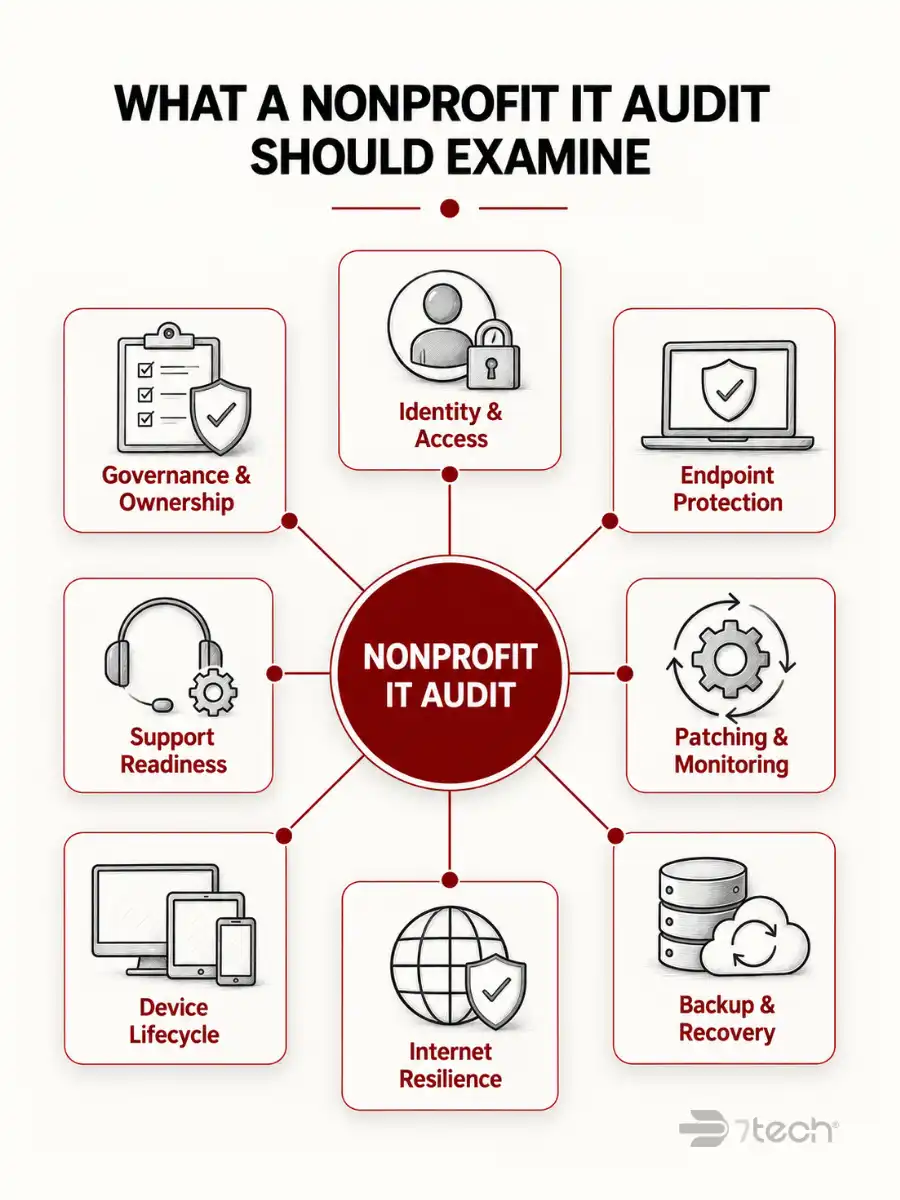
The assessment should also consider whether authentication practices align with current NIST password and authentication guidance.
For executives, the key question is not simply whether a password policy exists. It is whether access to important systems is consistently controlled as employees, vendors, responsibilities, and risks change.
Endpoint Protection and Anti-Malware
Determine whether workstations and servers have active protection, centralized visibility, alerting, and consistent coverage.
Protection should be evaluated as an operational capability rather than a software checkbox. Leadership needs confidence that suspicious activity can be identified and acted on across the environment.
Patching and Systems Monitoring
Evaluate whether critical systems are updated on a defined cadence and whether monitoring can identify outages, failures, vulnerabilities, or suspicious activity before they become larger business disruptions.
The executive issue is predictability. Unmanaged systems create uncertainty about where outdated software or unnoticed failures may be creating exposure.
Backup and Disaster Recovery
Confirm that backups exist, are appropriately managed, and can actually be restored.
Having a backup is not the same as having a recovery capability. A backup that cannot be restored reliably when operations are disrupted provides limited business value.
Secure Remote Access
Review how employees, vendors, and administrators connect remotely, whether those connections are appropriately secured, and whether remote access creates unnecessary exposure.
This becomes especially important for nonprofits with distributed teams, hybrid employees, volunteers, or third-party vendors requiring system access.
Workstation Lifecycle and Asset Hygiene
Examine device age, inventory accuracy, operating system support status, replacement schedules, and lifecycle planning.
Organizations that replace equipment only after it fails can turn predictable capital planning into recurring operational disruption and unexpected expense.
Internet Resilience and Failover
Assess what happens when the organization’s primary internet connection fails.
For cloud-dependent nonprofits, connectivity can affect phones, collaboration platforms, donor systems, financial applications, remote access, and direct service delivery. Internet failover is therefore a business continuity issue, not simply a networking feature.
Help Desk and Support Readiness
Review how users request assistance, whether issues are tracked, how escalation occurs, and whether support capacity is sufficient to prevent small technology problems from becoming prolonged productivity issues.
Executives should be able to determine who is accountable when technology stops working and whether users can get help without repeatedly escalating problems themselves.
Policy, Documentation, and Governance
Examine whether leadership has usable technology documentation, defined policies, clear standards, and enough visibility to make informed decisions about cybersecurity, compliance, continuity, and investment.
Good governance turns technical information into defensible leadership decisions.
Vendor Oversight and Role Clarity
Define who owns support, cybersecurity, escalation, technology planning, and risk management.
Ambiguous ownership is an operational risk of its own. A technically straightforward problem can remain unresolved when internal staff and outside vendors each assume someone else is responsible.
The CISA Cybersecurity Performance Goals also provide organizations with a practical reference point for evaluating important cybersecurity safeguards.

How We Analyzed 26 Nonprofit IT Assessments
This analysis covers 26 nonprofit organizations assessed from Q1 2023 through Q4 2025. The underlying reviews were Network Assessments rather than client outcome studies.
The organizations were prospects at the time of assessment. Therefore, the findings represent observed conditions during assessments, not improvements achieved after organizations became 7tech clients.
Findings are presented in aggregate rather than as individual nonprofit case studies.
There is another important limitation: not every control was evaluated in every assessment. Denominators therefore vary by control. A finding of 20/21 means the control was evaluated in 21 organizations, not all 26.
A “Satisfactory” rating means that an evaluated area met the applicable assessment standard. It should not be interpreted as proof that an organization had no technology or cybersecurity risk.
The 26 assessed organizations also should not be treated as statistically representative of the nonprofit sector as a whole. The data is most useful for understanding the patterns observed within this specific assessment sample.
What Failed Most in 7tech’s 26 Nonprofit Assessments?
Three control areas produced the most consistent weaknesses: password management, internet failover, and workstation lifecycle planning.
Each finding represents a different type of business exposure.
Password management affects access discipline and the organization’s ability to control who can reach important systems and information.
Internet failover affects continuity. When connectivity is essential to phones, cloud applications, donor management, financial operations, or service delivery, a single connection can become a single point of operational failure.
Workstation lifecycle planning affects reliability, budgeting, security, and employee productivity. Without a defined refresh strategy, organizations can end up reacting to device failures rather than planning for them.
Yet these weaknesses tell only part of the story.

Which IT Controls Performed Better?
Several foundational capabilities were rated Satisfactory everywhere they were evaluated:
- Application control: 21 of 21
- Endpoint anti-malware: 21 of 21
- Help desk support: 19 of 19
- Systems monitoring: 18 of 18
- Patch management: 18 of 18
- Backup and disaster recovery: 8 of 8
- Secure remote access: 8 of 8
Only 2 of the 26 organizations had any Requires Immediate Attention finding.
Because assessment coverage varied, these results should be interpreted control by control rather than converted into broad percentages describing the organizations as a whole.
For executives focused specifically on disruption and cyber resilience, 7tech’s guidance on ransomware prevention for nonprofit organizations provides additional context for protecting continuity.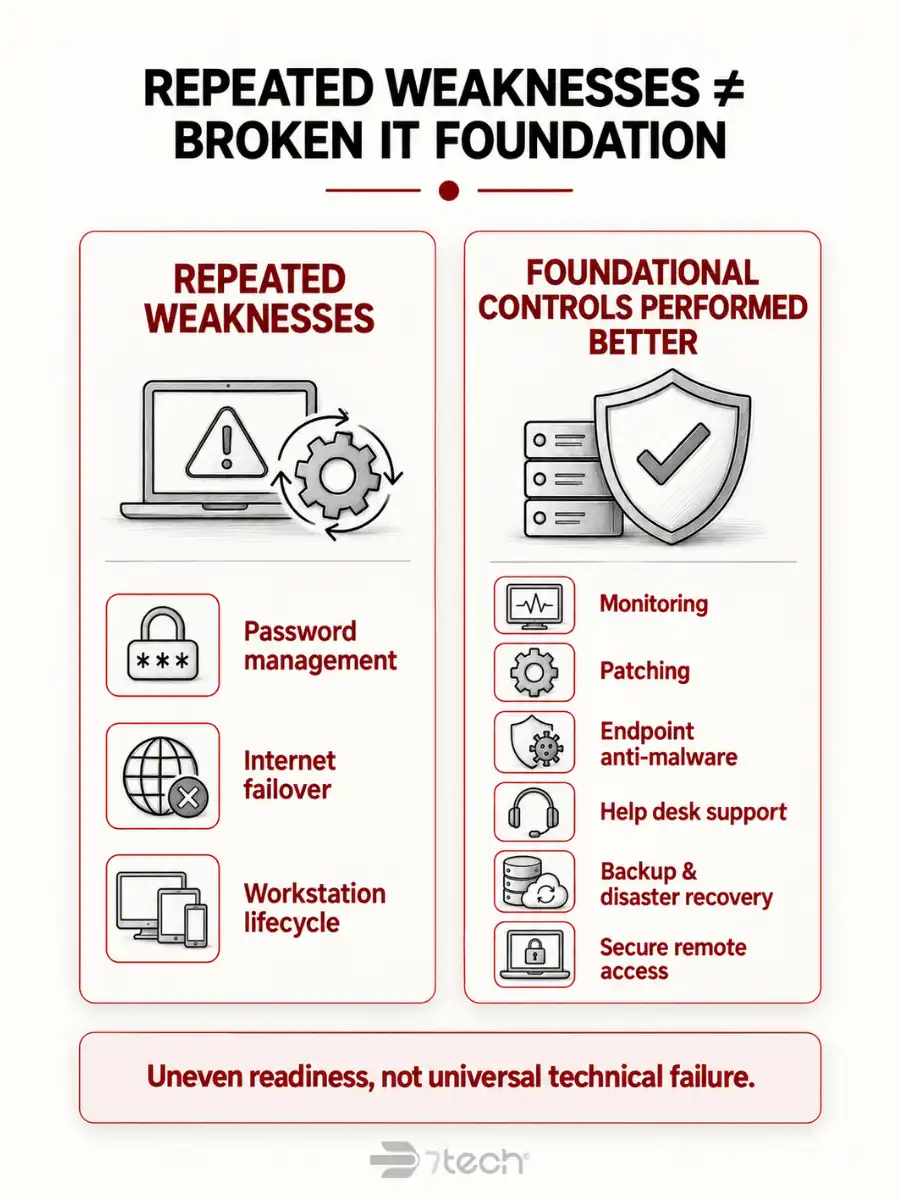
Why Repeated IT Gaps Did Not Mean Broadly Broken IT Foundations
Across these 26 nonprofit assessments, repeated IT gaps did not add up to broadly broken IT foundations.
Password management, internet failover, and workstation lifecycle planning showed clear concentrations of weakness. Those findings deserve attention.
At the same time, monitoring, patching, endpoint anti-malware, help desk support, backup and disaster recovery, and secure remote access were Satisfactory everywhere those controls were evaluated.
Only 2 of 26 assessed organizations had any Requires Immediate Attention finding.
The pattern therefore points to uneven readiness rather than universal technical failure: concentrated weaknesses existed alongside functioning foundational capabilities.
That distinction matters because leadership decisions based only on the length of a findings report can lead to poor prioritization.
Frequency is not severity. A weakness found repeatedly may require a systematic improvement plan, while a single high-impact issue could justify immediate action because of its potential effect on operations, security, compliance, or reputation.
Likewise, Satisfactory does not mean risk-free. It means the evaluated control met the applicable assessment standard.
The executive takeaway is straightforward: audit findings should be interpreted in context, not counted in isolation.
How Should Nonprofit Leaders Interpret IT Audit Results?
Nonprofit leaders should first determine whether the assessment reveals failing foundational capabilities or concentrated gaps inside an otherwise functioning environment.
Those conditions require different responses.
A useful executive review evaluates every significant finding through three dimensions:
These dimensions should remain separate.
For example, a workstation lifecycle issue affecting most employees may deserve structured budget planning because of its broad operational impact. A less frequent issue involving privileged access to a critical system could demand faster action because its potential severity is greater.
This is where an audit becomes useful to executive leadership. Instead of presenting technology as a collection of technical deficiencies, it creates a basis for decisions about risk, ownership, investment, and timing.
For continuity-related issues involving connectivity, backup, or recovery, a business impact analysis can help leaders connect technology dependencies to operational consequences.
How Should a Nonprofit Prioritize Remediation After an IT Audit?
Prioritize nonprofit IT audit findings according to business risk, ownership, and operational impact rather than simply fixing the most frequently occurring findings first. 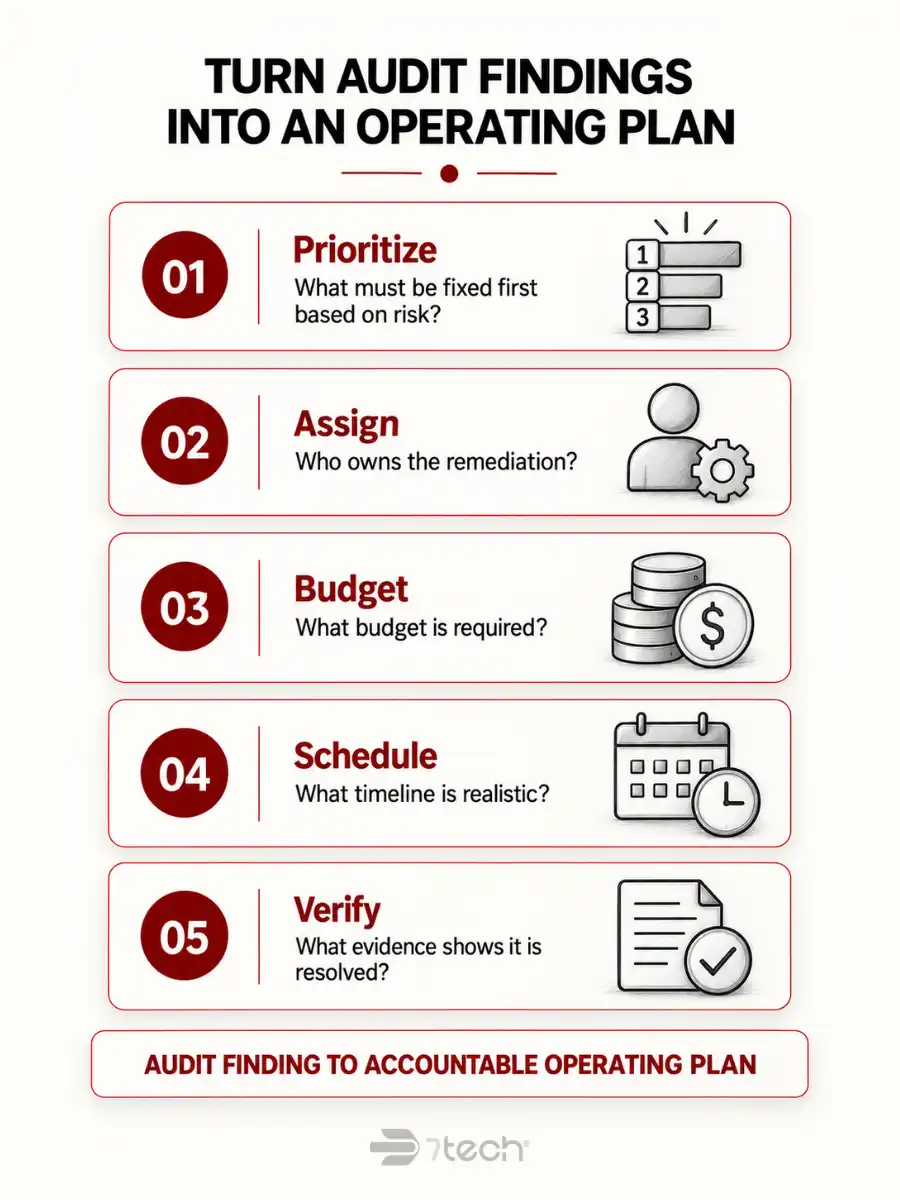
Start with issues that could create the greatest security, continuity, or organizational exposure.
Identity and password weaknesses should be prioritized according to the sensitivity of affected accounts and systems.
Resilience issues such as internet failover should be evaluated according to how long the organization can realistically operate without connectivity.
Workstation lifecycle deficiencies should become a planned refresh program rather than an annual cycle of emergency replacements.
Every remediation roadmap should answer five executive questions:
- What must be fixed first based on risk?
- Who owns the remediation?
- What budget is required?
- What timeline is realistic?
- What evidence will demonstrate that the issue is resolved?
This turns an audit report into an accountable operating plan.
Budgeting should follow the same logic. If hardware refreshes, support capacity, resilience improvements, or security controls remain chronically underfunded, the same findings can reappear year after year.
7tech’s nonprofit IT budgeting guidance provides a deeper framework for connecting technology planning with predictable financial decisions.
When Does a Nonprofit Need an Audit, an Assessment, or Ongoing IT Oversight?
A one-time nonprofit IT audit or assessment is useful when leadership needs an objective snapshot before making a budget decision, preparing for a board discussion, changing technology providers, or addressing uncertainty about the organization’s current environment.
Ongoing oversight becomes more important when the same findings keep returning, ownership remains unclear, or significant technology decisions are being made without sufficient leadership visibility.
Repeated findings may signal more than an isolated technical problem. They can indicate unresolved issues with process, budgeting, accountability, or governance.
That does not automatically mean the organization’s IT foundation is failing.
It means the organization may need a management process that continually reviews risk, assigns ownership, tracks remediation, and keeps technology decisions aligned with operational priorities.
When that pattern exists, nonprofit leaders may also benefit from comparing support models and accountability structures. 7tech’s perspective on managed IT services for nonprofits provides a useful framework for that evaluation.
Frequently Asked Questions About Nonprofit IT Audits
What is included in a nonprofit IT audit?
A nonprofit IT audit typically reviews identity controls, endpoint security, patching, monitoring, backup, disaster recovery, remote access, device lifecycle, internet resilience, support readiness, documentation, governance, and vendor accountability.
How is an IT audit different from an IT assessment?
An IT audit generally implies a more formal review against defined controls or standards. An IT assessment may be broader and more operational. The 7tech data analyzed in this article comes specifically from nonprofit Network Assessments.
How often should a nonprofit review its IT environment?
Review frequency depends on operational change, risk, compliance obligations, and leadership needs. A new provider, major technology change, significant staffing shift, new compliance requirement, or recurring technology problem can all justify another review.
What are the most common nonprofit IT audit findings?
In 7tech’s sample of 26 nonprofit Network Assessments, the most repeated weaknesses were password management, internet failover, and workstation lifecycle planning. Results apply to this assessed sample and should not be generalized to all nonprofits.
Do multiple IT audit findings mean a nonprofit has weak IT?
Not necessarily. In 7tech’s assessed sample, concentrated weaknesses existed alongside foundational capabilities rated Satisfactory everywhere they were evaluated. Leadership should evaluate findings according to frequency, severity, and coverage instead of using the total number of findings as an overall IT-health score.
Who should review nonprofit IT audit results?
Executive leadership and the person accountable for IT should review significant findings together. Board, finance, compliance, or risk stakeholders should also participate when findings could materially affect continuity, regulatory obligations, budgets, or organizational risk.
What should a nonprofit fix first after an IT audit?
Start with findings that create the greatest business exposure. Consider security impact, operational consequences, affected systems and users, compliance requirements, remediation cost, and whether compensating controls already reduce the risk.
See How Ready Your Nonprofit’s Technology Really Is
A useful nonprofit technology audit should leave leadership with three things: clarity about what is working, visibility into what deserves attention, and an accountable plan for what happens next.
The findings from these 26 assessments illustrate why context matters. Repeated weaknesses do not automatically prove that an organization’s IT foundation is broken. But recurring issues can reveal where stronger planning, visibility, resilience, or accountability is needed.
7tech’s Technology Readiness Assessment is designed to give nonprofit leaders that structured view of their technology environment so they can understand current conditions, identify meaningful priorities, and make informed decisions about what comes next.
Schedule your Technology Readiness Assessment by calling (855) 701-6777.

Neal Juern, Founder and CEO of 7tech, helps business leaders take control of their IT and strengthen cybersecurity without the complexity. Since founding 7tech in 2012, he’s built it into a 5X MSP 501 winner and guided hundreds of executives toward smarter, safer operations through Managed IT Services and Managed Security Services that make sense to people outside the IT department. He speaks regularly to executive and nonprofit audiences across Texas.