


Table of Contents
A hybrid employee is locked out of Microsoft 365 right before a customer call, while a manager waits on approval access and the office copier still isn’t mapped for a new hire. None of that feels strategic, but it touches revenue, service quality, and risk before lunch.
Steven Simon, Director of Security Operations at 7tech, notes: “Treat every ticket as both a user problem and an operations record, because the notes you keep today shape tomorrow’s security, reporting, and workflow decisions.”
IT helpdesk best practices are the operating habits that make support faster, clearer, more secure, and easier to manage as companies grow. The goal is a Service Desk that protects working time, keeps access disciplined, and gives leaders clean visibility into recurring tickets, approval delays, device issues, and security handoffs. Password resets alone can consume a large share of support time; Gartner has tied 40% of help desk calls to password expirations, changes, and resets.
IT Helpdesk Best Practices That Reduce Daily Friction
Support practices matter when accounting, field operations, HR, vendors, and managers all depend on the same systems. A stalled login, missing printer driver, or unclear approval route doesn’t stay inside IT. In one Forrester analysis on organizations adopting Mac enterprise devices, survey respondents reported a 24% reduction in help desk tickets and cited reduced troubleshooting and maintenance effort as key drivers of IT efficiency.
-
Clear ticket ownership: One person owns the issue, next step, and user update, so there’s no confusion about whether the copier vendor, Microsoft 365 admin, or Service Desk Pro is moving it forward.
-
Fast human triage: Early review keeps payroll access from sitting behind a low-impact software question. At 7tech, 20-minutes to human response, that’s our standard.
-
Documented recurring fixes: If the same VPN setting breaks for new laptops, the fix becomes onboarding documentation.
-
Secure access workflows: Password resets, MFA prompts, remote access, and permission changes need disciplined checks because convenience without control creates exposure.
Once intake is clear, categories decide where each ticket goes next.
IT Helpdesk Categories Best Practices For Tickets That Actually Move
Categories aren’t filing labels. They control routing, reporting, escalation, vendor involvement, and executive visibility, especially when a Service Desk supports Microsoft 365 monitoring, SOC review, vCIO planning, and compliance readiness.
-
Access and identity tickets: Group passwords, MFA, onboarding, offboarding, and role changes so your team can spot permission drift after promotions or departures.
-
Device and workstation issues: Route laptops, printers, peripherals, mobile devices, and remote workstations clearly. Printer companies and warranty providers get involved faster when the category is right.
-
Business application problems: Track accounting systems, project platforms, ERP, CRM, and Microsoft 365 issues because they affect approvals, invoices, and customer handoffs.
-
Network and connectivity issues: Capture Wi-Fi, VPN, remote access, ISP coordination, and office connectivity with clean notes before escalation.
-
Security and compliance events: Give suspicious emails, endpoint alerts, policy exceptions, and evidence requests visibility beyond basic troubleshooting.
Clean categories help mature companies see patterns instead of treating every ticket like a one-off. For organizations deploying cloud PCs, research shows that companies adopting Windows 365 specifically experienced an average 13.4% reduction in overall help ticket volumes due to standardized Cloud PC environments.
IT Helpdesk Best Practice Decisions That Protect Working Time
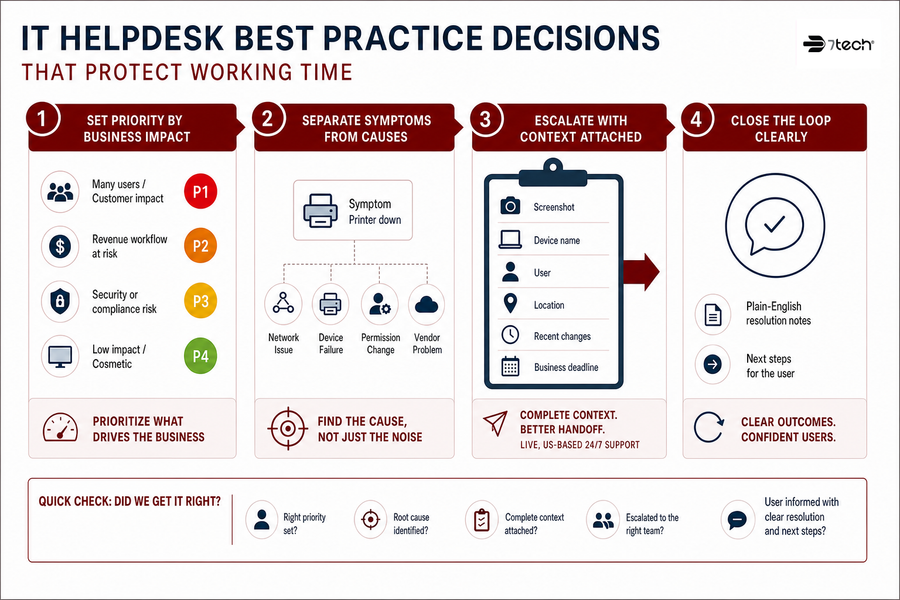
A controller waiting on invoice approvals doesn’t need a ticket that says “application issue.” They need the right priority, clear ownership, and enough context for a tactical response without restarting the conversation at every handoff.
-
Set priority by business impact: Priority should reflect affected users, customer impact, revenue workflow, and security risk. Executive access, payroll, and production work deserve different handling than a cosmetic desktop setting.
-
Separate symptoms from causes: “Printer down” may point to a network issue, device failure, permission change, or vendor problem.
-
Escalate with context attached: Include screenshots, device name, user, location, recent changes, and the business deadline before escalation. US-based 24/7 support works better when the handoff is complete.
-
Close the loop clearly: Users need plain-English resolution notes and next steps, not only a closed ticket notice.
That same discipline matters even more when work happens outside the office.
Keep IT Support Moving
-
How to Handle Support Tickets: The Strategy That Keeps Your Business Moving Forward
-
IT Support Tiers: Stop Ticket Delays Before They Stall Payroll And Approvals
-
Staff Augmentation Vs Managed Services: Who Owns Tickets, Risk, And Compliance?
-
IT Procurement Best Practices That Keep Budgets, Vendors, And Cloud Rollouts On Track
IT Service Desk Best Practices For Hybrid Teams
Hybrid work pulls identity, devices, cloud apps, remote access, and user training into the same support conversation. A Service Desk can’t treat a managed laptop, Microsoft 365 permission, and home network question as unrelated when one employee needs all three to finish client work.
A remote estimator may need cloud file storage from a managed laptop before a bid deadline. A nonprofit finance user may approve payments from home, while a manufacturer needs secure access to production documentation. Pro-Cloud Technology, Microsoft 365 Administration Services, remote desktops, and cloud cybersecurity work best when configuration and monitoring are handled together.
-
Standardize secure access: Use MFA, a password manager, remote access controls, Zero-trust solutions, and mobile device management so access follows policy, not habit.
-
Support the whole endpoint: Track device health, patching, encryption, application control, and user experience together.
-
Train users continuously: Security awareness training and phishing-related reporting turn employees into useful signal.
IT helpdesk categories best practices also matter in hybrid environments because access, devices, cloud applications, and security events often overlap. Survey respondents using Copilot in Teams Phone reported a 21% increase in call volume, a 27% reduction in average call time, and a 25% improvement in resolution time attributable to Copilot productivity functionality.
This is where Service Desk practices connect daily support to larger operating controls. Identity management, endpoint health, cloud configuration, security monitoring.
Keep IT Tickets Moving
Turn helpdesk friction into clearer tickets, faster access, and stronger workflows with support from 7tech.
Service Desk Best Practices For Security And Compliance Readiness
Support tickets often become compliance records because they show how access, incidents, devices, and policy exceptions are handled. One IT helpdesk best practice is to write tickets as if finance, legal, IT, and an assessor may all need the same plain-English trail later.
-
Access changes need evidence: Onboarding, offboarding, approvals, and least-privilege access need dated records tied to the user and role.
-
Security alerts need routing: SOC support, threat detection, endpoint alerts, and escalation paths keep signals from getting buried in general support. Unit 42 reported that 13% of social engineering incidents were traced back to ignored or untriaged security alerts.
-
Patching needs visible records: Weekly installations, vulnerability remediation, vulnerability scans, and reporting help prove maintenance happened.
-
Users need security training: Security awareness training should show practical reporting behavior, especially around suspicious emails and Microsoft 365 activity.
-
Compliance needs preparation: HIPAA, FTC Safeguards Rule, SOC 2, and CMMC preparedness all depend on evidence. As a US-based MSSP, we pair co-managed expertise with our Security Operations Center, Security Event Monitoring, and Zero Compromise Cybersecurity™ approach.
Our triple-layered approach to cybersecurity connects Service Desk activity with threat detection, Microsoft 365 monitoring, vulnerability scans, and assessment preparation. For defense contractors, we provide CMMC readiness consulting, including gap analysis and preparation for CMMC assessment.
FAQ On Practical IT Support Operations
These questions come up when companies want support to feel more predictable without slowing people down. The useful answers usually live in ticket quality, clear routing, and plain communication.
What should a mature Service Desk measure?
Measure response time, same-day ticket resolution, first-call resolution, recurring issue trends, and user satisfaction. At 7tech, useful benchmarks include 20-minute human response time, 80% same-day ticket resolution, 64.7% first-call resolution, and a 97.4% CSAT score.
How should urgent tickets be defined?
Urgent tickets should connect to business impact, not noise level. Customer-facing downtime, security risk, payroll, finance approvals, production work, and executive access all deserve clear priority rules.
When should IT involve vendors?
Bring vendors in for ISP issues, copier setup, SaaS platforms, warranty support, and hardware acquisition. Our included vendor management keeps users from becoming traffic coordinators.
What belongs in a ticket note?
Include the user, device, location, application, screenshots, business impact, steps already tried, and deadline. Good notes help Pros resolve issues without making the employee repeat the story.
Discover Our Trusted IT Services Near You

Neal Juern, Founder and CEO of 7tech, helps business leaders take control of their IT and strengthen cybersecurity without the complexity. Since founding 7tech in 2012, he’s built it into a 5X MSP 501 winner and guided hundreds of executives toward smarter, safer operations through Managed IT Services and Managed Security Services that make sense to people outside the IT department. He speaks regularly to executive and nonprofit audiences across Texas.