

Table of Contents
The office manager has an invoice ready to approve, but the accounting login fails and the vendor payment clock keeps moving. That’s when IT support tiers stop being an IT chart and start affecting cash flow, onboarding, billing, vendor coordination, and secure remote access. Downtime now costs the world’s largest companies $600 billion a year, so clear escalation paths help people get the right help faster.
Steven Simon, Director of Security Operations at 7tech, notes: “A good support tier model tells employees where their issue is going, who owns the next step, and how work keeps moving while IT fixes it.”
IT Support Tiers Explained For Everyday Business Workflows
Support tiers route requests to the right person faster. Instead of letting every printer issue, payroll access problem, and VPN failure sit in one queue, tiers help employees get the right level of help with less back-and-forth. That matters when ticket volume rises, and 75% of customer service reps said they saw the highest ever volume in customer service tickets in 2024. At 7tech, we keep IT support tiers explained in plain English so employees get clearer updates and faster movement on the issues blocking their work.
-
Tier zero self-service: Password reset guides, basic Microsoft 365 instructions, and service portal articles help employees solve simple issues without waiting for a person.
-
Tier one first response: Service Desk Pros handle triage, identity checks, printer setup, email access, and common login problems. The goal is to clear routine requests quickly without bouncing employees between queues.
-
Tier two deeper troubleshooting: These Pros review device settings, VPN problems, application errors, and permissions that affect daily work.
-
Tier three advanced expertise: Senior specialists handle server changes, financial system configuration, endpoint security concerns, and infrastructure issues. AI also helps teams route work faster, with 83% of CRM leaders saying it makes ticket resolution easier.
What Is The Difference Between Different IT Support Tiers In Daily Operations
The answer to what is the difference between different IT support tiers isn’t just skill level. The real difference is ownership, business risk, access level, and urgency, especially when payroll, billing, customer service, or compliance work is waiting.
-
Complexity of the issue
IT issues have different operational impacts and need to be prioritized appropriately. A failed payroll export from a financial system needs deeper troubleshooting because it affects deadlines, employee pay, and reporting.
-
Access to sensitive systems
Financial system changes, vendor software permissions, and HR file access need the right approval trail before anything changes.
-
Urgency for the business
A remote employee locked out before a client call needs faster classification than a low-priority monitor request. We use triaged support through US-based Pros, with a 20-minute average response time for critical issues.
-
Risk tied to security
A suspicious endpoint alert isn’t treated like a routine software update. It needs escalation before one risky device affects shared files or cloud apps.
-
Follow-through after each handoff
Good escalation doesn’t mean starting over. The next Pro should know the ticket history, business deadline, and remaining action.
Tiers Of IT Support And The Business Cost Of Slow Escalation
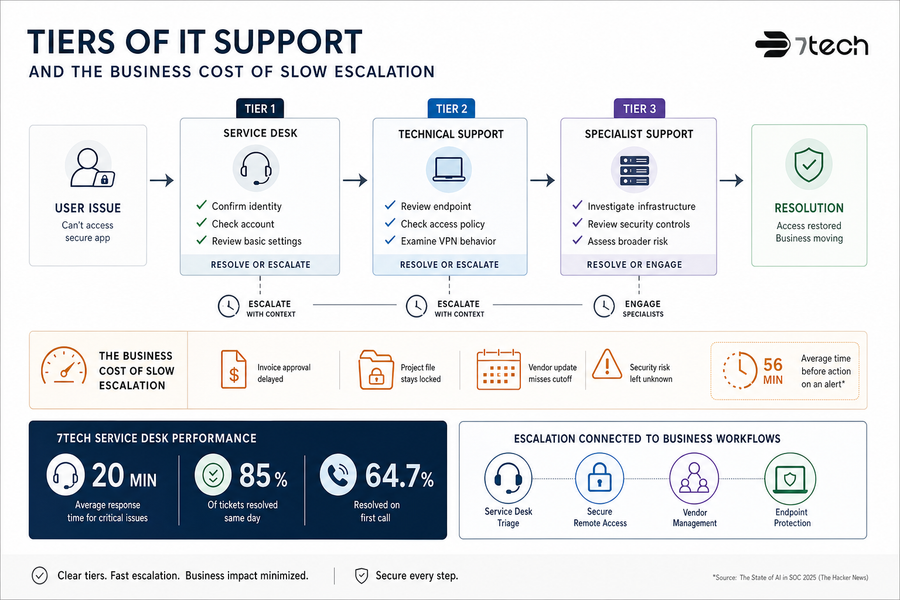
A hybrid employee can’t access a secure app needed for a customer handoff. Tier 1 confirms identity, checks the account, and reviews basic settings. Tier 2 looks at the laptop, access policy, and VPN behavior. Tier 3 checks deeper infrastructure or security controls if the issue points to a wider risk.
That path matters because stalled access rarely affects just one person. An invoice approval waits, a project file stays locked, or a vendor portal update misses the day’s cutoff. If the ticket has a security angle, slow escalation also leaves the business guessing whether the issue is a bad setting, a risky device, or an active threat. According to one survey, a full 56 minutes pass on average before anyone acts on an alert.
7tech performance data: our US-based Service Desk provides a 20-minute average response time for critical issues, and resolves 80% of tickets the same day.
That is why the tiers of IT support need to match the workflows people already depend on.
Key capability areas include service desk triage, secure remote access, vendor management, endpoint protection.
Keep Support Tickets Moving
IT Technical Support Tiers For Security Compliance And Hybrid Work
Some tickets aren’t just “fix my computer” requests. They affect who can reach sensitive data, whether audit evidence is complete, and whether employees can keep working safely from home, the office, or a client site. That’s where IT technical support tiers need clear handoffs.
-
Identity and access control
Zero trust means ensuring that only the people who need access to an asset, at that time, have access. That matters when someone requests payroll, legal, or financial system access.
-
Endpoint risk and containment
If a laptop behaves suspiciously, security teams contain the device to reduce further exposure to shared resources. Ignored alerts carry real risk, with 13% of social engineering incidents traced to ignored or untriaged security alerts.
-
Cloud and Microsoft access
Microsoft 365, Azure, secure virtual desktops, and cloud backups need support that connects login problems to data protection and business continuity.
-
Audit records and evidence
vCISO guidance help organize policies, access records, and compliance documentation before an auditor asks for them.
-
Security operations support
Our private, US-based Security Operations Center handles higher-tier threat monitoring and response internally. Outages show why this discipline matters, including 759 U.S. hospitals affected by IT outages after a faulty CrowdStrike update.
Fix IT Escalations Before Work Stalls
If support tickets are slowing payroll, approvals, or access, 7tech can help align your IT support tiers with how your business works.
IT Support Tiers That Fit How Your Company Actually Works
Changing support habits takes patience. People are used to emailing the same person, walking up to the nearest IT contact, or waiting until a ticket becomes urgent. A practical model doesn’t punish that behavior. It gives everyone a clearer path for getting help, especially when onboarding, vendor apps, remote access, or compliance evidence is involved.
-
Map common ticket types: Sort recurring requests by tier, such as password resets, Microsoft 365 access, printer setup, VPN issues, new laptop builds, and financial system changes.
-
Define escalation triggers: Decide what moves a ticket upward, including payroll deadlines, repeated login failures, suspicious endpoint behavior, server changes, or stalled customer handoffs.
-
Document vendor ownership: List who contacts software vendors, copier providers, internet carriers, and line-of-business application support when a ticket crosses company boundaries.
-
Measure business outcomes: Track response quality by practical results, such as fewer idle employees, faster onboarding, cleaner offboarding, same-day ticket closure, and fewer repeat tickets.
If your current process depends on memory and hallway requests, we can help assess the environment and build a practical support model around how work actually moves.
We can also work alongside internal teams through co-managed support when extra bandwidth, security resources, compliance reporting, or after-hours coverage is needed. We offer flat-rate pricing with no hidden fees and a 60-day satisfaction guarantee, so the path from stalled invoice approval to cleaner escalation is easier to plan.
Explore IT Services

Neal Juern, Founder and CEO of 7tech, helps business leaders take control of their IT and strengthen cybersecurity without the complexity. Since founding 7tech in 2012, he’s built it into a 5X MSP 501 winner and guided hundreds of executives toward smarter, safer operations through Managed IT Services and Managed Security Services that make sense to people outside the IT department. He speaks regularly to executive and nonprofit audiences across Texas.