The Complete Guide to IT Support for Nonprofit Organizations
Last updated: June 12, 2026
IT support for nonprofit organizations is the structure that keeps staff, volunteers, programs, donor systems, and leadership teams operating securely and reliably. The right IT support model does more than fix tickets. It protects mission continuity, donor trust, budget predictability, and executive confidence.
For many nonprofit leaders, the real question is not, “Do we have IT support?” It is, “Is our current support model strong enough for our mission, risk, and growth?” This guide explains what nonprofit IT support should include, how to spot gaps, and how to evaluate whether your current provider or internal team is still the right fit.
For a service-specific overview of how 7tech supports nonprofits, visit 7tech’s IT services for nonprofit organizations.
Executive summary
- Effective IT support for nonprofit organizations should include responsive help desk support, proactive maintenance, cybersecurity fundamentals, onboarding and offboarding, backup readiness, cloud administration, and strategic planning.
- Common warning signs include slow response times, recurring issues, reactive security, stalled technology projects, unclear ownership, and too much leadership time spent chasing IT problems.
- The right IT support model should improve reliability, reduce avoidable disruption, protect sensitive data, and give executives a clear view of risk and cost.
- For deeper cost planning, start with this guide to nonprofit IT budget planning.
Is Your Nonprofit Getting the IT Support It Really Needs?
Many nonprofits think about IT only when something breaks. That is understandable. Executive teams are often balancing programs, fundraising, grant reporting, staffing, board expectations, and daily service delivery with limited internal bandwidth.
But technology should support the mission, not compete with it.
If staff wait too long for help, volunteers struggle with access, the same problems keep returning, or leadership cannot get a clear answer about security and backup readiness, the issue is usually bigger than one ticket. It often means the organization has outgrown its current support approach.
Strong nonprofit technology support creates clarity in four areas:
- Reliability: Systems work consistently enough for staff to serve clients, donors, and communities without constant interruption.
- Security: Sensitive data is protected through practical, documented safeguards.
- Accountability: Everyone knows who owns prevention, response, recovery, and communication.
- Planning: Leadership can budget and prioritize technology decisions instead of reacting to surprises.
The rest of this guide gives nonprofit executives a practical framework for evaluating what IT support should include, where gaps usually appear, and how to compare internal, managed, and co-managed support models.
Why IT Support for Nonprofit Organizations Is Different
Nonprofits do not operate like generic small businesses. Their IT support needs should not be treated that way.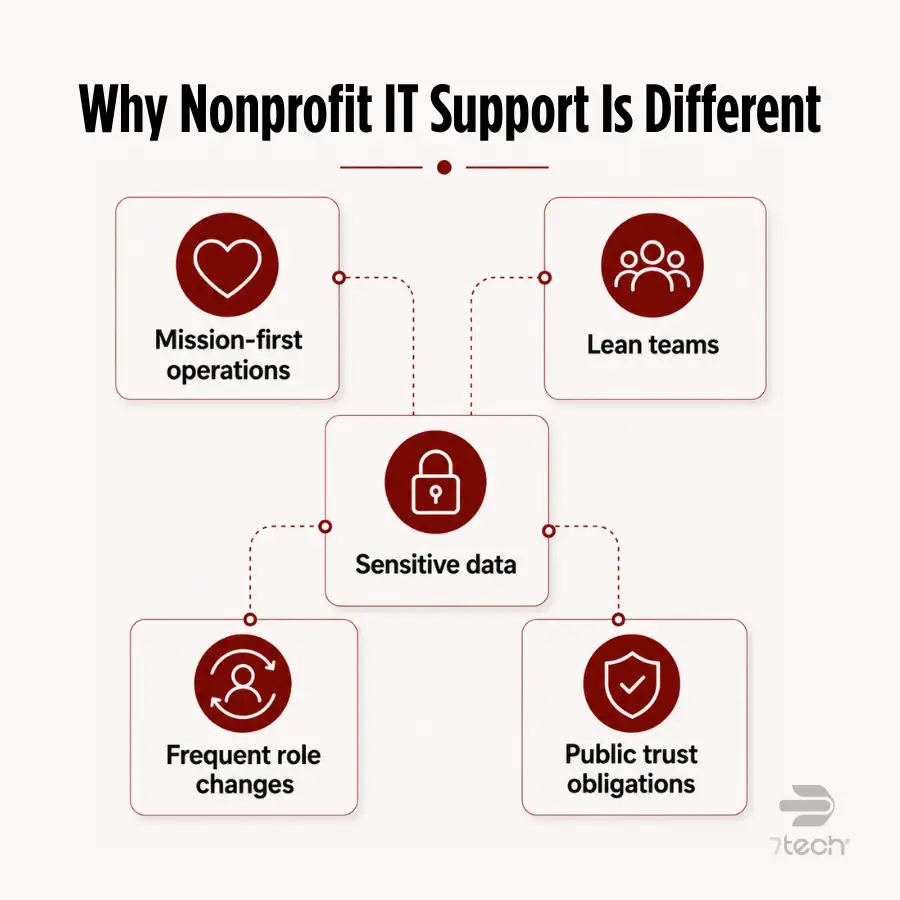
- Mission-first operations: Technology issues can affect programs, constituents, donors, staff, volunteers, and board confidence.
- Lean teams: Many organizations have limited administrative capacity and little tolerance for rework, downtime, or avoidable complexity.
- Sensitive data: Donor records, client information, financial data, health-related information, and internal communications all require careful handling.
- Frequent role changes: Staff turnover, volunteer access, seasonal programs, board transitions, and contractor involvement create real access-control challenges.
- Public trust obligations: When technology fails visibly, the impact can extend beyond operations into reputation, stewardship, and donor confidence.
That is why IT support for nonprofit organizations should be evaluated through the lens of mission continuity, risk management, and leadership visibility. Closing tickets matters, but it is not enough.
What IT Support for Nonprofit Organizations Should Include
Strong nonprofit IT support should help the organization prevent problems, detect risk early, respond quickly, and recover cleanly. Guidance from the NIST Cybersecurity Framework 2.0 quick-start guide and CISA Cyber Essentials reinforces a simple point: responsible IT support is not just reactive troubleshooting. It is operational readiness.
Responsive help desk support
Staff and volunteers need fast, respectful support for everyday problems such as password resets, login issues, file access, printing, email trouble, device problems, and software questions.
Good help desk support should reduce friction. Users should understand what is happening, what to expect next, and how quickly the issue is likely to move forward. For executive teams, response quality matters because slow support quietly turns into lost productivity, frustration, and internal complaints.
Proactive maintenance and monitoring
Break-fix support waits until something fails. Proactive support looks for weak points before they disrupt operations.
For nonprofits, proactive maintenance should include device health checks, patching, recurring issue review, backup monitoring, endpoint protection oversight, and network monitoring where appropriate. This work is often invisible when done well, but leadership feels the result: fewer repeat issues, fewer surprises, and less operational drag.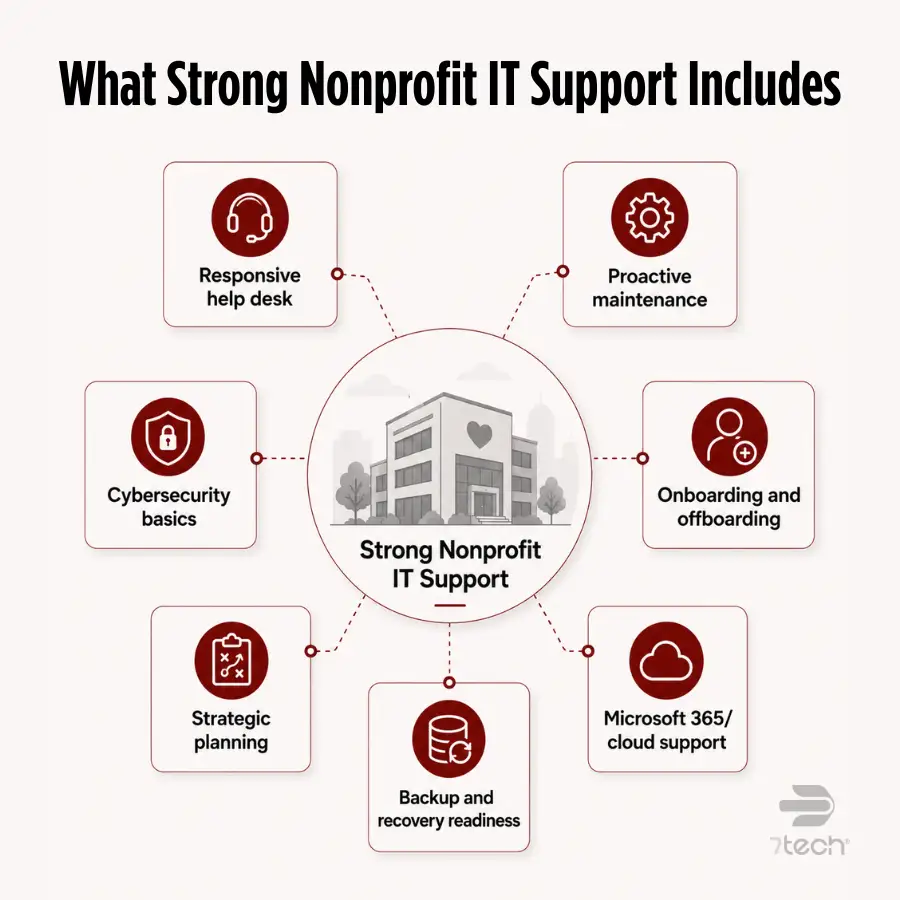
Cybersecurity fundamentals for nonprofits
Nonprofit cybersecurity services should cover the basics consistently. These are not optional extras. They are part of a responsible nonprofit managed services model.
At minimum, nonprofit IT support should include:
- Multifactor authentication for critical systems
- Endpoint protection for workstations and laptops
- Regular software patching
- Email filtering and phishing protection
- Security awareness training for staff and volunteers
- Backup monitoring and recovery planning
- Practical reporting that leadership can understand
The goal is not to overwhelm nonprofit leaders with technical detail. The goal is to make sure the organization has defensible, well-managed security practices that reduce avoidable exposure.
User onboarding, offboarding, and access control
Every new employee, volunteer, contractor, board member, and leadership transition creates access decisions. Weak onboarding creates productivity delays. Weak offboarding creates unnecessary risk.
Strong nonprofit IT support should include clear processes for account setup, license assignment, device preparation, access approvals, password management, and timely access removal when roles change. Role-based permissions should be reviewed regularly so users have the access they need without exposing more data than necessary.
Strategic planning and budgeting support
Nonprofit executives should not have to guess when devices need replacing, which software licenses are underused, or whether a technology project belongs this quarter or next year.
A capable nonprofit IT provider helps leadership plan around device lifecycle, licensing, cybersecurity improvements, cloud platforms, compliance exposure, remote work needs, and budget timing. This turns IT from a recurring source of surprises into a managed part of organizational planning.
Vendor and Microsoft 365 support where applicable
Many nonprofits rely heavily on Microsoft 365 and other cloud platforms. But licensing alone does not mean access governance, security settings, user policies, and day-to-day administration are fully handled.
Support should include configuration, policy management, permission reviews, user support, and oversight of cloud responsibilities. Microsoft’s guidance on security in Microsoft for Nonprofits is useful context because cloud platforms still require active administration. The platform provides tools; the organization still needs someone accountable for using them correctly.
Backup and recovery readiness
Backups matter only if recovery is understood, tested, and owned.
Nonprofit leaders should know what is backed up, how often backups run, where backups are stored, how recovery works, and who is responsible during an outage or data-loss event. This is not fear-based planning. It is basic resilience.
The 7 Signs Your Nonprofit Has Outgrown Its Current IT Support
Most nonprofits do not outgrow IT support all at once. The signs build slowly until technology starts consuming more time, trust, and attention than leadership expected. 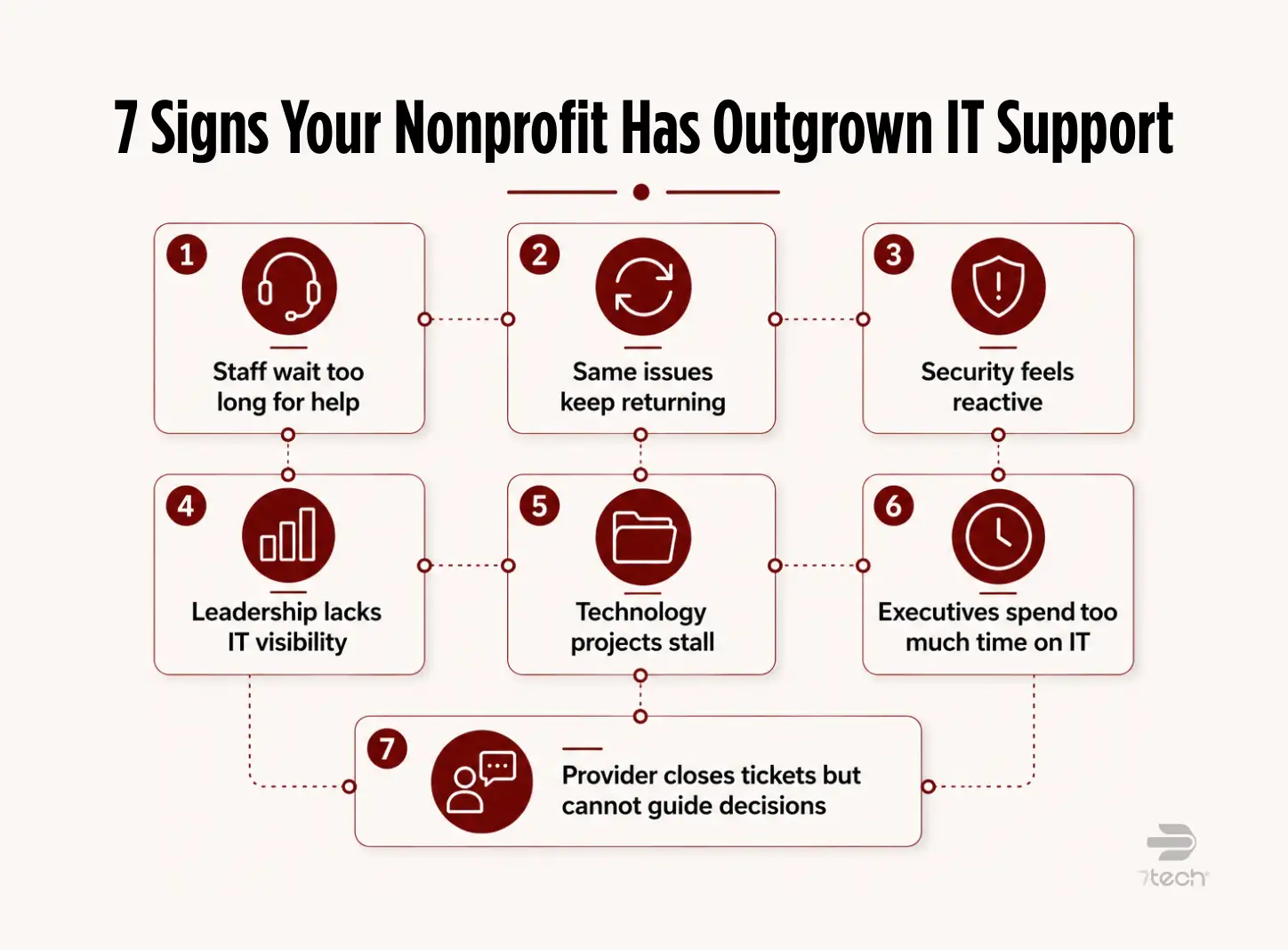
- Staff wait too long for help. Long support delays create hidden productivity costs and unnecessary frustration across the organization.
- The same issues keep returning. Repeat problems often point to patchwork troubleshooting instead of root-cause resolution.
- Security feels reactive. If protection depends mostly on users remembering to “be careful,” the support model is too thin.
- Leadership lacks visibility into IT risk. Executives should not be left guessing about access, backups, patching, security gaps, or major support trends.
- Technology projects stall. Cloud migrations, device refreshes, security improvements, and system upgrades slow down when no one owns planning and follow-through.
- Executives spend too much time on IT problems. Leadership bandwidth should go to mission, operations, fundraising, and growth, not ticket chasing.
- Your provider closes tickets but cannot guide decisions. If support stops at troubleshooting, the organization may not be getting the strategic guidance it now needs.
These signs usually point to a support model that has become too reactive for the organization’s current complexity. If that sounds familiar, these signs it is time to switch your IT provider can help leadership assess whether the issue is temporary or structural.
If ransomware planning is part of the concern, this related resource on ransomware prevention for nonprofit organizations can help frame the conversation in practical terms.
What Great Nonprofit IT Support Actually Looks Like
Great nonprofit IT support is often most visible in the absence of chaos.
Staff get help quickly. Recurring issues decrease. Security basics are handled consistently. Cloud platforms are actively managed. Ownership is clear. Leadership gets plain-language updates instead of technical noise. Technology projects move forward without requiring executives to personally coordinate every detail.
In practical terms, strong support gives nonprofit leaders confidence in five areas:
- Systems are dependable. Staff can do their work without constant workarounds.
- Users are supported. Employees and volunteers know where to go for help and what to expect.
- Risk is visible. Leadership can understand major technology and cybersecurity priorities without decoding jargon.
- Costs are more predictable. Planning replaces last-minute purchasing and emergency decision-making.
- Accountability is clear. Someone owns prevention, response, recovery, and communication.
Great IT support does not just fix isolated problems. It creates a more stable operating environment where technology supports the mission instead of distracting from it.
Managed IT vs Internal IT for Nonprofits
There is no universal winner between managed IT, internal IT, and co-managed IT. The right model depends on organizational complexity, budget, cybersecurity expectations, compliance exposure, and how much oversight leadership can realistically provide.
If your leadership team is comparing these models directly, this guide to MSP vs in-house IT can help frame the tradeoffs. For broader service context, review what managed IT services include.
What Does IT Support Cost for Nonprofit Organizations?
The cost of IT support for nonprofit organizations depends on user count, number of locations, device count, support hours, cybersecurity needs, cloud platforms, compliance exposure, and the condition of the existing environment.
A break-fix arrangement may appear less expensive at first because costs show up only when something breaks. But that model can leave leadership exposed to more downtime, more uncertainty, more emergency spending, and more internal effort over time.
Managed IT, co-managed IT, and internal staffing each have different cost structures. The better comparison is not only monthly spend. It is total operational impact.
Nonprofit leaders should evaluate:
- How much downtime costs the organization
- How often repeat issues interrupt staff
- How much executive time is spent managing IT problems
- How much risk remains unmanaged
- Whether security, backup, and access responsibilities are clearly owned
- Whether the current model supports growth or only reacts to pain
The cheapest option is often not the most economical option. A support model that reduces disruption, improves security, and gives leadership predictable planning can create more value than a lower-cost model that leaves gaps unmanaged.
For detailed budgeting considerations, use this guide on how much nonprofits should budget for IT.
How the Right IT Support Protects What Matters Most
Protects your mission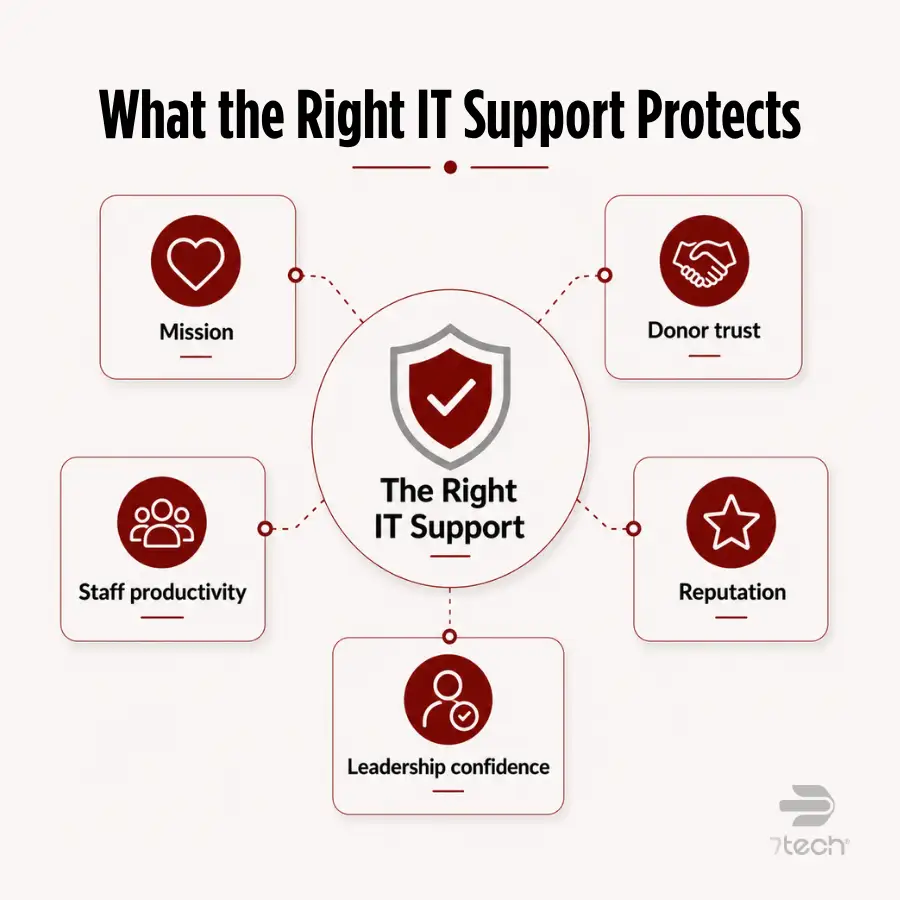
When systems are unstable or support is slow, programs feel it. Reliable IT support helps keep services moving and reduces the operational drag that pulls staff away from the people and communities they serve.
Protects donor trust
Donor records, payment details, grant documents, financial data, and internal communications require disciplined stewardship. Strong IT support helps leadership demonstrate that access, security, and data-handling practices are being managed intentionally.
Protects staff productivity
Recurring issues waste time quietly. Better support reduces friction so employees and volunteers can focus on meaningful work instead of workarounds, repeated tickets, or avoidable delays.
Protects your reputation
Boards, donors, staff, auditors, and community partners notice when technology problems become visible. Preparedness, communication, and documented ownership help prevent small issues from becoming leadership distractions.
Protects leadership confidence
Executives need more than technical activity. They need visibility, accountability, and support they can explain clearly. A stronger managed security services strategy can help leadership understand what is protected, where gaps remain, and what should be prioritized next.
Questions Every Nonprofit Should Ask Before Choosing an IT Provider
The goal of provider evaluation is not just to compare personalities or pricing. It is to confirm who owns prevention, response, recovery, communication, and the day-to-day oversight that keeps technology dependable.
- Do they understand nonprofit operations and the realities of lean teams?
- Can they explain issues, risks, and recommendations in plain language?
- Do they include cybersecurity fundamentals, or only help desk ticket handling?
- What response and resolution expectations do they set?
- How do they handle emergencies, escalations, and recovery ownership?
- Can they support staff, volunteers, remote users, and multiple locations?
- Can they work well with internal IT if co-managed support is needed?
- What does onboarding look like, and how do they reduce disruption during transition?
- How do they manage Microsoft 365, cloud access, sharing settings, and policy enforcement?
- How do they measure service quality and communicate progress to leadership?
- Do they provide reporting that a CEO, CFO, or board member can understand?
- Do they have relevant nonprofit references?
For a fuller evaluation framework, review these questions to ask your IT provider, this guide on how to choose a managed services provider, and this cybersecurity assessment checklist before making a change.
Why Nonprofits Choose 7tech
Nonprofits often need more than ticket resolution. They need a support experience that is responsive, understandable, respectful of mission pressure, and clear enough for leadership to trust.
7tech supports nonprofit organizations through a US-based team, no outsourced technicians, a 20-minute average human response time, strong same-day ticket closure performance, managed and co-managed IT options, and strategic guidance that goes beyond troubleshooting. The service posture is built around clarity rather than jargon, so executives and users are not left decoding technical language to understand what is happening.
That matters because nonprofit leaders are rarely looking for hype. They are looking for dependable support, clear communication, and a provider that helps their teams stay focused on clients, programs, donors, and mission.
“I especially appreciate their technician’s willingness to communicate and work to make things seamless for our small to mid-sized non-profit. Relationships are important to us and 7tech has gone out of their way to make that connection.”
— Randy McGibeny, CEO, ChildSafe
Another nonprofit leader described the shift to 7tech as moving from IT being “the biggest headache” to having a dependable partner that allowed the organization to focus more fully on its clients. That is the standard nonprofit IT support should meet: less friction, more clarity, and stronger operational confidence.
FAQ
What does IT support for nonprofit organizations include?
IT support for nonprofit organizations typically includes help desk support, proactive maintenance, cybersecurity basics, onboarding and offboarding, vendor support, Microsoft 365 administration, backup readiness, and strategic planning guidance.
Do nonprofits need managed IT services or internal IT?
It depends on size, complexity, risk, and leadership bandwidth. Some nonprofits need internal IT, some benefit from managed services, and many are best served by a co-managed model that adds capacity and expertise.
How much should a nonprofit budget for IT support?
Budget depends on users, locations, cybersecurity needs, compliance exposure, support hours, and service scope. Nonprofits should evaluate total operational impact, not just monthly cost.
What cybersecurity protections should nonprofits expect from IT support?
Nonprofits should expect multifactor authentication, endpoint protection, patching, email filtering, security awareness training, backup monitoring, and practical reporting as part of a responsible support model.
How can a nonprofit tell if its current IT support is no longer enough?
Common signs include slow response, recurring issues, reactive security, stalled projects, weak reporting, unclear ownership, and too much executive time spent managing technology problems.
Can an IT provider support nonprofit staff, volunteers, and remote work?
Yes, if the provider has clear processes for access control, onboarding, offboarding, device support, cloud administration, remote access, and user support across distributed teams.
What should nonprofit leaders ask before switching IT providers?
Ask about nonprofit experience, response expectations, cybersecurity coverage, onboarding process, communication style, strategic guidance, reporting, references, and who owns prevention, response, and recovery.
Start With Clarity, Not Pressure
Your nonprofit’s IT support should make leadership feel more informed, not more burdened. It should help staff work smoothly, protect sensitive data, reduce avoidable disruption, and give executives a clear view of what is working, what needs attention, and what should happen next.
If your current support model no longer matches your nonprofit’s mission, risk, or growth needs, start with a clear assessment of where things stand. A discovery conversation can help leadership identify what is working, where gaps exist, and whether 7tech’s nonprofit IT services are the right fit.

Neal Juern, Founder and CEO of 7tech, helps business leaders take control of their IT and strengthen cybersecurity without the complexity. Since founding 7tech in 2012, he’s built it into a 5X MSP 501 winner and guided hundreds of executives toward smarter, safer operations through Managed IT Services and Managed Security Services that make sense to people outside the IT department. He speaks regularly to executive and nonprofit audiences across Texas.