
How to Choose the Right IT Provider for Your San Antonio Nonprofit
Choosing the right IT provider for your San Antonio nonprofit is a leadership decision, not just a technology decision. The right partner protects your mission, donor trust, staff productivity, sensitive data, and board confidence while helping you spot IT risks before they become expensive problems.
For nonprofit executives, the right IT provider is not simply the vendor with the most tools. It is the partner that helps your organization make responsible, mission-protecting decisions with limited resources and clear priorities.
This guide explains how to evaluate managed IT services for nonprofits through the lens of nonprofit leadership, including support responsiveness, cybersecurity, compliance, pricing transparency, board reporting, local accountability, and nonprofit experience.
Executive Summary
- Choose an IT provider that understands nonprofit operations, funding pressure, and board accountability.
- Prioritize responsive support, cybersecurity, compliance guidance, and clear reporting.
- Compare providers using the same scorecard so the decision is based on mission fit, not sales impressions.
- The right partner should reduce staff friction, protect sensitive data, and give leadership visibility before issues escalate.
What Should a Nonprofit Look for in an IT Provider?
A nonprofit should look for an IT provider that protects mission continuity, not just devices and networks. That means fast support, clear communication, proactive cybersecurity, predictable costs, nonprofit sector experience, and executive-ready reporting.
The best managed IT services for nonprofits in San Antonio do more than support devices. They help leaders protect mission-critical work, donor confidence, staff productivity, and board visibility.
Technology is not the mission. It is the infrastructure behind the mission. When systems fail, staff lose time, programs slow down, donors lose confidence, and leadership is left explaining why preventable issues were not caught earlier.
The right IT partner should help your leadership team understand what is stable, what is exposed, what needs attention, and what decisions should be brought to the board. That communication should be plain-English, specific, and calm.
For San Antonio nonprofits, this matters because many organizations operate with lean teams, grant-funded programs, volunteer access, hybrid staff, sensitive donor data, and board-level accountability. Your IT provider should understand those pressures before recommending a solution.
Start With Your Nonprofit’s Mission, Staff, and Risk Priorities
Before comparing IT providers, clarify what your nonprofit is actually trying to protect. You are not buying “IT support” in the abstract. You are protecting the systems, people, and workflows that keep your mission moving.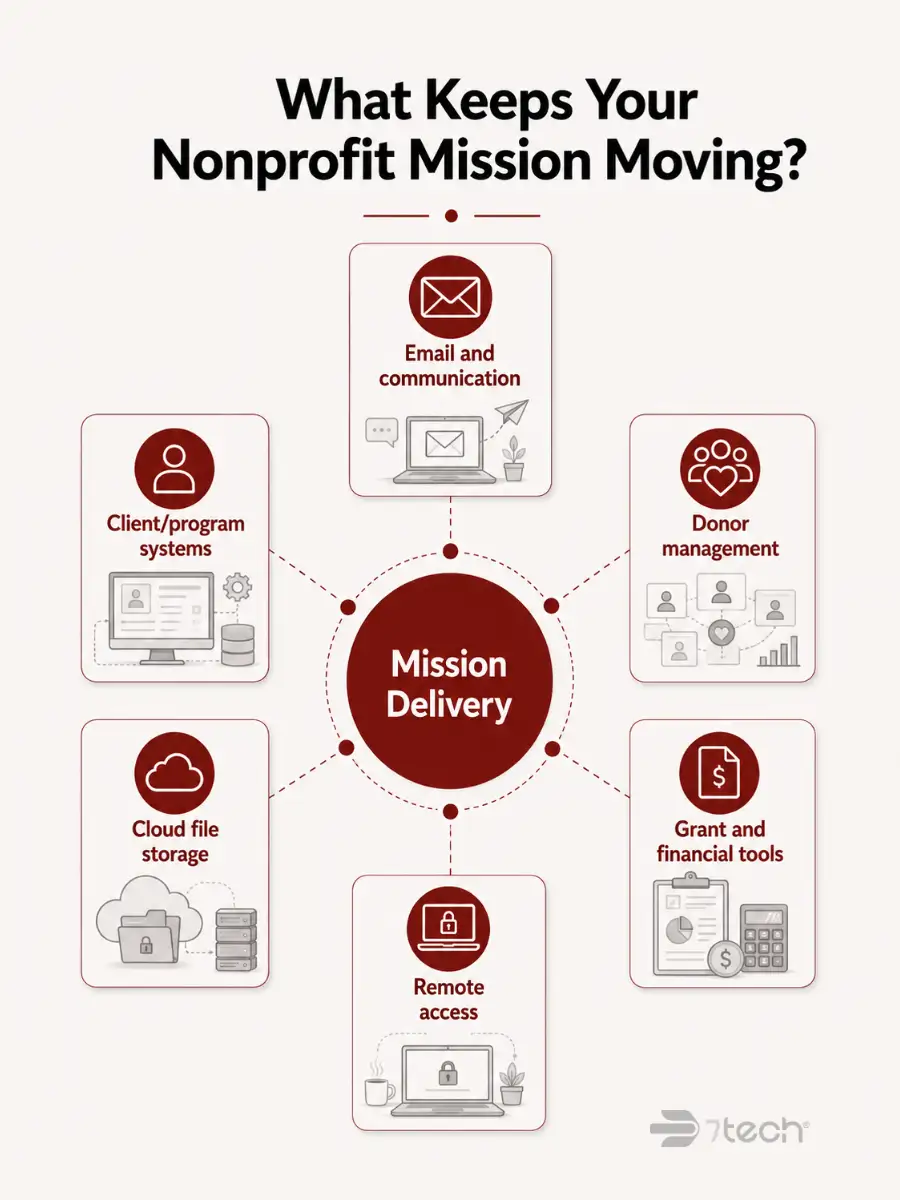
Start by identifying which technology failures would most directly affect your ability to serve clients, communicate with donors, manage grants, report outcomes, or support staff. For many nonprofits, mission-critical systems include:
- Email and communication platforms used by staff and leadership
- Client, case management, or program delivery systems
- Donor management and fundraising platforms
- Grant reporting and financial management tools
- Cloud file storage and collaboration systems
- Remote access tools for hybrid staff, volunteers, or field teams
Document the platforms your nonprofit relies on every day. Include Microsoft 365, donor databases, cloud storage, payment systems, accounting software, security tools, remote access platforms, and program-specific applications.
This mapping process helps prospective providers understand your environment. It also reveals gaps, redundancies, outdated tools, or risks that a strong nonprofit IT partner can help prioritize.
Be honest about where technology is creating pressure. Common nonprofit pain points include unpredictable IT costs, slow response times, unclear cybersecurity posture, staff complaints, compliance uncertainty, and difficulty explaining IT risk to the board.
Those issues are not just technical. They create operational, financial, and reputational pressure. A strong IT provider helps reduce that burden.
Look for Proven Nonprofit IT Experience
Nonprofit IT experience should mean more than having a few nonprofit clients. The right provider should understand funding pressure, donor trust, volunteer access, board dynamics, compliance expectations, staff constraints, and mission continuity.
Ask whether the provider has worked with nonprofits similar in size, structure, and complexity. A provider used only to corporate environments may not understand the urgency of protecting limited staff time, limited budgets, and program operations.
Many nonprofits rely on distributed teams, volunteers, part-time staff, field workers, and multiple service locations. Ask how the provider handles onboarding, offboarding, role-based access, remote work, mobile devices, and volunteer accounts.
Strong access management protects sensitive information without slowing down the people who need to do the work.
Pay close attention to communication style. Nonprofit executives should not have to decode technical language to make responsible decisions. A strong IT partner explains risk, options, cost, and tradeoffs in plain English.
Look for signs that the provider is genuinely connected to the nonprofit community, not just willing to sell to it.
That may include supporting nonprofit events, participating in sector conversations, understanding local funding pressures, and showing respect for mission-driven work.
A provider that cares about the nonprofit community is more likely to understand why every IT recommendation has to protect the mission, respect the budget, and support responsible stewardship.
Prioritize Responsive San Antonio IT Support
For nonprofits, response time is not just an IT metric. It affects staff productivity, donor communication, program delivery, grant deadlines, and confidence in leadership.
Strong managed IT services for nonprofits in San Antonio should combine remote support efficiency with local accountability when hands-on assistance is needed.
Remote support can resolve many issues efficiently, but some situations still require on-site help. Confirm whether the provider offers local support in the San Antonio area and how quickly they can provide hands-on assistance when needed.
During urgent IT issues, your support partner should help staff keep working wherever possible. Ask how they prioritize critical systems, communicate workarounds, and reduce downtime during outages or service interruptions.
Your team should not have to chase answers while trying to keep programs running.
Nothing frustrates already-stretched staff more than anonymous ticket queues, unclear updates, or repeated explanations of the same problem. Seek providers that offer responsive human support, consistent communication, and technicians who understand your environment.
Ask how the ticketing process works, who your staff contacts, how updates are communicated, and when issues are escalated. The right provider reduces the burden on your team instead of adding another process to manage.
Ask About Response Times and Resolution Standards
Service commitments matter only when they are clearly defined. Nonprofit leaders should understand how quickly a provider responds, how issues are escalated, and how resolution expectations differ based on urgency.
Ask for specific timeframes:
- How quickly will someone acknowledge a support request?
- How are urgent issues prioritized?
- What happens if the first technician cannot resolve the issue?
- Who communicates with leadership during major disruptions?
- How are after-hours issues handled?
Vague promises like “fast support” or “quick turnaround” are not enough. Clear expectations help leadership plan, communicate with staff, and avoid surprises.
Not every issue has the same mission impact. A printer issue may be inconvenient. A donor database outage before a fundraising campaign may be urgent. A security incident involving sensitive information may require immediate escalation.
Ask how the provider defines critical, high, medium, and low-priority issues. Their prioritization model should reflect your nonprofit’s operational reality.
During an outage or security incident, leadership needs timely, accurate information. Ask who contacts you, how often updates are provided, and what information executives will receive. Strong communication helps leaders make calm decisions and prepare appropriate updates for staff, donors, funders, or the board.
Review Cybersecurity Coverage Through a Nonprofit Lens
Cybersecurity is not just about blocking attacks. For nonprofits, cybersecurity protects donor trust, grant eligibility, client confidentiality, staff confidence, and community reputation.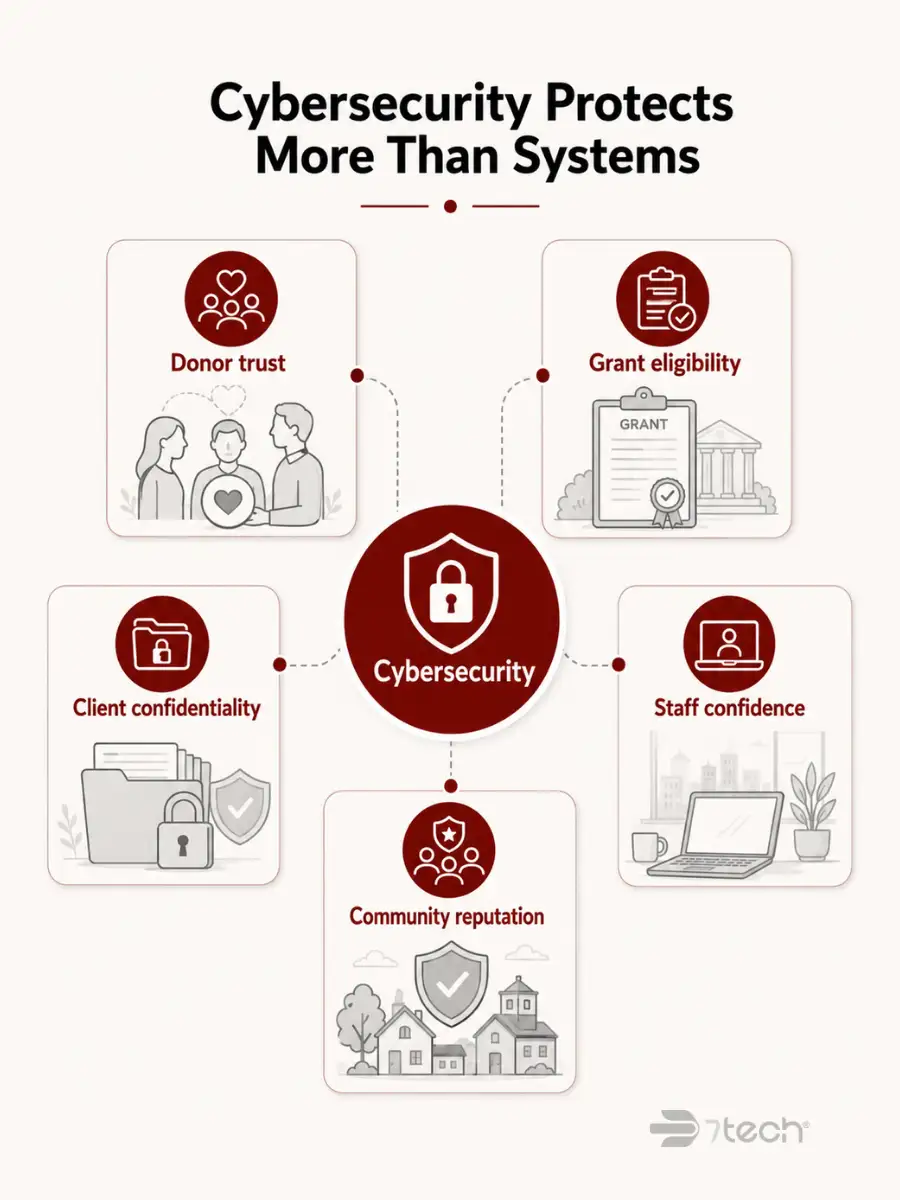
When comparing managed IT services for nonprofits in San Antonio, cybersecurity should be evaluated by how well it protects donor records, grant data, payment information, staff accounts, and mission-critical systems.
A breach can do more than disrupt systems. It can force leadership to notify donors, answer board questions, explain what protections were in place, and reassure funders that the organization is still a responsible steward of sensitive information.
Your nonprofit may handle donor records, payment details, employee data, client files, grant documents, internal communications, and program data. Your IT provider should understand how that data is stored, accessed, monitored, and protected.
Ask specifically about:
- Email security and phishing protection
- Endpoint detection and response
- Multi-factor authentication and access controls
- Microsoft 365 security monitoring
- Backup and disaster recovery
- Incident response planning
Effective cybersecurity includes prevention, detection, response, and recovery. Some providers only offer basic preventive tools. Others provide monitoring, incident response, remediation, and recovery planning.
Ask who is responsible for each stage. Who monitors alerts? Who investigates suspicious activity? Who isolates threats? Who communicates with leadership? Who helps restore operations?
The NIST Cybersecurity Framework is a useful reference for understanding, assessing, prioritizing, and communicating cybersecurity risk across organizations.
Cybersecurity should be evaluated based on what it protects: donor confidence, funding relationships, sensitive data, program continuity, and board trust. A provider that understands nonprofits should be able to discuss risk in terms of mission impact, not just technical controls.
Confirm Data Protection and Compliance Experience
Many San Antonio nonprofits operate under compliance expectations tied to healthcare, education, payment processing, grants, cyber insurance, or government contracts. The right IT provider helps leadership stay ahead of those requirements without turning executives into compliance specialists.
The right managed IT services for nonprofits in San Antonio should help leadership understand compliance responsibilities without forcing executives to manage technical documentation alone.
Depending on your programs, your nonprofit may need to account for HIPAA, PCI DSS, cyber insurance questionnaires, grant-related cybersecurity requirements, or other privacy and security expectations.
Ask providers for examples of how they have helped similar organizations understand compliance gaps, prepare documentation, improve controls, or respond before an audit, renewal, funder review, or insurance questionnaire.
Data protection should include more than backup software. Ask about:
- Backup testing and disaster recovery planning
- Role-based access controls and multi-factor authentication
- Encryption and endpoint protection
- Secure employee and volunteer offboarding
- Privileged account monitoring
- Compliance-related documentation
Assumptions about data protection create false confidence. Verification protects leadership from being surprised later.
Compliance is not a one-time project. It is an ongoing responsibility. Your provider should help leadership understand what matters, what changed, what needs attention now, and what can be prioritized later.
CISA cybersecurity best-practice resources can help organizations understand practical ways to improve cyber safety and resilience.
Check the Tools and Systems They Support
Your IT provider should support the tools your staff actually use, not force your nonprofit into systems that create more work. Compatibility matters because staff capacity is already limited.
Most nonprofits rely heavily on Microsoft 365, cloud file storage, email, remote access, and collaboration tools. Confirm the provider can manage these systems securely and efficiently.
Ask about Microsoft 365 administration, user management, email filtering, secure file sharing, remote access controls, mobile device policies, and backup protection for cloud data.
Technology should make nonprofit work easier, not more complicated. Ask whether the provider’s recommended tools will reduce staff frustration, simplify access, and improve collaboration.
The best solution is not always the most complex one. It is the one your team can actually use securely and consistently.
Nonprofits may grow through new grants, expanded programs, new service locations, or increased donor engagement. Your IT environment should support that growth without major disruption. Ask how the provider adds users, supports new locations, manages new software, and scales cybersecurity protections as your organization grows.
Ask for Local Nonprofit References
References help you understand how a provider performs after the sales process is over. Ask for references from nonprofits of similar size, complexity, or mission whenever possible.
When speaking with references, ask practical questions:
- How quickly does the provider respond?
- Do they communicate clearly?
- Do staff feel respected?
- Does leadership receive useful updates?
- Have recurring issues decreased?
- Has confidence improved around security, compliance, or continuity?
The ultimate test of a nonprofit IT provider is whether they help staff and leadership spend less time fighting technology and more time serving the mission.
Nonprofit leaders are stewards of donor, grant, and program dollars. Your IT provider should understand that every recommendation must make sense in the context of mission value.
Look for a partner who can explain why an investment matters, what risk it reduces, how it protects the organization, and how it supports responsible use of limited resources.
What Strong Nonprofit IT Support Looks Like in Practice
When evaluating IT providers, nonprofit leaders should look for proof that the provider understands mission-driven work, communicates clearly, responds quickly, and reduces the burden on already-stretched teams.
For San Antonio nonprofits, that proof should come from organizations that have experienced the provider’s support directly.
7tech’s nonprofit clients often point to the same qualities this guide recommends evaluating: responsiveness, respectful communication, dependable planning, clear explanations, and the ability to help staff stay focused on the mission instead of IT problems.
“One of the biggest benefits since moving our non-profit to 7tech has been the skilled, responsive, and professional customer service they deliver. Their level of responsiveness, timeliness, clarity, and trustworthiness are second to none.”
Richard Singleton, Chief Executive Officer, STARRY
“By far, 7tech’s responsiveness has been AMAZING as they work quickly to get to the bottom of any issue. Since 7tech transitioned our non-profit’s file storage to SharePoint, our team is no longer tethered to an on-premise server and we have the flexibility and freedom to work when and how we want.”
Randy McGibeny, CEO, ChildSafe
These are the outcomes nonprofit executives should look for in any IT provider: responsive human support, clear communication, reduced staff friction, and technology that helps the organization keep serving without unnecessary disruption.
Review Their Onboarding Process
Switching IT providers can feel risky for nonprofit leaders because disruption affects staff, services, and confidence. A strong onboarding process reduces that risk and gives leadership a clear path forward.
Ask each provider to explain their onboarding process in detail. What happens first? What does your team need to prepare? How do they avoid interrupting daily operations?
Providers with mature onboarding processes should be able to describe timelines, responsibilities, communication steps, documentation, and risk checks clearly.
Good onboarding documentation should include:
- Network information
- User and device inventories
- Vendor contacts and licensing details
- Security configurations and backup status
- Access permissions
- Known gaps and recommended next steps
Your staff should not be confused about how to get help after the transition. Confirm that support channels, contact information, expectations, and escalation paths are communicated clearly from the beginning.
The best onboarding experience should feel organized, respectful, and low-drama. Your team should know who to contact, what to expect, and how support will work.
Understand Pricing, Contracts, and Budget Stewardship
Nonprofit leaders are not simply looking for the cheapest IT provider. They are looking for a responsible investment that protects the mission, reduces risk, supports staff, and can be explained clearly to the board.
Transparent managed IT services for nonprofits in San Antonio help nonprofit leaders plan responsibly, avoid surprise costs, and explain IT investments clearly to the board.
Predictable pricing helps nonprofit leaders avoid budget surprises and explain IT spending in terms of mission protection. The goal is not to defend technology because it sounds impressive. The goal is to make a clear, responsible decision that protects mission dollars.
Ask for a clear breakdown of what is included, what is optional, and what may create additional cost. Leadership should be able to explain the investment in terms of risk reduction, staff productivity, cybersecurity, compliance, and continuity.
Hidden fees and narrow service definitions can create frustration later. Review contract terms carefully for:
- Limits on support tickets, users, devices, or hours
- Additional charges for after-hours support
- Project fees for migrations, upgrades, or security improvements
- Hardware, licensing, or third-party software costs
- Contract renewal terms and price adjustment language
- Termination requirements and data handoff procedures
Understanding the full cost picture helps leadership compare providers accurately.
Frame pricing discussions in mission terms. Does this investment reduce risk, protect donor trust, improve staff productivity, and prevent avoidable disruption? Or does it add complexity without enough value?
A provider that understands nonprofit stewardship will help you evaluate IT investments based on mission return, not just technical capability. For more guidance on planning technology spend, review our resource on nonprofit IT budgeting.
Ask About Leadership and Board Reporting
Technology governance increasingly requires executive visibility. Your IT provider should help leadership understand what is working, what needs attention, and what could become a problem before it reaches the board table.
Technical reports rarely help non-technical executives. Ask for reporting samples that explain risk, support performance, cybersecurity posture, and open issues in plain language.
Effective reporting should answer leadership questions clearly:
- What is stable?
- What is exposed?
- What needs a decision?
- What should the board know?
- What has improved since the last review?
Your board may ask about technology investments, cybersecurity, compliance, vendor performance, or risk exposure. Your IT provider should help you answer those questions with confidence.
Providers with vCISO or strategic advisory services can be especially valuable when leadership needs board-ready security and compliance guidance.
One of the most valuable things an IT partner can do is identify problems before they become visible failures. Ask about monitoring, maintenance, vulnerability management, backup checks, and regular risk reviews.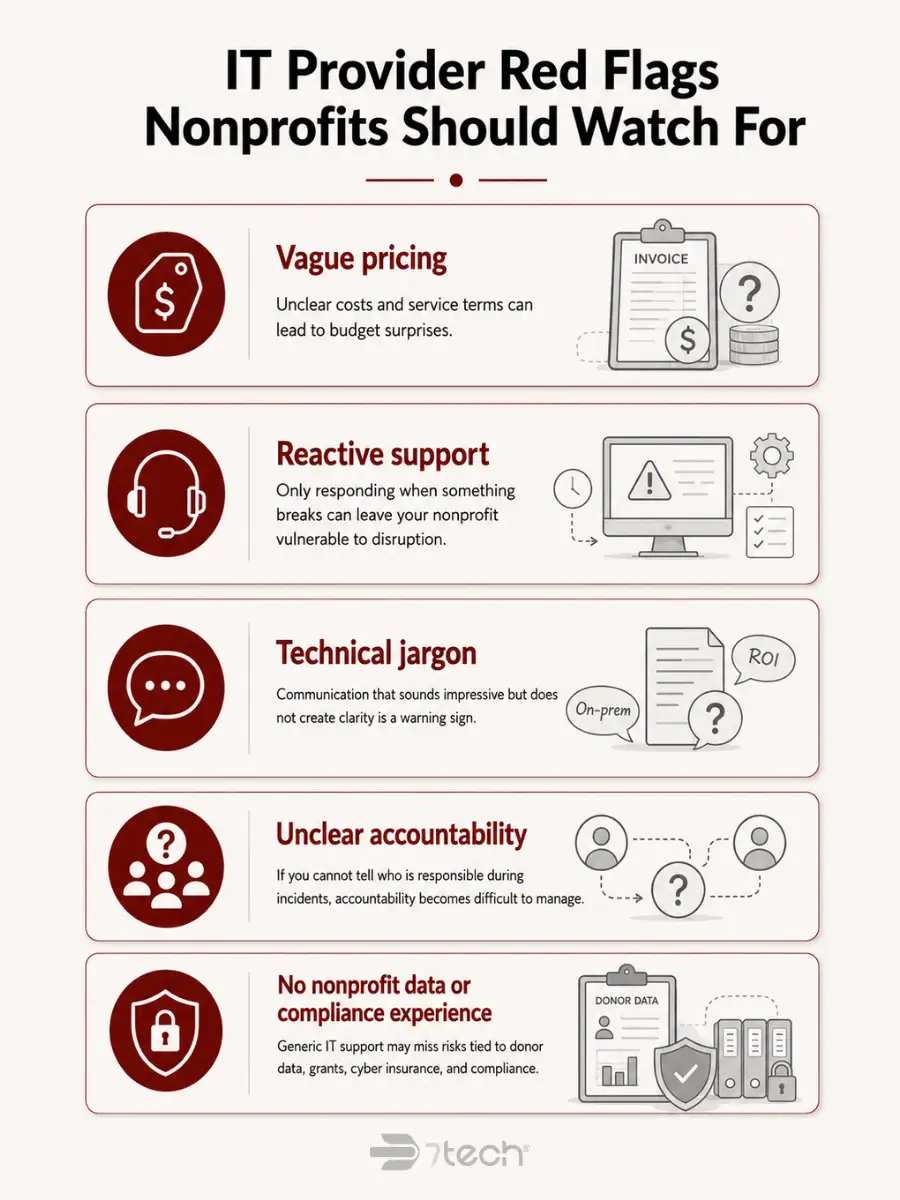
The right provider should tell leadership the truth in plain language before it matters, not after staff, donors, funders, or board members have already felt the impact.
Watch for IT Provider Red Flags
During your evaluation, watch for signs that a provider may create more risk, confusion, or leadership burden than they remove.
- Vague pricing or unclear service commitments: If a provider cannot explain what is included, what costs extra, and how support is delivered, leadership may face budget surprises later.
- Reactive support with no proactive risk guidance: If the provider only responds when something breaks, they may not give your nonprofit the visibility needed to prevent avoidable disruption.
- Technical jargon that leadership cannot use: Communication that sounds impressive but does not create clarity is a warning sign. Your provider should help leadership understand risk, not make IT feel more mysterious.
- Outsourced support without clear accountability: If you cannot tell who is responsible for your account, who handles sensitive issues, or who communicates during incidents, accountability becomes difficult to manage.
- No experience protecting donor data, grant funding, or compliance requirements: Generic IT support may miss the specific risks nonprofits face around donor data, funding relationships, cyber insurance, grants, and board accountability.
Use a Nonprofit IT Provider Comparison Scorecard
A structured comparison scorecard helps leadership evaluate providers objectively. It also creates a clear record of why the organization selected a specific partner.
Compare every provider across the same categories so the decision is based on mission fit, responsiveness, security, compliance, and cost instead of impressions alone.
Weight each category based on risk to your programs and funding. A healthcare nonprofit may weight compliance and privacy more heavily. A nonprofit with field staff may prioritize remote access and mobile security. An organization preparing for growth may need stronger scalability and onboarding support.
The right provider is one your leadership team can confidently recommend based on clear reasoning. That does not mean choosing the cheapest option or the most technical proposal. It means choosing a partner that protects the mission, uses budget responsibly, communicates clearly, reduces hidden risk, and helps leadership avoid being blindsided.
Frequently Asked Questions About Choosing a Nonprofit IT Provider
What should a nonprofit look for in an IT provider?
A nonprofit should look for responsive support, nonprofit experience, strong cybersecurity, predictable pricing, compliance guidance, plain-English communication, and board-ready reporting. The right provider protects the mission, not just the technology.
How much should a nonprofit budget for managed IT services?
Managed IT service costs vary by organization size, user count, complexity, cybersecurity needs, and compliance requirements. Nonprofits should prioritize predictable pricing, clear scope, and services that protect mission continuity and reduce avoidable risk.
Should a nonprofit choose a local San Antonio IT provider?
A local San Antonio IT provider can offer on-site support, regional accountability, and familiarity with the local nonprofit community. The best choice combines local responsiveness with nonprofit experience and strong cybersecurity capability.
What cybersecurity services should a nonprofit IT provider include?
Cybersecurity services should include email filtering, endpoint protection, monitoring, backup and disaster recovery, access controls, multi-factor authentication, security awareness training, and incident response planning. Nonprofits with compliance obligations may also need vCISO guidance.
How can IT support help protect donor trust?
IT support protects donor trust by securing donor data, payment information, email systems, cloud platforms, and user access. It also helps leadership demonstrate responsible stewardship through documentation, reporting, and proactive risk management.
What should nonprofit leaders ask before signing an IT contract?
Ask what is included, what costs extra, how response times are defined, how incidents are communicated, who handles cybersecurity, how onboarding works, and whether the provider has references from similar nonprofits.
How can a nonprofit compare IT providers objectively?
Create a scorecard that compares mission fit, responsiveness, cybersecurity, compliance experience, pricing, onboarding, reporting, and references. Weight each category based on the risks most likely to affect your programs, funding, and staff productivity.
Choose an IT Provider That Protects the Mission Behind the Technology
The right IT provider for your San Antonio nonprofit should do more than keep computers running. It should help leadership protect donor trust, staff productivity, sensitive data, funding relationships, compliance readiness, and mission continuity.
That requires responsive support, clear communication, strong cybersecurity, predictable pricing, nonprofit experience, and board-ready visibility into risk.
Schedule a quick 15-minute discovery call today to learn more about 7tech’s managed IT services for nonprofits in San Antonio and to see how we help mission-driven organizations reduce technology friction, protect sensitive data, and keep teams focused on the work that matters most.

Neal Juern, Founder and CEO of 7tech, helps business leaders take control of their IT and strengthen cybersecurity without the complexity. Since founding 7tech in 2012, he’s built it into a 5X MSP 501 winner and guided hundreds of executives toward smarter, safer operations through Managed IT Services and Managed Security Services that make sense to people outside the IT department. He speaks regularly to executive and nonprofit audiences across Texas.