


Table of Contents
Disciplined technology purchasing keeps approvals moving, budgets cleaner, vendor choices safer, and rollouts less disruptive. For Texas operations, that means finance teams aren’t chasing surprise renewals, project teams aren’t waiting on laptops, and plant managers aren’t stuck with systems that don’t fit production work. IT procurement best practices make that planning practical, especially when top-performing organizations reduce ordering costs by up to 52% and simpler procurement is 21% less likely to add complexity.
Steven Simon, Director of Security Operations at 7tech, notes: “Good procurement starts before the invoice, with ownership, security review, support handoff, and renewal terms clear enough that finance can approve without guessing.”
Early Buying Signals That Shape IT Procurement Best Practices
Procurement friction usually shows up first in daily work. A Service Desk ticket waits because no one owns the app, or onboarding slips because the laptop standard changed midstream. With 61% of purchase influencers using or planning private genAI for purchasing, clean request data matters.
-
Renewals arrive late: Finance sees invoices after cancellation windows close.
-
Devices lack standards: New hires receive inconsistent laptops, docks, and security settings.
-
Software skips review: Teams buy tools before access, data handling, and support terms are checked.
-
Vendors multiply quietly: 7tech’s IT Buyer’s Guide covers hidden contract costs, IT budgeting, and provider questions before spend is approved.
Business Risk Behind Each IT Procurement Best Practice
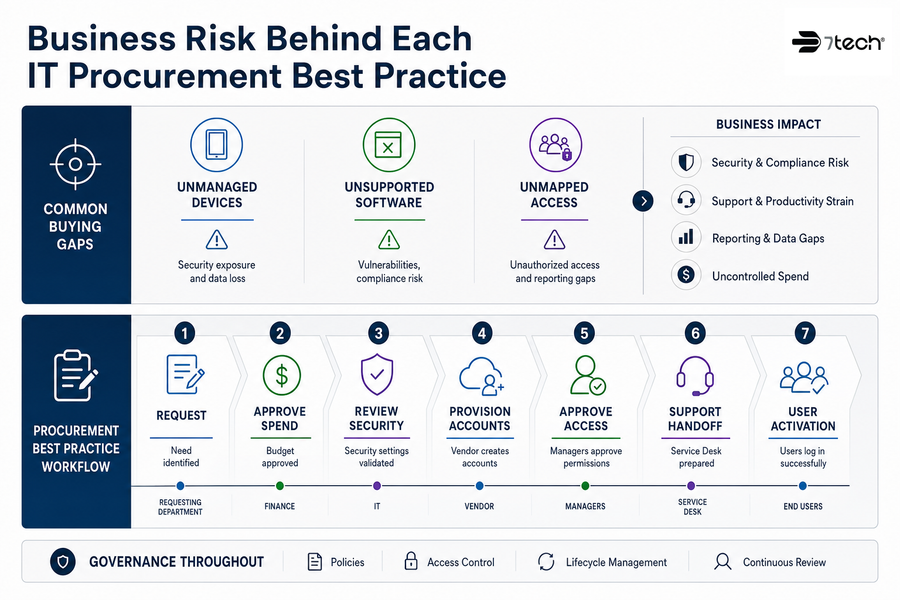
A single buying habit can ripple through support, security, and reporting. A field team buys unmanaged tablets for jobsite photos. An operations team renews unsupported software. A fundraising platform is adopted before access permissions are mapped. These are common growth gaps, and 7tech’s San Antonio IT consulting work often starts with network infrastructure assessment, cybersecurity analysis, cloud migration planning, and strategic IT planning.
What this looks like in practice: A department requests estimating software, finance approves spend, IT reviews security settings, the vendor creates accounts, managers approve access permissions, and the Service Desk receives the support handoff before users log in.
Best Practices In IT Procurement For Vendor Selection
Best practices in IT procurement treat vendor selection as a business control, not a price sort. With 88% of IT decision-makers open to switching at least some IT vendors, selection needs to cover support response, data access, renewals, integration quality, and compliance preparation.
-
Check support ownership first. Know who handles user tickets, vendor escalations, and after-hours coordination.
-
Review security responsibilities clearly. Confirm logging, MFA, data handling, and alert response.
-
Confirm integration requirements early. Test Microsoft 365, finance, and workflow connections before purchase.
-
Document renewal and exit terms. Capture notice dates, data export terms, and cancellation windows.
Related IT Sourcing Guides
IT Procurement Process Best Practices For Budget Control
IT procurement process best practices give finance and operations a cleaner view of spend before invoices arrive. Integrated operating models have reduced ordering costs by up to 52% because approvals, vendors, and data move through one process instead of scattered email threads. 7tech’s IT Buyer’s Guide covers IT budgeting, cost analysis, hidden contract costs, and the true cost of downtime.
-
Build one renewal calendar: Include cloud, security, telecom, and device contracts.
-
Assign system ownership: Name the business owner before approval.
-
Separate must-have tools: Identify required platforms before duplicate subscriptions become recurring spend.
-
Track support impact: Flag tools that increase Service Desk ticket volume or user training.
-
Review contract exit terms: Understand cancellation windows, data return, and vendor handoff requirements.
Procurement Practices In IT That Support Secure Cloud Growth
Cloud purchasing works best when governance travels with the subscription. Microsoft 365, SharePoint, cloud file storage, remote access, mobile devices, backup, and Cloud Cybersecurity all touch identity, support tickets, file access, and employee handoffs.
According to IBM research cited by CloudSecureTech, 63% of breached organizations either lacked an AI governance policy or were still developing one.
7tech’s Pro-Cloud Technology background, cloud-first since 2012, helps connect approvals to secure remote work and cleaner rollouts.
-
Standardize cloud identities: Use one identity path for Microsoft 365 access.
-
Review access by role: Match SharePoint folders, cloud files, and remote access permissions to job duties.
-
Match backup to workflow: Include hybrid and cloud-based backups for critical systems.
-
Plan support before rollout: SharePoint transitions, synchronized email and calendars, remote access, and Meraki network performance all need clear handoffs.
IT Procurement Governance For Compliance Readiness
Procurement records become evidence when regulated work is reviewed. Vendor security reviews, software inventories, device standards, encryption, MFA, backup, logging, and access approvals all show how systems are selected and managed. That matters when 41% of organizations require vendors to demonstrate framework compliance before initial evaluation moves forward. As a US-based managed security services provider, 7tech supports CMMC readiness consulting, CMMC preparedness, gap analysis, and assessment preparation.
-
Map vendors to data. Know which vendors touch contracts, employee records, financial data, controlled information, or other sensitive records.
-
Require access approval records. Keep manager approval tied to each account.
-
Standardize endpoint security controls. Include encryption, MFA, patching, and device standards in purchase review.
-
Keep assessment evidence organized. CMMC assessment preparation works best when procurement records, access decisions, and security controls are connected to readiness expectations.
Service Desk And Security Requirements Before Purchase Approval
Every approved tool creates future support work. Before finance approves a platform, decide how users open tickets, how patches are applied, how identities are managed, how vendor support is reached, and how accounts are removed during offboarding. At 7tech, 80% of tickets are closed the same day they were opened, and 20-minutes to human response, that’s our standard. Clean handoffs help the Service Desk avoid starting from a blank page.
-
Confirm who supports users: Name the Service Desk path, vendor escalation contact, and internal owner.
-
Define patching responsibility: Assign updates before launch.
-
Check security monitoring fit: Include Security Operations Center (SOC) visibility, Zero-trust solutions, and Zero Compromise Cybersecurity (™) review points where needed.
-
Plan onboarding and offboarding: Tie access to HR workflows.
Approval is easier when support, security, and ownership are mapped into daily work. Review tickets, access changes, vendor handoffs, and Tactical response requirements through a Triple-layered approach to cybersecurity before final approval.
Practical Procurement Steps Your Team Can Start Using
Process change is hard when people already manage renewals, tickets, audits, and vendor calls. Start with simple request paths and clear ownership, since procurement functions following those principles are 21% less likely to add complexity. Private genAI purchasing support is also rising, with 61% of purchase influencers using or planning it.
-
Create one intake path: Route every technology request through one form or Service Desk ticket queue.
-
Require IT and security review: Check access, data, monitoring, and vendor responsibilities.
-
Build a renewal calendar: Share it with finance.
-
Tie systems to owners: Name the department lead responsible for each application, device group, or vendor relationship.
-
Use planning inputs: Include technology roadmaps, network infrastructure assessments, cybersecurity analysis, and cloud migration planning. When internal IT needs extra capacity, 7tech’s co-managed support adds procurement guidance, tools, and security operations support without disrupting existing ownership.
Bring Order to IT Procurement
Make vendor reviews, renewals, and cloud purchases easier to approve and support. Work with 7tech to tighten your procurement process.
FAQ About IT Buying Decisions
Who Should Be Involved Before Approving IT Purchases
Include finance, operations, IT, security, and the department requesting the system. Each group sees a different part of the invoice, workflow, data, or support handoff.
How Often Should Vendor Contracts Be Reviewed
Review contracts before renewal windows, budget planning, and major system changes. Don’t wait until the invoice is due, because cancellation dates, price changes, and support terms often need more time than one approval meeting allows.
What Belongs In An IT Procurement Checklist
Include the business owner, data type, access needs, MFA, backup, patching, vendor support, renewal terms, and offboarding steps. Keep it short enough to use and clear enough for shared approval.
How Does Procurement Support CMMC Preparedness
Procurement creates records for vendor reviews, access approvals, device controls, and evidence collection. CMMC readiness consulting and gap analysis use those records for readiness assessment and assessment preparation.
A Practical Path Forward
Better IT purchasing reduces approval delays, clarifies ownership, improves budgeting, and supports security and compliance readiness. It can start with one renewal calendar, one intake path, and one clear handoff from purchasing to IT, security, finance, and the Service Desk.
If you want a practical review of your current buying process, 7tech can help. 7tech is a San Antonio-based managed IT and security provider with IT consulting experience across cloud, vendor management, CMMC preparedness, and co-managed security operations. A short conversation can show where procurement is already working and where cleaner steps would reduce friction.
Discover Our Trusted IT Services Near You

Neal Juern, Founder and CEO of 7tech, helps business leaders take control of their IT and strengthen cybersecurity without the complexity. Since founding 7tech in 2012, he’s built it into a 5X MSP 501 winner and guided hundreds of executives toward smarter, safer operations through Managed IT Services and Managed Security Services that make sense to people outside the IT department. He speaks regularly to executive and nonprofit audiences across Texas.