

Table of Contents
-
What An IT Strategy Example Should Clarify Before Tools Are Chosen
-
Using An IT Strategy Template Without Turning IT Into Shelfware
-
Business Outcomes From Examples Of IT Strategy That Actually Hold Up
-
Building An IT Strategy Roadmap Example Around Real Workflows
-
Turning An IT Strategy Plan Example Into A Security And Compliance Operating Rhythm
A construction office in San Antonio is trying to approve change orders while field teams need remote access, Microsoft 365 files keep moving, and security alerts land during payroll review.
An IT strategy plan example matters because it turns technology decisions into an operating plan tied to workflows, security, budgets, vendors, and growth. That clarity bridges the gap between high-level business goals and the daily technical execution required to support them.
Use the example as a guide, not a copy-and-paste document. We’ll show how to read it, adapt it, and turn it into practical decisions.
Steven Simon, Director of Security Operations at 7tech, notes: “Start with the work people are trying to finish, then map systems, risk, support, and budget around those workflows before choosing tools.”
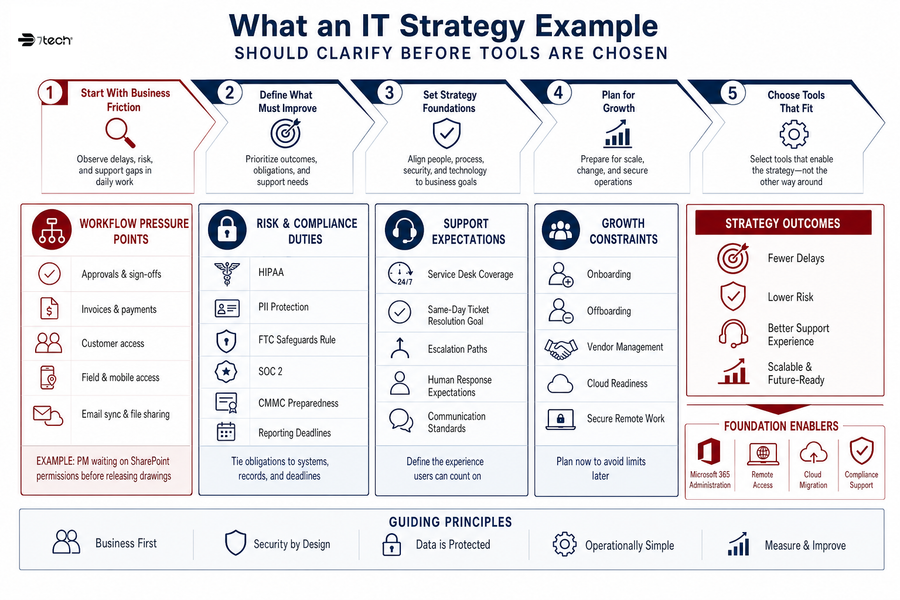
What An IT Strategy Example Should Clarify Before Tools Are Chosen
A useful technology strategy starts with business friction, not hardware preferences. Before budgets are approved, leadership needs to see where delays, risk, and support gaps touch daily work, especially since unclear business outcomes contribute to 43% of IT project delays and unrealistic timelines account for 42%.
-
Workflow pressure points: Identify where approvals, invoices, customer access, field access, email sync, or file sharing slow down teams.
-
Risk and compliance duties: Tie HIPAA, PII, FTC Safeguards Rule, SOC 2, or CMMC preparedness tasks to real records, systems, and reporting deadlines.
-
Support expectations: Define Service Desk coverage, Same-day ticket resolution, escalation paths, and human response expectations before users start chasing updates.
-
Growth constraints: Plan onboarding, offboarding, vendor management, cloud readiness, and secure remote work before headcount strains the current setup.
That is where a technology strategy example becomes useful. It connects Microsoft 365 administration, remote access, cloud migration, compliance support, and co-managed expertise to the way work actually moves.
Using An IT Strategy Template Without Turning IT Into Shelfware
Specific workplace scenario: A real estate firm moves property folders into SharePoint while executives need secure mobile access, calendar sync, and permissions that match deal teams. The plan has to cover who can see purchase agreements, who updates listing files, and how access changes when a transaction closes. If that detail is skipped, people invent workarounds with email attachments.
Templates are useful when they force decisions about ownership, timing, security, and budget. With AI investment growing to about 12% of IT spend in 2024, the structure also keeps new tools tied to real operating needs. Our Pro-Cloud Technology perspective comes from being cloud-first since 2012, with deep Microsoft cloud experience behind the planning.
-
Application owners: Name who owns each system, license, workflow, and data set.
-
Access rules: Define MFA, role-based permissions, and remote access controls.
-
Vendor timing: Match renewals, purchasing, migrations, and responsibilities.
Those decisions become the raw material for roadmap planning.
Business Outcomes From Examples Of IT Strategy That Actually Hold Up
Leadership evaluates IT strategy by operational effect: fewer stalled approvals, cleaner access control, predictable support, better compliance readiness, and lower disruption from technology changes.
-
Cleaner budget visibility
With 86% of tech leaders expecting increased budgets, IT strategy examples should connect purchasing to lifecycle timing, licensing, and fewer surprise projects. -
Faster employee productivity
Onboarding, offboarding, permissions, devices, and cloud file access need a defined path. The new estimator should not wait unnecessarily for bid folders. -
Stronger security operations
Our Triple-layered approach to cybersecurity includes Zero Compromise Cybersecurity™, Zero-trust solutions, SOC monitoring, live threat monitoring, vulnerability scans, and tactical response from US-based security specialists. -
Better compliance preparation
We use gap analysis, assessment preparation, CMMC readiness consulting, CMMC preparedness, and readiness documentation to prepare defense contractors for CMMC assessment without treating compliance as automatic. -
Less vendor drag
Printer companies, ISPs, VoIP vendors, and software providers need clear handoffs for tickets, renewals, and outage updates, since 63% of advanced organizations report effective strategy execution compared to 46% of less advanced organizations.
|
Operational Signal to Track |
System of Record |
Owner |
Decision It Supports |
|---|---|---|---|
|
Unplanned SaaS renewals discovered late in the renewal cycle |
Procurement tracker, Microsoft 365 admin center, contract repository |
CFO with IT director |
Whether to consolidate licenses, renegotiate terms, or retire unused tools before the next budget cycle |
|
New hire tickets waiting on laptop imaging, Entra ID group assignment, or SharePoint access |
Service Desk queue, HRIS onboarding workflow, device management console |
HR operations manager with Service Desk lead |
Whether onboarding needs automated role-based access templates or a tighter HR-to-IT handoff |
|
Critical vulnerabilities open beyond the agreed remediation window |
Vulnerability scanner, SOC alert portal, endpoint detection platform |
Security operations lead with system owners |
Whether to escalate patching, isolate an asset, or approve compensating controls |
|
Missing evidence for access reviews, MFA enforcement, asset inventory, or incident response testing |
GRC workspace, ticketing system, identity provider logs, policy library |
Compliance manager with CMMC consultant |
Whether the organization is ready for assessment preparation or needs a focused gap remediation sprint |
|
Support delays caused by unclear ownership between ISP, VoIP carrier, printer vendor, and internal IT |
Vendor escalation log, Service Desk notes, network monitoring platform |
Operations manager with co-managed IT partner |
Whether to assign a single escalation coordinator and define response expectations by vendor category |
Build A Stronger IT Operating Plan
-
What Is IT Procurement: A Practical Guide To Smarter Tech Buying
-
IT Helpdesk Best Practices That Keep Tickets, Access, And Approvals Moving
-
IT Procurement Best Practices That Keep Budgets, Vendors, And Cloud Rollouts On Track
-
IT Support Tiers: Stop Ticket Delays Before They Stall Payroll And Approvals
Building An IT Strategy Roadmap Example Around Real Workflows
An operations manager is waiting on a same-day support ticket while a department lead needs remote access working before a client deadline. A roadmap should sequence improvements in a way the business can absorb, especially when over 30% of IT leaders cite geopolitical impact on tech budgets as the primary risk for technology strategies and spending.
Use an IT strategy roadmap example to make the work visible before assigning dates. The next steps need to respect ticket flow, deadlines, and user capacity.
-
Map key systems: Connect revenue, billing, field work, compliance, and customer access to daily platforms.
-
Rank operational risk: Prioritize issues by business impact, not technical noise.
-
Assign system owners: Cover Microsoft 365, remote access, backup, endpoint protection, and vendor tickets.
-
Phase the work: Schedule cloud migration, patching, user training, and security improvements in manageable stages.
7tech service data shows 80% of tickets are closed the same day they’re opened—supported by US-based technicians, 24/7 responsive IT support, and live phone answering during business hours, backed by a 20-minute human response standard.
Turning An IT Strategy Plan Example Into A Security And Compliance Operating Rhythm
The strongest plans become recurring routines: reviews, alerts, access checks, patching, evidence collection, and leadership reporting. As we continue enhancing our compliance advisory with AI-driven analytics and continuous readiness monitoring, human oversight remains central—especially as 93% of executives say AI sovereignty must be factored into their 2026 business strategy and 53% expect AI to transform business models in their industry by 2030.
-
Monthly access review
Confirm who has access to email, SharePoint, accounting, project systems, and remote desktops. Tie changes to job roles, departures, and Zero-trust solutions. -
Security alert review
Review what the Security Operations Center (SOC) monitoring surfaced and what vulnerability remediation or tactical response followed. -
Compliance evidence check
Track policies, Microsoft 365 MFA/2FA, device encryption, security awareness training, vulnerability reports, and CMMC preparedness documentation where relevant. -
Backup and recovery review
Review hybrid and cloud-based backups, restore testing, and continuity planning before a disruption turns into invoice delays or customer access issues.
Now for the common planning questions.
FAQ About IT Planning Decisions
Turn Your IT Strategy Into Daily Control
7tech helps translate IT planning into workflows, security priorities, vendor decisions, and support rhythms your team can actually run.
What Should Be Included In A Strategic IT Plan?
Include business goals, systems inventory, risk priorities, cloud direction, support model, compliance needs, budget timing, and roadmap ownership. Make it specific enough to show who owns Microsoft 365, backups, vendor tickets, remote access, and evidence collection.
How Detailed Should An IT Roadmap Be?
Detail should match the risk and operational dependency of each system. A payroll platform, ERP, project management system, or customer portal needs clearer sequencing than a low-risk internal tool.
How Does Cybersecurity Fit Into IT Strategy?
Cybersecurity works as an operating layer across identity, endpoints, cloud systems, email, backups, monitoring, and user behavior. That includes access rules, endpoint protection, Security Operations Center review, vulnerability scans, user training, and recovery planning.
When Should Outside IT Consultants Be Involved?
Bring in outside guidance when internal teams need deeper assessment work, security operations support, compliance preparation, cloud migration planning, or vendor coordination capacity. Co-managed IT can add tools, expertise, and Security Operations Center coverage while respecting the systems and relationships already in place.
If this example gives you a useful starting point, compare it against your current planning process. When gaps show up around ticket flow, cloud access, compliance tasks, security alerts, vendor coordination, or those change-order approvals from the opening scenario, it’s worth discussing them with a qualified IT strategy and security partner such as 7tech.
Trusted Managed IT Services Near You

Neal Juern, Founder and CEO of 7tech, helps business leaders take control of their IT and strengthen cybersecurity without the complexity. Since founding 7tech in 2012, he’s built it into a 5X MSP 501 winner and guided hundreds of executives toward smarter, safer operations through Managed IT Services and Managed Security Services that make sense to people outside the IT department. He speaks regularly to executive and nonprofit audiences across Texas.