Q4 IT Checklist for Businesses: What to Review Before Year-End
A Q4 IT checklist for businesses should answer one practical question: Is your technology ready to support the priorities, risks and workload your business will face through year-end?
Before Q4 gets busy, review the systems your team depends on, upcoming technology expenses, user access, backup and recovery readiness and your year-end IT plans. Addressing these areas early can reduce unexpected costs, avoid preventable disruptions and give leadership greater confidence heading into the final quarter.
There’s something impressive about how well families execute the back-to-school season. Backpacks are ready, bedtimes are adjusted and the route to school is planned out. Somehow, amid everything else going on, families manage to pull it together and show up ready on day one.
It’s a useful reminder for business leaders: preparation at the right moment can change how the entire season goes.
Q4 works the same way. Businesses that use September to identify technology gaps have more time to address them before calendars fill, budgets tighten and year-end priorities compete for attention.
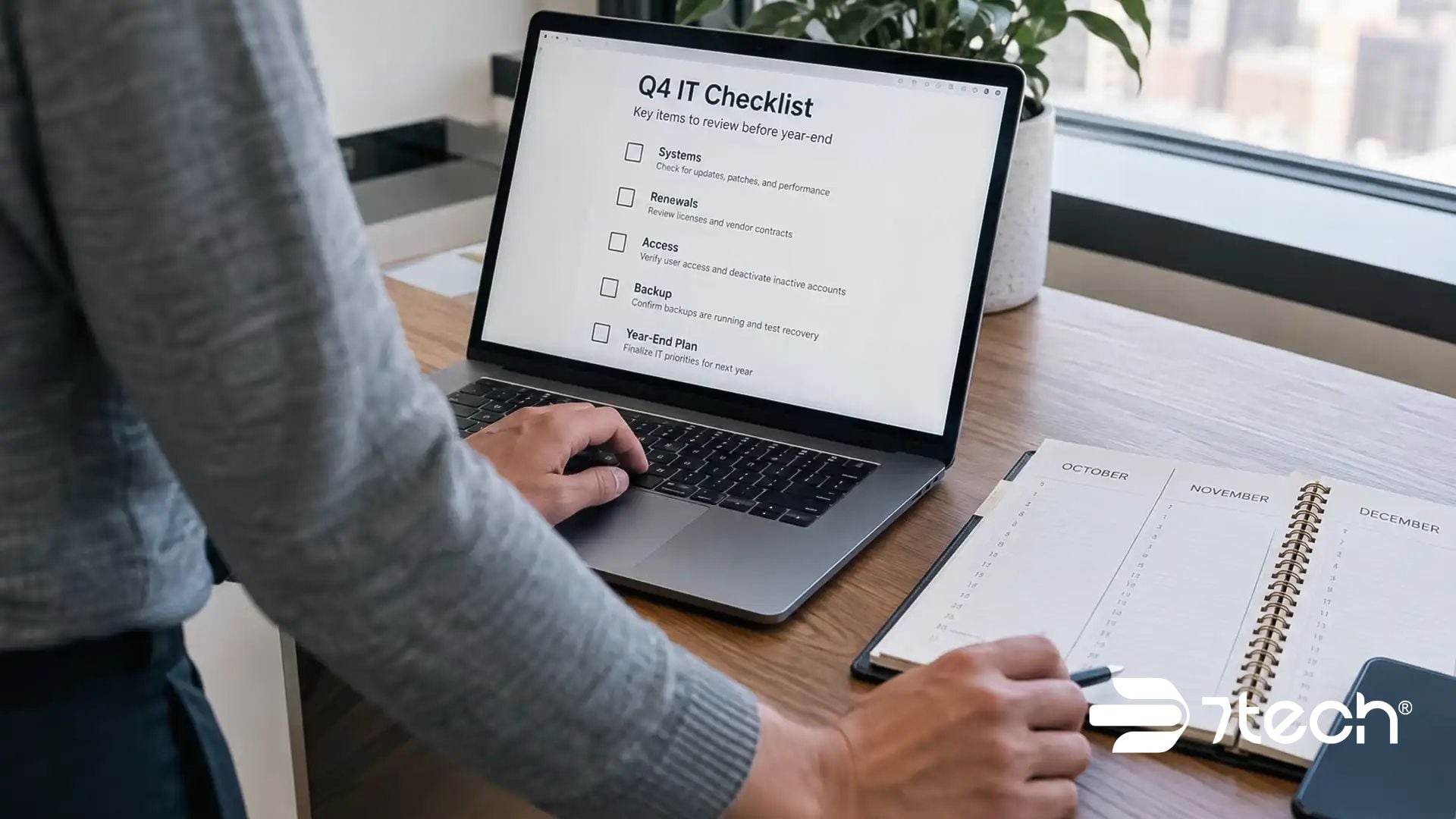
Executive Q4 IT Checklist
Before the fourth quarter begins, leadership should be able to answer five questions:
- Can our technology reliably support our year-end business priorities?
- Do we know which IT expenses, renewals and hardware decisions are coming?
- Does employee access reflect current roles and responsibilities?
- Could we recover critical operations if systems became unavailable?
- Does our IT partner understand what the business needs to accomplish before year-end?
If any answer is unclear, September is an opportunity to resolve it before uncertainty becomes urgency.
A broader approach to managed IT services that support year-end planning can help connect these individual Q4 questions to year-round technology performance, security, continuity and business priorities.
1. Make Sure Technology Can Support Your Q4 Priorities
Start with the business rather than the technology.
If you asked three leaders what absolutely must be accomplished before year-end, would you get the same answer? Leadership teams sometimes assume alignment without verifying it.
Identify the revenue targets, customer commitments, operational projects and deadlines that cannot slip. Then determine what technology those priorities depend on.
Ask:
- Which systems are essential to meeting our Q4 goals?
- Can they reliably support the expected workload?
- Have staffing or responsibilities changed?
- Does each employee have the tools and information required for their current role?
- Are there unresolved technology issues that could delay an important initiative?
Summer can quietly change how a company operates. Employees take time off, new people arrive and responsibilities shift. By September, the organization may look the same on paper while operating differently in practice.
For executives, the issue is not simply whether the technology works today. It is whether the technology can support what the business has committed to delivering tomorrow.
That is the purpose of assessing technology readiness for Q4 as part of a broader business IT planning checklist. NIST’s small business cybersecurity framework guidance similarly encourages smaller organizations to connect cybersecurity risk management to business requirements, priorities and available resources.
Leadership can also use guidance on how to evaluate IT performance to determine whether current technology is supporting the business as expected rather than relying only on the absence of major support incidents.
2. Review Your IT Budget, Renewals and Aging Technology
Technology expenses have a way of becoming urgent when they are not identified early.
Before budgets are finalized and schedules tighten, create visibility into what is coming before year-end.
Review upcoming software and Microsoft 365 licensing decisions, warranties, vendor contracts and hardware replacements. Look for aging equipment that is already causing performance or reliability problems.
An IT budget and renewals review can be incorporated into broader IT budget planning so technology spending becomes more predictable and upcoming investments can be evaluated before they turn into urgent requests.
Security, backup and compliance requirements should be part of the same conversation. A postponed technology investment can become more expensive when it turns into an emergency purchase, unexpected outage or year-end compliance scramble.
Lifecycle status belongs in the review as well. Microsoft end-of-support guidance explains that products reaching the end of support no longer receive security updates, non-security updates or assisted support, making lifecycle and replacement timing relevant to year-end planning.
Executives should also ask whether they understand why each significant IT expense exists. Technology spending should connect to a business requirement such as productivity, security, compliance, continuity or growth.
The objective is not simply to spend less. It is to make technology costs more predictable and ensure leadership is not surprised by avoidable Q4 expenses.
Businesses reviewing aging equipment can also consider whether an end-of-year tech refresh could address reliability or performance issues before they continue into the next year.
3. Clean Up Access, Accounts and Documentation
Access management is easy to postpone because problems are not always visible.
Old user accounts may remain active. Employees who changed positions may still have permissions associated with previous responsibilities. Documentation may be outdated, incomplete or understood by only one person.
Those conditions can create both operational friction and unnecessary security exposure.
Before Q4, review active accounts and confirm that employees have access to what they need — and no more than they need. Pay particular attention to employees who recently joined, changed positions, returned from leave or departed the organization.
A formal employee access review checklist can help make that process repeatable. The FTC’s guidance on controlling access to data recommends restricting access to sensitive information based on business need and limiting administrative privileges.
Also review documentation for critical systems, vendors and processes. Leadership should not discover during an outage that essential information existed only in one employee’s inbox or memory.
Good documentation and disciplined access management reduce dependence on individual people and make the organization easier to operate, secure and recover.
4. Verify Your Backup and Recovery Readiness
September is National Preparedness Month, making it a natural time to review how the business would respond to an unexpected disruption.
A backup is important, but business recovery requires more than having copies of data.
Leadership should know what happens after an outage, cyber incident or other disruption. Who makes decisions? Which systems must return first? How will employees continue working? Who communicates with customers, vendors or other stakeholders?
Review your current backup and recovery processes and confirm:
- Critical business data is being backed up as intended.
- Backup systems are being monitored and managed.
- Recovery responsibilities are clearly assigned.
- The recovery plan reflects your current technology environment.
- The people responsible for executing the plan understand their roles.
A practical backup and recovery checklist for business should also connect those technical recovery steps to broader business continuity planning guidance so leadership understands how essential operations will continue while systems are restored.
CISA’s backup and recovery guidance for businesses also emphasizes identifying critical information, protecting backups and regularly testing recovery rather than assuming that stored copies alone are sufficient.
7tech’s managed IT services include management and monitoring of data backups, along with daily automated workstation health and safety checks, helping organizations identify potential issues before they become business interruptions.
A recovery plan should create clarity under pressure. If your team would have to figure out the plan during the disruption, the plan is not ready.
It is also worth challenging the common backup assumptions businesses make before a real disruption exposes a difference between having backups and being able to recover the business.
5. Review Q4 Technology Plans With Your IT Partner
A strategic IT partner should understand more than your open support tickets.
Use September to discuss where the business is going through year-end and what technology needs to make possible.
The conversation should cover your Q4 business priorities, unresolved operational risks, hardware and software decisions, cybersecurity concerns, backup and recovery readiness and any regulatory or compliance requirements approaching before year-end.
It is also an opportunity to ask a broader question:
What technology issue could surprise leadership between now and year-end?
That question can reveal risks that do not appear in a help desk report but still matter to the business.
A structured set of questions to ask your IT provider before year-end can help leadership evaluate priorities, responsibilities and unresolved issues as part of managed IT planning for year-end.
7tech supports businesses with services that extend beyond day-to-day troubleshooting, including 24/7 service desk support, technology purchasing assistance, vendor management, Microsoft 365 management, backup management, cybersecurity monitoring and strategic technology guidance.
The businesses that get the most value from an IT partner treat the relationship as part of business planning rather than something they use only when technology fails.
What Executives Should Know Before Q4 Begins
You do not need to personally understand every technical detail in your environment. You do need enough visibility to make responsible decisions.
By the start of Q4, leadership should understand what technology the company depends on, where meaningful risks exist, what major expenses are approaching and who is accountable when something goes wrong.
That visibility matters because technology problems rarely remain technology problems. Downtime affects productivity and revenue. Weak access controls increase security exposure. Unplanned purchases affect budgets. Poor recovery preparation can turn an interruption into a prolonged operational problem.
Understanding the cost of IT downtime can help executives connect technology reliability to lost productivity, operational disruption and other business consequences rather than viewing downtime only as an IT metric.
A strong Q4 IT review turns those unknowns into decisions that can be made while there is still time to act.
That is the purpose of a Q4 business technology checklist and a year-end technology review for businesses: giving leadership enough visibility to make deliberate decisions about technology risk, spending, continuity and accountability before Q4 pressure limits its options.
Frequently Asked Questions About a Q4 IT Checklist for Businesses
What should businesses include in a Q4 IT checklist?
A Q4 IT checklist should cover business-critical systems, upcoming technology expenses and renewals, aging hardware, employee access, documentation, cybersecurity, backups, recovery plans and technology priorities that must be completed before year-end.
Together, these areas create a practical IT checklist for businesses and year-end IT checklist for identifying technology issues that deserve attention before the final quarter.
When should a business complete its Q4 IT review?
September is an ideal time because it gives leadership time to identify and address technology gaps before Q4 deadlines, budget decisions, holidays and year-end operational demands compete for attention.
Why should executives participate in a Q4 IT review?
Executives provide the business context IT teams need. Leadership can identify revenue priorities, customer commitments, budget constraints and operational risks so technology decisions support business outcomes rather than being made in isolation.
What technology expenses should businesses review before year-end?
Review software and licensing renewals, warranties, aging hardware, vendor contracts, security investments, backup requirements and planned technology projects. Early visibility makes budgeting easier and reduces the likelihood of unexpected Q4 expenses.
What user access should businesses review before Q4?
Confirm that active employees have permissions appropriate to their current responsibilities and that former employees no longer have access. Pay particular attention to employees who recently joined, changed positions, returned from leave or left the organization.
How should businesses evaluate backup and recovery readiness?
Confirm that critical data is backed up, backups are monitored and recovery responsibilities are documented. Leadership should also know which systems must be restored first and how operations will continue if normal technology becomes unavailable.
What should businesses discuss with their IT provider before year-end?
Discuss Q4 business priorities, unresolved technology risks, upcoming renewals, hardware decisions, cybersecurity, compliance obligations, backup and recovery readiness and any technology investments required to support next year’s plans.
Get Clarity Before Q4 Gets Busy
The families that have a smoother start to the school year are usually the ones that handled the important details before the first bell rang.
Your business has a similar window before Q4.
7tech helps businesses turn technology uncertainty into a clear plan by reviewing what is working, what needs attention and which risks should be addressed before they become urgent.
A thoughtful year-end IT checklist is ultimately about creating that clarity early enough to act, before technology decisions become emergency decisions.
Schedule a 15-minute discovery call to review your Q4 IT priorities, identify potential gaps and determine what deserves attention before year-end.

Neal Juern, Founder and CEO of 7tech, helps business leaders take control of their IT and strengthen cybersecurity without the complexity. Since founding 7tech in 2012, he’s built it into a 5X MSP 501 winner and guided hundreds of executives toward smarter, safer operations through Managed IT Services and Managed Security Services that make sense to people outside the IT department. He speaks regularly to executive and nonprofit audiences across Texas.