
Table of Contents
An employee gets locked out of Microsoft 365 ten minutes before a customer call, and the invoice file they need is behind that login. The difference in IT support vs helpdesk is scope, not semantics. A helpdesk often handles the ticket, while broader IT support owns the user, access, device, vendor, and security handoff.
Password work alone creates real workflow drag, with account lockouts, expirations, and resets consuming a significant portion of daily help desk capacity.
Steven Simon, Director of Security Operations at 7tech, notes: “Support scope should match how work actually moves through the business, from approvals and devices to vendors, remote access, and security evidence.”
IT Support Vs Helpdesk
Before you compare providers or internal coverage, define the work behind each ticket. A copier setup request, a locked laptop, and a remote access approval all look simple until no one owns the handoff.
-
Ticket intake: A basic support desk often starts with intake and routing. Our Service Desk adds structure, documentation, escalation, and 20-minutes to human response, that’s our standard.
-
Employee throughput: Fast answers matter because stalled access delays calls, approvals, shipments, and billing. We track same-day ticket resolution, with 80% of tickets closed the same day they’re opened.
-
Access and devices: Mature coverage includes onboarding, offboarding, MFA, mobile device management, and Microsoft 365 administration, so employee changes don’t depend on memory or scattered inbox requests.
-
Hybrid work support: Remote teams need secure access, reliable endpoints, and clear ownership when home networks, cloud files, or virtual desktops block work.
Helpdesk Vs IT Support
Growth adds handoffs. When the support model is unclear, tickets bounce between a printer vendor, an internal approver, a software admin, and the employee trying to finish customer work.
-
Fewer stalled employee workflows: New hires need accounts, groups, devices, MFA, and file access before their first project meeting. Cloud environments can reduce friction, with Windows 365 users reporting a 13.4% average reduction in help ticket volumes.
-
Cleaner vendor ownership: Printer companies, ISPs, telecom providers, and line-of-business software vendors all need one coordinated path when a ticket depends on them.
-
Stronger access control habits: Offboarding should close accounts, devices, licenses, shared mailbox access, and SaaS permissions without waiting for someone to remember a side system.
-
Better support for internal IT: Co-managed IT gives internal teams added capacity, tools, and security expertise when ticketing, Microsoft 365 administration, and incident response need tighter coordination. That coordination can affect resolution speed; more than 68% of surveyed respondents reported that Microsoft Unified led to faster time to resolution for ticketing and incident response.
Helpdesk Vs Service Desk
The phrase helpdesk vs service desk matters because language sets expectations for ownership. Many people say “helpdesk” because it’s familiar, but we use Service Desk because the work includes structured ticket management, end-user support, escalation, documentation, remote support, and coordination with security operations.
Workplace scenario: A new employee needs Microsoft 365 access before a client kickoff, but the laptop shipment is still in transit. MFA setup depends on the right mobile number, the printer vendor needs coordination, and remote access requires manager approval. A Service Desk workflow keeps those steps visible instead of treating each item as a disconnected ticket.
That naming choice helps define what coverage needs to include next: onboarding, offboarding, secure remote access, vendor coordination, and Microsoft 365 administration.
Explore IT Support Essentials
IT Support And Helpdesk Coverage For Security And Compliance
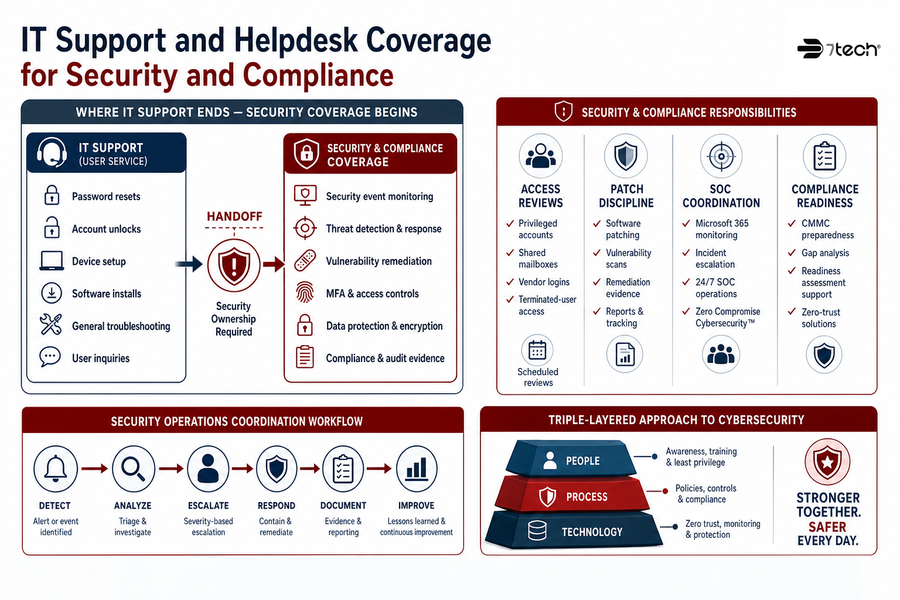
User support and security operations overlap every day, but they’re not the same job. A ticket response process doesn’t automatically cover security event monitoring, auditing, vulnerability remediation, MFA, hard drive encryption, software patching, application control, or compliance evidence.
Security-related support needs defined ownership because attackers often blend into normal workflows, including cases where targeted employees receive hundreds of emails within minutes before someone poses as IT support through Teams or a phone call.
-
Access reviews: Review privileged accounts, shared mailboxes, vendor logins, and terminated-user access on a schedule.
-
Patch discipline: Track software patching, vulnerability scans and reporting, and remediation evidence so risk work isn’t buried in ordinary tickets.
-
SOC coordination: Our Security Operations Center supports Microsoft 365 monitoring, incident escalation, and Zero Compromise Cybersecurity™ through a devoted US-based security team.
-
Compliance readiness: CMMC preparedness, gap analysis, readiness assessment support, and Zero-trust solutions fit inside a Triple-layered approach to cybersecurity.
Helpdesk And IT Support Decisions That Improve Daily Operations
Changing support models affects people, budgets, approvals, and vendors, so start by mapping how work actually gets done. Microsoft-focused environments show why structure matters, with surveyed organizations reporting total IT support tickets decreased an average of 45% after deploying Microsoft 365 E3.
-
Map ticket categories: Tie password resets, device issues, invoice access, software requests, and remote access approvals to named business owners.
-
Review employee changes: Walk through onboarding and offboarding, including laptops, Microsoft 365, MFA, password manager access, and mobile device management.
-
Document vendor handoffs: List printers, ISPs, telecom, cloud apps, and finance platforms, then define who opens, tracks, and closes each vendor case.
-
Compare security coverage: Match monitoring, backups, patching, vCIO planning, and compliance readiness against your current obligations.
FAQ About Helpdesk And Service Desk Support
Is A Service Desk Only For Fixing Employee Tickets?
No. A Service Desk handles user tickets, but mature coverage also includes documentation, escalation, remote support, vendor coordination, and access workflows. The difference shows up when a ticket touches multiple systems, approvals, or vendors.
Align Support With How Your Team Works
If tickets now touch access, devices, vendors, and security, 7tech can help you define the right support model for growth.
When Does User Support Become Managed IT?
It becomes managed IT when someone owns the systems behind the tickets, including devices, cloud platforms, backups, Microsoft 365, purchasing, and lifecycle planning. At that point, the work is less about closing one request and more about keeping daily operations moving cleanly.
How Does Security Change The Support Model?
Security adds monitoring, evidence, escalation, and access discipline. AI can help with triage and insight, and 83% of CRM leaders say AI makes it easier for customer service specialists to resolve requests and tickets.
Can Internal IT Work With An Outside MSSP?
Yes. Co-managed IT adds capacity, tools, and security operations support without dismissing the value of the internal team. It works best when ticket ownership, escalation paths, access control, and compliance readiness responsibilities are clearly documented.
Talk Through Your Support Model With 7tech
Knowing the difference between reactive ticket intake, Service Desk coverage, managed IT ownership, and security operations gives you a clearer view of where work slows down, who owns each handoff, and what evidence supports compliance readiness.
7tech is a San Antonio-based managed IT and MSSP team with Texas-focused IT support, nationwide security operations, US-based 24/7 support, and an exclusive Security Operations Center. If you want a clear read on what your current support model covers, contact us for a practical conversation about support structure, cybersecurity operations, compliance readiness, or co-managed IT—before the next Microsoft 365 lockout turns into a delayed customer call.
Explore IT Services

Neal Juern, Founder and CEO of 7tech, helps business leaders take control of their IT and strengthen cybersecurity without the complexity. Since founding 7tech in 2012, he’s built it into a 5X MSP 501 winner and guided hundreds of executives toward smarter, safer operations through Managed IT Services and Managed Security Services that make sense to people outside the IT department. He speaks regularly to executive and nonprofit audiences across Texas.