6 Nonprofit Cybersecurity Myths That Put Your Organization at Risk
Why Nonprofit Cybersecurity Myths Create Real Organizational Risk
Cybersecurity for nonprofits is ultimately about protecting the mission.
Your organization may hold donor information, employee records, volunteer data, financial information, login credentials, and sensitive information about the people you serve. At the same time, staff need reliable access to email, cloud applications, files, fundraising platforms, financial systems, and other technology to keep programs running.
A cyber incident can therefore create consequences well beyond IT. It can interrupt services, consume resources intended for programs, create difficult questions from donors and the board, and affect people who depend on your organization.
The NIST Cybersecurity Framework 2.0 reflects this broader view of cyber risk by including governance alongside identifying, protecting, detecting, responding, and recovering. For nonprofit executives and boards, cybersecurity belongs in organizational risk discussions rather than being treated solely as a technical concern.
Organizations that need more visibility across those responsibilities may also benefit from understanding how managed security services bring monitoring, protection, and response capabilities together.
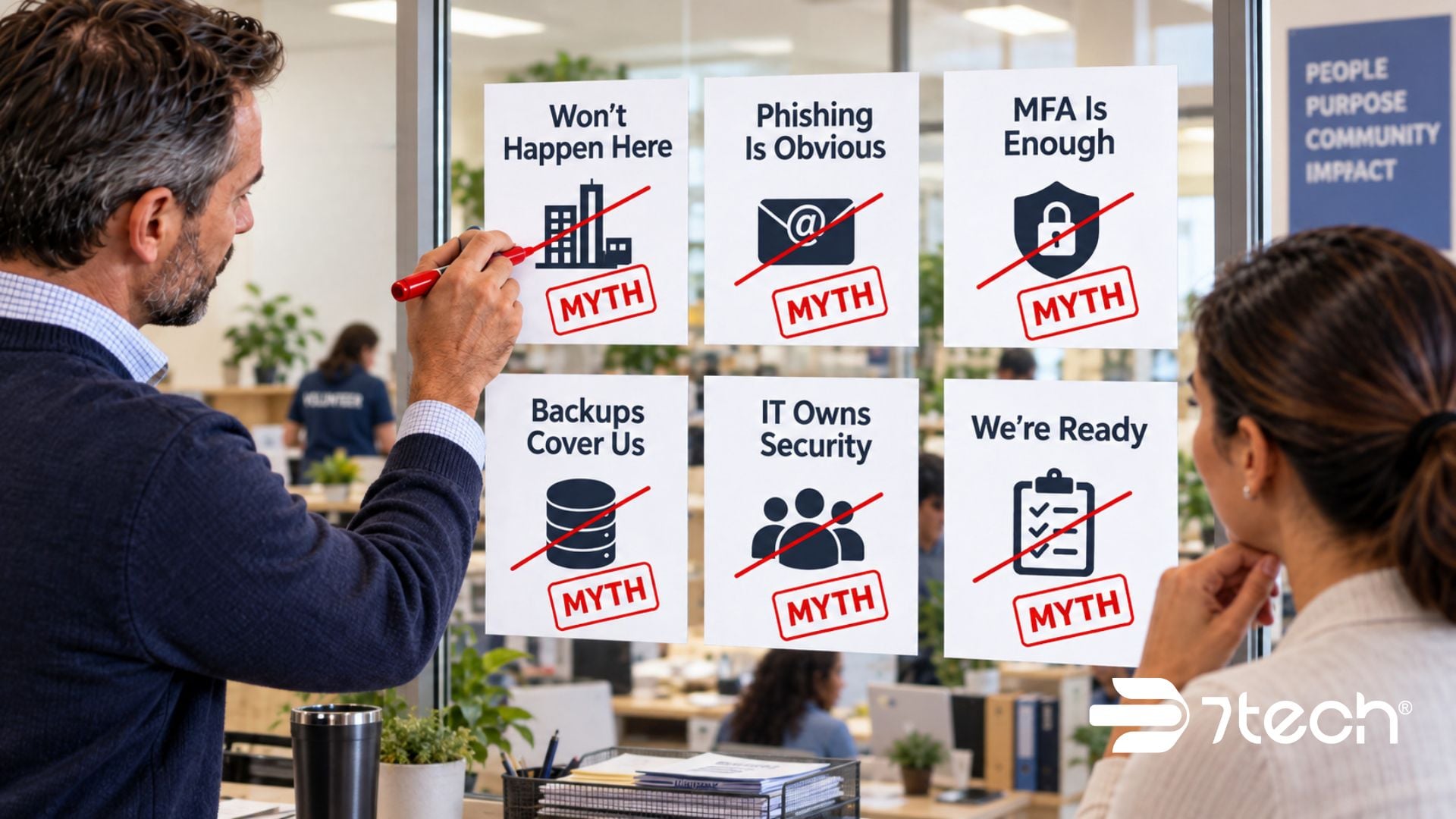
Here are six nonprofit cybersecurity myths worth challenging.
Myth 1: “That Won’t Happen to Us”
It is an easy assumption to make.
You are focused on serving your community, raising funds, managing programs, and making every dollar count. You may not consider your organization as attractive a target as a large corporation with millions of customer records.
Attackers do not need to specifically choose your nonprofit.
Many attacks exploit opportunity: an exposed account, stolen password, vulnerable system, phishing message, or another weakness that provides a way in. Nonprofits can also hold information with value to criminals, including donor records, employee information, financial data, credentials, and sensitive information about clients.
Microsoft’s Digital Defense Report identifies non-governmental organizations and think tanks among sectors targeted by threat actors, reinforcing why mission-driven status should not be treated as protection.
7tech nonprofit assessment data also shows why leaders should look across the entire environment. Malware protection/software control was satisfactory in all 21 organizations evaluated, while Password Management was below satisfactory in 20 of 21 and internet backup/failover was below satisfactory in all 11 organizations evaluated for that capability. Strong results in one area can coexist with significant needs elsewhere.
A nonprofit IT audit can help leadership replace assumptions with a clearer picture of technology and security gaps.
Fact: Cybercriminals look for opportunity. Being a nonprofit does not make your organization invisible.
Myth 2: “Employees Will Recognize a Phishing Email”
The obvious phishing email filled with strange wording, spelling errors, and an unfamiliar sender is no longer a useful mental model.
Modern phishing can look polished and credible. A message may appear to come from an executive director, board member, donor, vendor, colleague, financial institution, or cloud platform your team already knows.
AI has made creating convincing messages easier as well. That makes nonprofit phishing awareness less about spotting bad grammar and more about recognizing unusual behavior.
Employees should pay particular attention when a message asks them to:
- Make an urgent or unusual request
- Change payment or banking instructions
- Share donor, employee, or client information
- Purchase gift cards or make an unexpected payment
- Sign in through a new or unfamiliar link
- Open an unexpected document or attachment
Imagine an employee receiving what appears to be an urgent email from the executive director requesting financial information before a board meeting. The sender looks legitimate. The timing makes sense. The employee wants to help.
That is precisely when a verification process matters.
Joint CISA phishing guidance reinforces the importance of addressing phishing through both user awareness and technical safeguards.
Employees should know that an unusual request can be verified through another trusted channel before they click, respond, share information, or send money. They should also know exactly where to report suspicious activity without worrying that they are wasting someone’s time.
Fact: A convincing email can still be a scam.
Myth 3: “MFA Fully Protects Our Accounts”
Multi-factor authentication is an important cybersecurity safeguard, especially for systems containing sensitive organizational information. Nonprofit MFA should be viewed as one component of account protection rather than the finish line.
Attackers can use techniques such as MFA fatigue to persuade someone to approve a fraudulent login. One example is prompt bombing, where repeated authentication requests are sent in the hope that a user eventually approves one.
For a nonprofit employee balancing programs, donors, volunteers, deadlines, and administrative responsibilities, repeated prompts can arrive at exactly the wrong moment.
The joint CISA phishing guidance also addresses methods attackers use to obtain credentials and bypass weaker forms of MFA.
The practical rule for employees should be clear: If you did not initiate the login, do not approve the request. Report it.
MFA should operate alongside secure account configurations, appropriate access controls, employee awareness, monitoring, and a defined process for responding to suspicious activity. Leaders looking more closely at authentication can also review the benefits of two-factor authentication as part of a layered account-security approach.
Here, the first-party evidence is directly relevant. 7tech nonprofit assessment data found Password Management below satisfactory in 20 of 21 organizations evaluated. In one six-organization assessment cohort, both Password Management and the extra sign-in verification step were below satisfactory in all six organizations evaluated for those controls.
Those findings illustrate why account security should be evaluated across multiple controls rather than inferred from the presence of MFA alone.
Fact: MFA is an important part of a broader account and access security strategy.
Myth 4: “Our Backups Have Us Covered”
For nonprofit leaders, the meaningful backup question is not simply whether backups exist. It is: How quickly can we restore the systems and information our mission depends on?
Imagine ransomware locking your nonprofit out of critical systems tomorrow morning.
Can the data be restored? Has restoration actually been tested? How long will it take? Which systems come back first? Who owns the recovery process? Can employees continue serving clients, donors, volunteers, and community partners while recovery is underway?
Those questions matter because downtime can interrupt much more than office productivity.
Meals on Wheels San Antonio provides a useful example of how technology continuity connects directly to mission delivery. Its cybersecurity needs include protecting donor, volunteer, and client information, while technology downtime could affect meal deliveries and essential services. Its CEO, Vinsen Faris, described 7tech’s approach this way:
“They don’t just care about our computers; they care about the success of our mission.”
CISA ransomware preparedness guidance emphasizes backup protection, restoration testing, and prioritizing critical systems as part of ransomware readiness.
That distinction is particularly important for nonprofit backup and recovery. A backup that has never been restored under realistic conditions gives leadership limited evidence about how the organization will perform during an actual disruption.
Nonprofits can explore both ransomware prevention for nonprofits and business continuity planning for nonprofits when evaluating how prevention and recovery work together.
Fact: Recovery confidence should come from tested restoration, clear priorities, and realistic recovery expectations.
Myth 5: “Cybersecurity Is Only IT’s Responsibility”
Your IT team or provider plays an important role in nonprofit cybersecurity, but cyber risk is created and managed across the organization.
It appears when someone opens an email. When Development handles donor information. When Finance receives a request to change payment instructions. When HR manages employee records. When someone shares a document. When leadership approves technology or access decisions.
That makes cybersecurity a governance and operating issue as well as a technical one.
The NIST Cybersecurity Framework 2.0 reinforces this leadership perspective through its Govern function, which focuses on establishing and monitoring an organization’s cybersecurity risk-management strategy, expectations, and policy.
Clear responsibilities make that governance practical.
Leadership establishes expectations and priorities. IT implements and manages controls. Employees recognize and report suspicious activity. Department leaders understand the information and systems their teams depend on. Vendors receive appropriate access. The board receives enough visibility to exercise appropriate oversight.
Cybersecurity awareness training supports those responsibilities without expecting staff to become security experts. Employees need enough knowledge to recognize something unusual, stop before acting, and know where to get help.
For organizations with limited internal technology resources, clearly defining the scope of nonprofit IT support can also help leadership understand who owns monitoring, security, recovery, escalation, and day-to-day support.
Fact: Cyber resilience depends on clear responsibilities across leadership, IT, employees, departments, and outside partners.
Myth 6: “We Know What to Do If Something Happens”
It is Tuesday morning.
Several employees suddenly cannot access their files. Someone reports a suspicious message. Another employee says their computer is behaving strangely.
Programs still need to run. Donors and community partners are still calling. Staff want answers.
Now everyone is looking to leadership.
This is the wrong moment to begin answering basic incident-response questions:
- Should employees shut down their computers?
- Who contacts IT or the security provider?
- How will teams communicate if normal systems are unavailable?
- Who notifies executive leadership and the board?
- When should the cyber insurance carrier become involved?
- Who determines whether donors, clients, partners, or regulators require notification?
- Who communicates externally?
- Who has authority to make time-sensitive operational decisions?
A nonprofit incident response plan should establish those responsibilities before an emergency.
It should identify the people involved, escalation paths, important contact information, communication alternatives, critical systems, recovery priorities, outside resources, and decision authority. The plan should also be practiced so leadership can identify gaps while the organization has time to correct them.
The joint CISA phishing guidance recommends maintaining an incident response plan, while CISA ransomware preparedness guidance provides additional direction for preparing for disruptive ransomware events.
Fact: Your incident response plan should be familiar before the day your mission depends on it.
What Should Nonprofit Leaders Verify Now?
Nonprofit cybersecurity best practices become more useful when leadership can translate them into practical questions about organizational readiness.
- Exposure: Do we know which accounts, systems, vendors, and data create the greatest nonprofit cyber risk?
- Access: Where is MFA required, who has privileged access, and how quickly can inappropriate access be removed?
- Phishing: Do employees know how to verify unusual requests and report suspicious activity?
- Monitoring: Would suspicious account, endpoint, or network activity be detected quickly enough to respond?
- Recovery: Have critical systems and cloud data actually been restored successfully from backup?
- Response: Does everyone know who owns a cyber incident and who has authority to make time-sensitive decisions?
- Continuity: Can essential programs and services continue while technology recovery is underway?
Leadership should expect evidence behind those answers. A cybersecurity assessment checklist can help identify areas worth validating, while a nonprofit cybersecurity assessment can provide a more specific view of risk across your organization.
Frequently Asked Questions About Nonprofit Cybersecurity Myths
Why Would Cybercriminals Target a Nonprofit?
Attackers often pursue opportunity rather than organization size. Nonprofits may hold donor, employee, financial, credential, and client information while operating with limited security resources, making nonprofit data protection and access controls important regardless of the organization’s size.
What Are the Biggest Cybersecurity Risks for Nonprofits?
Common risks include phishing, stolen credentials, weak passwords, ransomware, inappropriate access, vulnerable systems, insufficient monitoring, untested recovery, and unclear incident-response responsibilities. The significance of each risk depends on the nonprofit’s systems, data, programs, and operational dependencies.
Is MFA Enough to Protect a Nonprofit?
MFA materially strengthens account security, but organizations still need secure configurations, access management, monitoring, employee awareness, and a process for responding to suspicious authentication attempts.
How Often Should a Nonprofit Test Its Backups?
Testing should occur regularly enough to demonstrate that critical data and systems can be restored within the organization’s recovery requirements. The appropriate frequency depends on how quickly data changes, system criticality, recovery objectives, and the consequences of downtime.
What Should a Nonprofit Incident Response Plan Include?
A nonprofit incident response plan should define roles, escalation procedures, communication methods, critical systems, outside contacts, decision authority, notification responsibilities, and recovery priorities. Staff and leadership should know how to access the plan if normal technology is unavailable.
Who Is Responsible for Cybersecurity at a Nonprofit?
Cybersecurity responsibilities are shared. Leadership governs risk and priorities, IT manages technical controls, employees follow security practices, department leaders protect the information and processes they oversee, and boards provide appropriate oversight.
How Can Nonprofit Leaders Tell Whether Their Cybersecurity Is Working?
Ask for evidence rather than reassurance: MFA coverage, access reviews, monitoring results, remediation status, successful backup restorations, employee training, tested incident procedures, and clear ownership. A structured assessment can reveal gaps that routine operations may not expose.
The Real Takeaway on Nonprofit Cybersecurity Myths
Nonprofit cybersecurity is ultimately about protecting your ability to carry out the mission.
Employees need dependable systems. Development teams need donor information protected. Program teams need access to the tools and data required to serve people. Leadership needs visibility into nonprofit IT risk. Boards need enough information to provide meaningful oversight.
The danger behind nonprofit cybersecurity myths is unverified confidence. An organization can have backups, MFA, antivirus, an IT provider, and employees who “know better” while still carrying gaps that have never been tested under pressure.
Nonprofit leaders should be able to answer practical questions with evidence: Where are we exposed? Which systems and information matter most? How quickly would we detect a problem? What can we restore? Who owns the response? How long can programs continue during a technology disruption?
If you are not sure how those assumptions would hold up during a real incident, 7tech can help evaluate the gaps in plain business terms and identify what deserves attention first.
Next step: Schedule a brief IT and security conversation with 7tech to review where a preventable technology or security issue could interrupt your mission.
Call (844) 701-6777 or visit 7tech.com.

Neal Juern, Founder and CEO of 7tech, helps business leaders take control of their IT and strengthen cybersecurity without the complexity. Since founding 7tech in 2012, he’s built it into a 5X MSP 501 winner and guided hundreds of executives toward smarter, safer operations through Managed IT Services and Managed Security Services that make sense to people outside the IT department. He speaks regularly to executive and nonprofit audiences across Texas.